An independent, practical comparison for small businesses and growing teams.
Disclosure: This article contains affiliate links. We may receive a commission if you sign up through them, at no additional cost to you. Our comparisons aim to explain where each platform fits best.
Quick Verdict: Quo vs Dialpad in 2026
Choose Quo if your priority is a straightforward business phone system that brings customer calls, SMS, shared numbers, internal notes, and team follow-ups together. It is particularly compelling for small businesses whose staff need to collaborate around the same customer conversations.
Choose Dialpad if you need a broader communications portfolio, built-in meetings, or a pathway to dedicated sales and support contact-center products with sophisticated coaching and operational analytics.
The headline price is not the whole story: both vendors advertise entry-level business communications plans from $15 per user per month with annual billing, but the right tier, minimum seats, messaging usage, and AI requirements can substantially change the final bill.
See Whether Quo Fits Your Team
Explore Quo’s current Starter, Business, and Scale plans before choosing a business phone system.
Affiliate disclosure: We may earn a commission if you purchase through this link, at no additional cost to you. Verify current pricing and terms on the provider’s website.
Quo vs Dialpad: Introduction
A business phone system is no longer just a dial tone. Customers expect a fast response to calls and texts, while employees need context that survives handoffs between teammates. That makes the choice between Quo (formerly OpenPhone) and Dialpad about workflow as much as calling.
Quo positions itself around customer conversations: shared numbers, a combined communications history, team collaboration, and Sona, its AI receptionist. Dialpad offers Dialpad Connect for calling, messaging, and meetings, alongside separate Dialpad Support, Dialpad Sell, and AI Agent products for more specialized operations.
This comparison focuses on Quo versus Dialpad Connect for everyday business communications. Where relevant, it separately discusses Dialpad’s contact-center and AI offerings so that different products are not treated as identical.
Editorial note: This article uses publicly described product capabilities and advertised pricing, not hands-on benchmark testing. Features, country coverage, usage policies, and promotions can change.
What Are Quo and Dialpad?
What is Quo?
Quo is a cloud-based business phone platform designed around team-owned customer relationships. Employees can work from desktop or mobile apps, share numbers, manage calls and texts, and collaborate through internal threads and notes. Its Business tier adds advanced routing, CRM integrations, and AI call summaries.
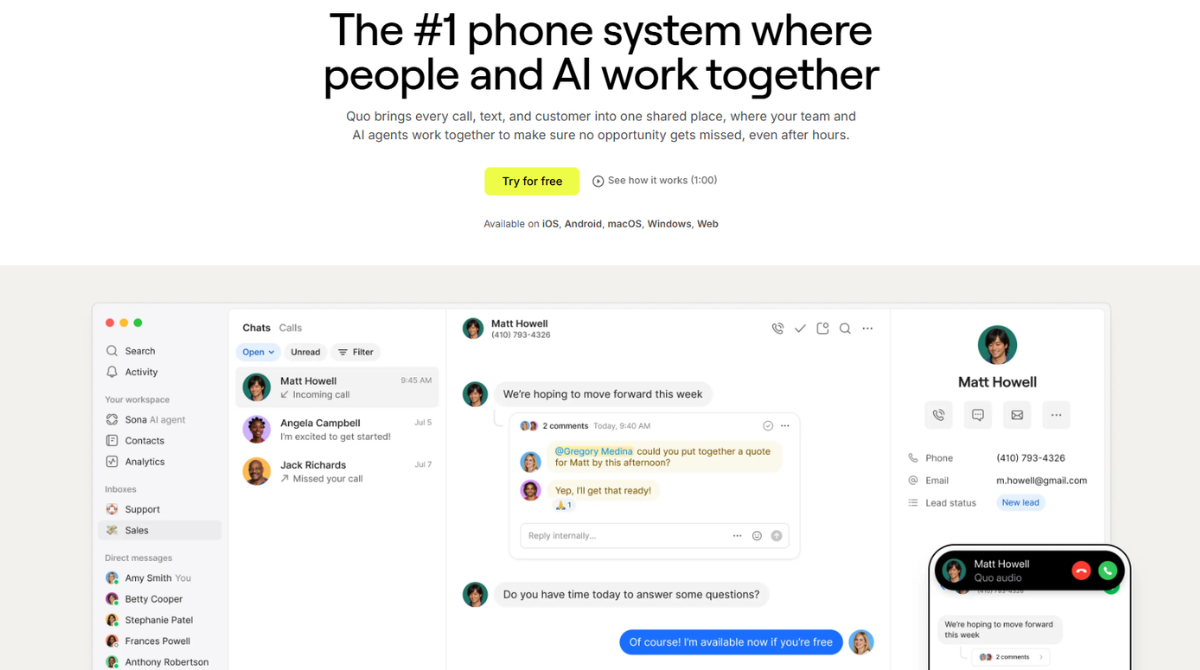
For a closer examination of its interface, pricing, and suitability, read our in-depth Quo Review 2026.
What is Dialpad?
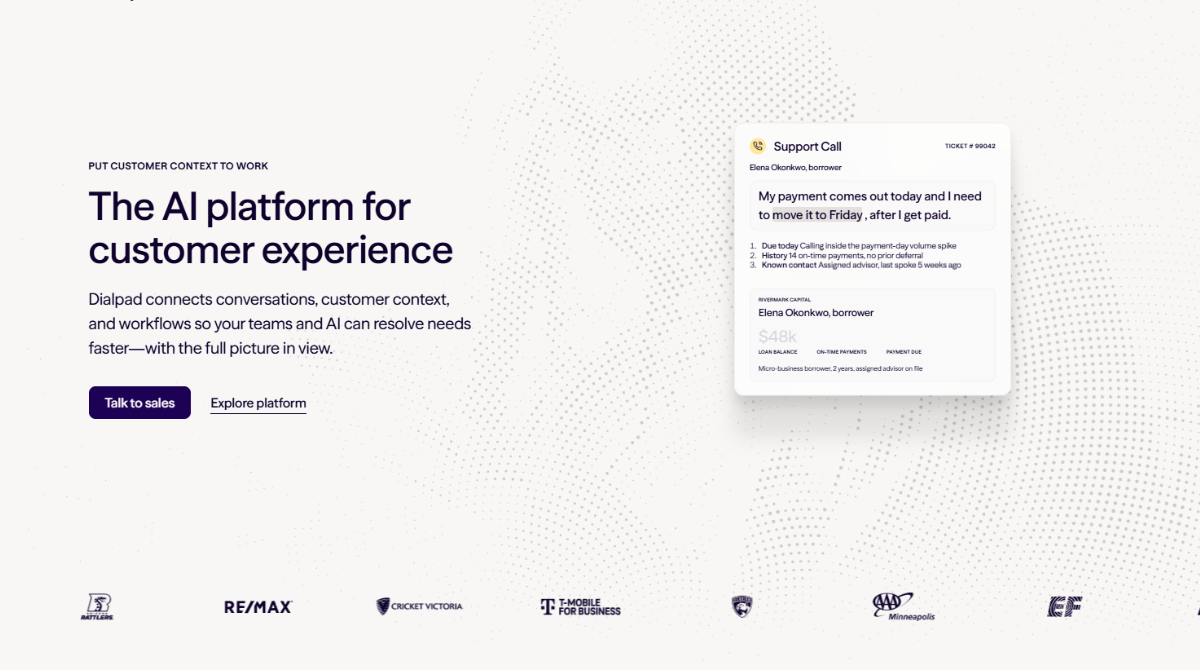
Dialpad is a business communications and customer engagement provider. Dialpad Connect covers business calling, messaging, and meetings. Separate Support and Sell offerings target contact-center and revenue teams, while Dialpad AI Agent is offered through a conversation-based model. This breadth can be valuable, but buyers should avoid assuming features shown in one Dialpad product are included in Connect Standard.
Why Dialpad Customers Consider Moving to Quo
Quo’s official comparison page features testimonials from customers who say they switched because managing shared calls and texts felt simpler, onboarding was easier, and customer information was more accessible to colleagues. Those are useful examples of why teams evaluate a move, but they are selected testimonials from a vendor page rather than representative survey results.
- One shared customer history: coworkers can see prior calls, texts, voicemail, and notes associated with a shared number.
- Fewer handoff gaps: internal threads let colleagues discuss a conversation without switching channels.
- Less administration: a smaller team may prefer a focused phone system over a more complex communications deployment.
- Customer follow-up: scheduled messages, auto-replies, and snippets can reduce repetitive work.
A switch is not automatically worthwhile. Teams that depend on Dialpad-specific call-center workflows, established integrations, or bundled meetings should evaluate replacement costs and training time first.
Quo vs Dialpad Pricing: Plans and Real-World Costs
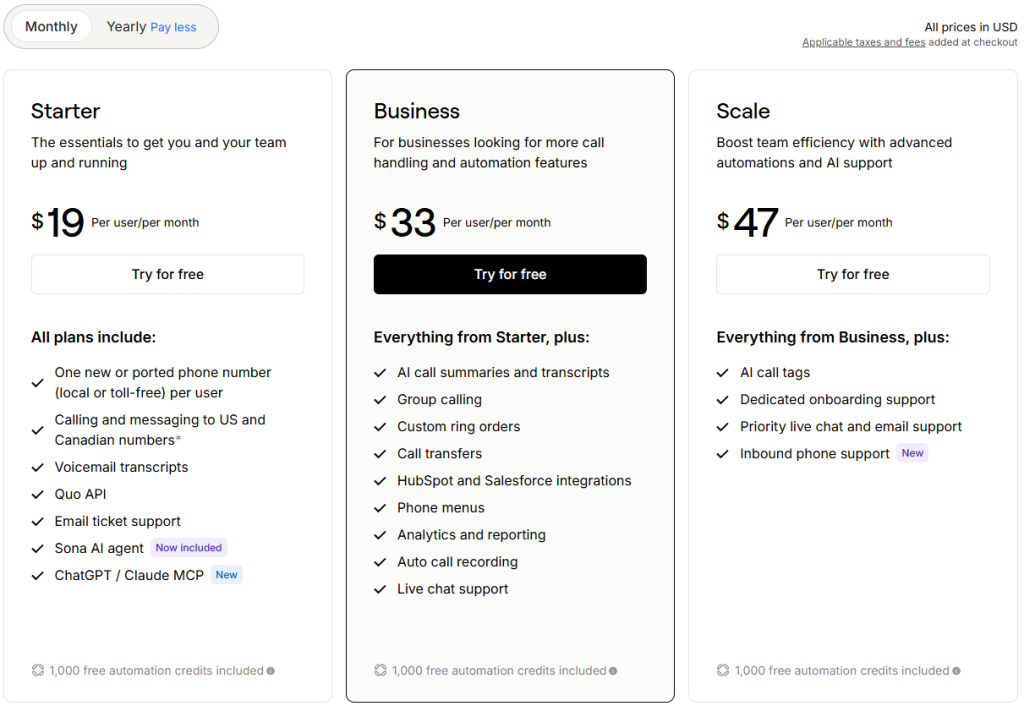
Quo pricing
- Starter: $15/user/month billed annually; shared numbers, US/Canada calling and messaging subject to applicable policies, internal threads, scheduled texts, snippets, and basic integrations.
- Business: $23/user/month billed annually; adds AI call summaries and transcripts, advanced call routing, phone menus, CRM integrations, and analytics.
- Scale: $35/user/month billed annually; adds AI call tags and enhanced onboarding/support options.
Dialpad Connect pricing
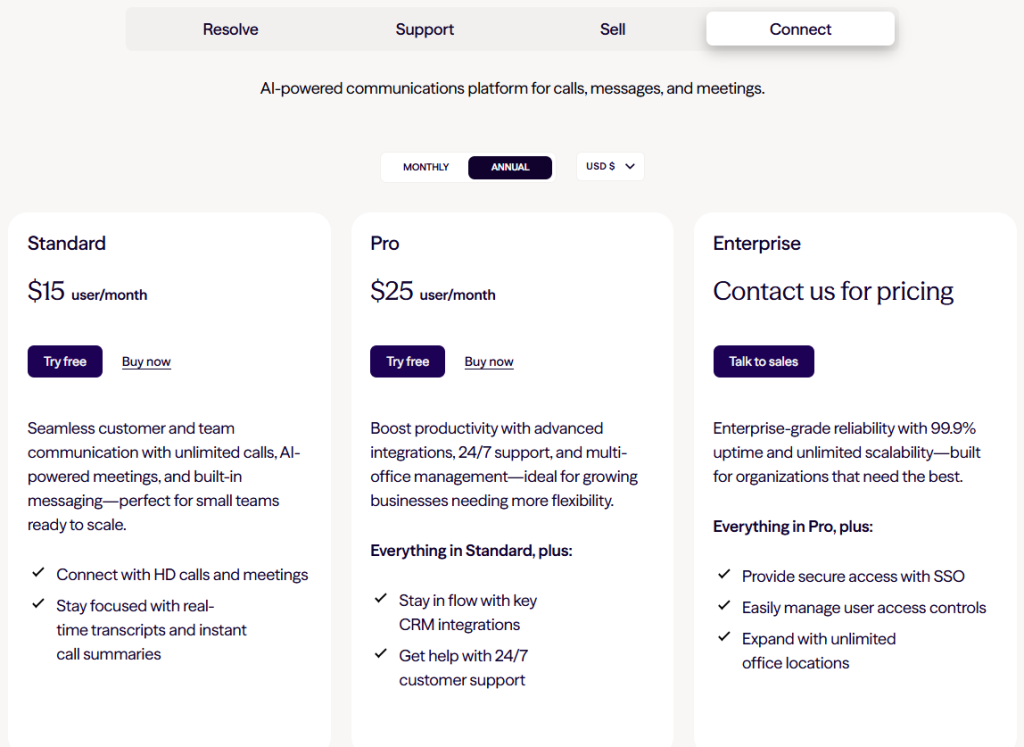
- Standard: advertised from $15/user/month with annual billing for core business calling, messaging, meetings, and standard call-management features.
- Pro: commonly advertised from $25/user/month with annual billing, with a three-user minimum reported in Quo’s 2026 comparison and review; adds capabilities such as expanded integrations and additional number options.
- Enterprise: custom pricing and contractual requirements; check directly with Dialpad for minimum seats and feature availability.
Illustrative annual-billing scenarios
Solo user: Quo Starter and Dialpad Connect Standard each start at an advertised $15/month equivalent, before taxes, usage, or extras. For a solo user who wants team collaboration later, consider the upgrade path as well as today’s price.
Three-person team: Quo Starter would be $45/month equivalent; Quo Business $69/month equivalent; Dialpad Connect Standard $45/month equivalent; and Dialpad Connect Pro $75/month equivalent, using the listed per-seat prices and assuming three paid seats.
Ten-person team: Quo Business would be $230/month equivalent, versus $250/month equivalent for Dialpad Connect Pro, before add-ons. This is a tier-to-tier illustration, not a claim that the two plans offer identical features.
Quo’s comparison page also highlights possible Dialpad costs for SMS overages, toll-free numbers, and specialized AI add-ons. These are vendor-reported examples, and they may vary by contract or region. Ask for a written quote that includes number porting, toll-free traffic, regulatory fees, international usage, recording, and AI.
Compare the Total Cost of Quo
Review Quo’s plans, included features, and any Sona usage charges before committing.
Affiliate disclosure: We may earn a commission if you purchase through this link, at no additional cost to you. Verify current pricing and terms on the provider’s website.
Feature Comparison: Where Each Platform Stands Out
Business calling and routing
Both products handle core business calling. Quo emphasizes shared numbers, phone menus, forwarding, transfers, and ring order in its higher tiers. Dialpad Connect includes business calling and offers routing controls, with capabilities depending on plan. Businesses needing complex queues, quality management, or high-volume agent supervision should compare Dialpad Support rather than assume Connect Standard has those tools.
Business SMS and shared inbox
Quo’s collaboration model is a major differentiator: multiple teammates can work from the same business number and retain shared context, while snippets, scheduled texts, and auto-replies support repeatable customer communication. Dialpad supports business messaging, but its message allowances, workflows, and available integrations should be checked against the exact plan and region.
Meetings and broader collaboration
Dialpad Connect’s integrated meetings may reduce tool switching for teams that regularly conduct voice and video meetings. Quo is more narrowly focused on business phone and messaging workflows. Neither approach is universally superior: choose based on whether customer communications or internal conferencing is your daily priority.
CRM and automation integrations
Quo lists integrations including HubSpot, Salesforce, Jobber, Pipedrive, Zapier, and Make, with access varying by tier. Dialpad also integrates with common business applications and offers APIs and additional integrations on eligible plans. Compare the exact events that sync—contacts, recordings, call outcomes, notes, and SMS—rather than counting logos on an integrations page.
Analytics and administration
Quo Business includes analytics intended to help smaller teams monitor communications. Dialpad’s larger product family offers deeper sales and support analytics in dedicated packages. If coaching, scorecards, or contact-center KPIs are essential, compare those dedicated products and their add-on costs.
Why Businesses May Prefer Quo
- Customer conversations stay together: shared numbers and conversation history can reduce repeated questions.
- Practical team collaboration: internal threads and notes help teammates coordinate replies.
- Useful SMS workflows: auto-replies, scheduled texts, and snippets can make follow-ups more consistent.
- Flexible growth: businesses can start with a small number of users and add people or numbers as needed.
- Accessible AI receptionist: Sona is available across Quo plans with a limited included allowance.
These advantages matter most when the team’s primary work is responding to customer calls and texts, not managing a large contact-center operation.
Save Time with AI: Quo Sona vs Dialpad AI
Quo: call intelligence and Sona
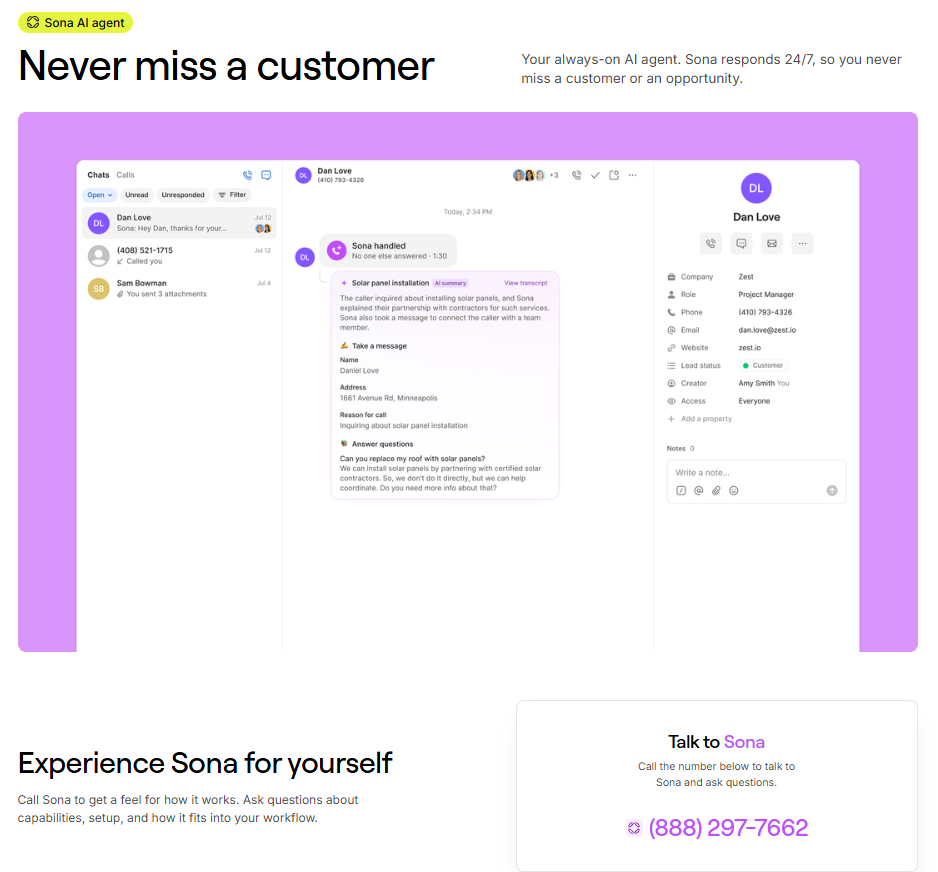
Quo Business includes AI call summaries, transcripts, and contact suggestions. Separately, Sona can answer incoming calls, ask questions, capture messages, and help a business respond when employees are unavailable. Quo currently describes 1,000 included automation credits—approximately ten calls—on every plan, with paid credit tiers for higher usage. Actual usage, features, and pricing should be confirmed on the Sona page.
Dialpad: AI across different products
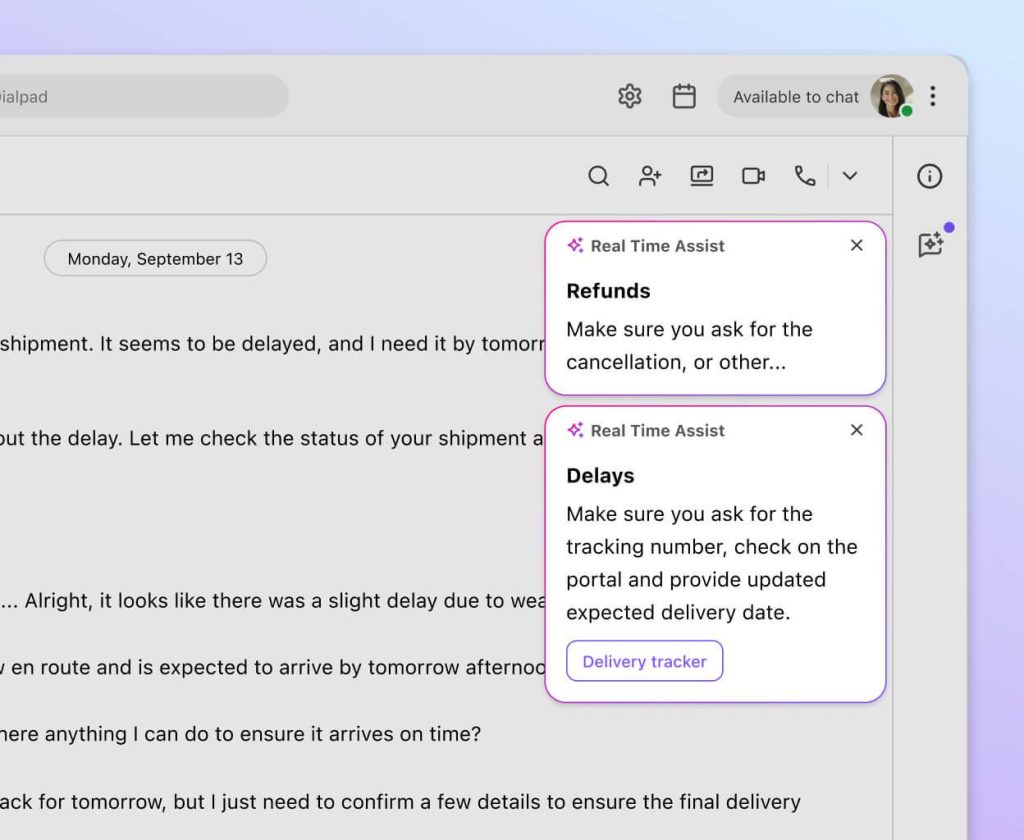
Dialpad markets AI-powered transcription, summaries, and other assistance across its product portfolio. Its AI Agent product supports autonomous voice and digital interactions, human handoffs, connectors, and analytics, with conversation-based pricing. The exact feature set depends on whether you purchase Connect, Support, Sell, or AI Agent, as well as your tier and add-ons.
Which AI approach is better?
For a small company that mainly wants missed calls answered and messages captured, Quo Sona is straightforward to evaluate. For a larger operation requiring complex AI-led service workflows or contact-center analytics, Dialpad AI Agent may deserve a separate pilot. Test each with realistic questions, escalation scenarios, business hours, accents, and privacy requirements before purchasing.
See How Quo Sona Works
Explore Quo’s AI receptionist, included allowance, and upgrade options for after-hours calls.
Affiliate disclosure: We may earn a commission if you purchase through this link, at no additional cost to you. Verify current pricing and terms on the provider’s website.
How to Move Your Dialpad Number to Quo
Keeping your established business number is often the most important part of switching. Quo promotes number porting as part of its onboarding process, but timing and eligibility depend on the current carrier, account information, and number type.
- 1. Audit your current setup: list every number, extension, routing rule, integration, voicemail, and recorded greeting.
- 2. Test Quo first: set up users, shared inboxes, and basic call flows with a temporary number.
- 3. Gather porting details: verify the Dialpad account holder, service address, account number, and any required authorization.
- 4. Submit the port request: follow Quo’s instructions and avoid canceling the old service prematurely.
- 5. Validate after cutover: test inbound and outbound calls, SMS, voicemail, emergency-address settings, CRM sync, and after-hours routing.
Do not assume every number can be ported instantly or without interruption. Ask Quo to confirm eligibility and the expected transfer window in writing.
What Customer Reviews Can and Cannot Tell You
Quo’s comparison page includes positive testimonials from customers who moved from Dialpad, plus selected critical reviews of Dialpad. These examples reveal real purchase considerations—usability, support, reliability, and billing clarity—but selection bias matters.
For a balanced assessment, compare recent verified reviews for both platforms from teams similar to yours. Look for patterns rather than isolated complaints: onboarding complexity, mobile reliability, message delivery, customer support responsiveness, and the handling of billing disputes. Neither product’s call quality can be judged reliably without testing it on your own network and devices.
Quo vs Dialpad: Pros and Cons
Quo pros
- Shared numbers and unified customer conversations suit small teams.
- Convenient internal threads, notes, scheduled messages, and templates.
- Straightforward Starter, Business, and Scale positioning.
- Sona provides an approachable option for missed-call handling.
Quo cons
- Advanced routing, CRM integrations, and call intelligence require higher tiers.
- Sona usage beyond included credits can increase costs.
- Less suited to organizations requiring a full enterprise contact-center suite.
- Geographic coverage and messaging registration requirements may not suit every market.
Dialpad pros
- Broader communications product family for calling, meetings, sales, and support.
- AI and contact-center capabilities can support complex operations.
- Connect Standard provides a competitively priced entry point.
- Potentially attractive for teams already committed to its supported integrations and workflows.
Dialpad cons
- Advanced capabilities may require Pro, Enterprise, Support, Sell, or separate AI products.
- Minimum seats and add-ons can complicate cost comparisons.
- Shared customer-message workflows may be less aligned with some small teams’ needs.
- Broader platform scope can mean additional setup and training.
Which Businesses Should Choose Quo or Dialpad?
Choose Quo if you…
- Run a small service business that needs a shared customer-facing number.
- Manage sales inquiries and follow-ups primarily through phone calls and SMS.
- Want colleagues to collaborate inside a customer conversation.
- Need an AI receptionist to capture missed or after-hours inquiries.
- Prefer a focused communication workflow over a full contact-center stack.
Choose Dialpad if you…
- Need meetings alongside calling in the same communications platform.
- Operate a dedicated sales or customer-support contact center.
- Require advanced agent coaching, scorecards, or contact-center reporting.
- Plan to evaluate a larger AI automation deployment with specialized workflows.
- Have existing Dialpad configurations that would be costly to replace.
If Quo appears to match your needs, our complete Quo Review 2026 examines its core features, strengths, limitations, and ideal users in more detail.
Frequently Asked Questions
Is Quo cheaper than Dialpad?
Both advertise entry-level annual-billing rates from $15 per user per month. Actual costs depend on the tier, number of seats, SMS usage, phone numbers, AI, and other fees. Compare a written quote for your exact use case.
Is Quo better than Dialpad for small businesses?
Quo can be the better fit for small teams that share customer calls and texts. Dialpad may be better when meetings, more specialized contact-center functions, or existing integrations matter more.
Does Quo include an AI receptionist?
Quo makes Sona available across plans with a limited included credit allowance. Higher usage requires checking its current paid tiers and conditions.
Does Dialpad have AI features?
Yes. Dialpad offers AI functionality across multiple products, including an AI Agent offering. Inclusion and pricing depend on the product and contract.
Can I keep my number when switching from Dialpad to Quo?
Quo supports number porting, subject to eligibility and carrier procedures. Confirm your number and timing before canceling Dialpad.
Does Quo offer unlimited texting?
Quo advertises domestic calling and messaging allowances on its plans, subject to its acceptable-use rules, registration, and regional restrictions. Review the current policy before high-volume use.
Which platform is better for contact centers?
Dialpad’s dedicated Support and Sell products are more directly aimed at specialized contact-center operations. Quo is generally more focused on smaller teams managing customer relationships.
Can healthcare businesses use Quo?
Quo states that signed BAAs are available on eligible Business and Scale plans. Healthcare organizations must verify contract terms, configuration, and their own compliance obligations before using any service with protected health information.
Can I try Quo before subscribing?
Quo advertises a seven-day trial. Trial limitations, including US business-texting registration requirements, should be reviewed before testing.
Final Verdict: Quo or Dialpad?
There is no universal winner. Quo is the stronger starting point for many small businesses that want one place to manage calls, customer texts, shared numbers, and team follow-ups. Its value is especially clear when responsiveness and shared context matter more than enterprise contact-center features.
Dialpad deserves serious consideration for organizations that need meetings within their communications platform or plan to deploy more specialized sales, support, coaching, and AI automation workflows. Those capabilities should be evaluated against the correct Dialpad product and total contract price.
Our recommendation: map your most common customer interaction, test it in both products, and calculate the total cost for your actual number of users, numbers, messages, and AI conversations. Then choose the platform that removes the most friction from that workflow.
Ready to Explore Quo?
Compare the latest Quo plans and see whether its shared inbox, business calling, and Sona AI receptionist meet your needs.
Affiliate disclosure: We may earn a commission if you purchase through this link, at no additional cost to you. Verify current pricing and terms on the provider’s website.
Further reading: Quo Review 2026: Is This AI-Powered Business Phone System Worth It?
Sources & Editorial Notes
Product details and advertised prices were checked against official Quo and Dialpad materials in September 2026. The Quo comparison page is a vendor-authored marketing page, so its customer examples and cost claims should be interpreted accordingly. Prices shown are US-dollar advertised rates, often with annual billing, and are not binding quotes.