Updated August 2026 · Independent product comparison · Prices shown in USD unless stated otherwise.
Want a closer look at Quo before making your decision?
Read our in-depth Quo Review 2026 for a detailed breakdown of its business calling features, shared inbox, Sona AI Receptionist, pricing, pros and cons, and whether it’s worth the investment for your team.
Quick Verdict: Quo or Aircall?
Choose Quo if you run a solo business or a small, customer-facing team that wants calling, shared SMS, conversation history, and straightforward collaboration without a minimum seat commitment. Choose Aircall if you manage a dedicated sales or support operation that values advanced routing, outbound sales workflows, agent analytics, and a broad integration ecosystem.
Both products now offer AI-assisted capabilities, so this is no longer a simple “Quo has AI, Aircall does not” decision. Your best choice depends on team size, geography, how you handle inbound calls, and the full cost of add-ons.
Our editorial verdict: Quo is the more accessible default for a small US- or Canada-focused business. Aircall can justify its higher minimum commitment when its contact-center workflows genuinely save agent time.
Quo vs Aircall: Introduction
Business phone systems have evolved beyond a dial pad and voicemail. Customers expect a quick answer, a useful text follow-up, and a seamless handoff when a different employee picks up the conversation. That makes the choice between Quo (formerly OpenPhone) and Aircall a decision about your entire customer communication workflow.
Quo is positioned as an AI-powered business phone system for modern teams. It brings calls, texts, shared phone numbers, internal collaboration, and Sona AI Receptionist into a relatively simple workspace. Aircall is a customer communications platform with calling, IVR, shared inbox capabilities, CRM integrations, analytics, and AI Voice Agents. It is especially relevant to teams that structure work around sales and support agents.
This guide compares the products across price, day-to-day usability, AI, migration, and long-term fit. For a closer look at Quo’s interface, use cases, and limitations, read our in-depth Quo Review 2026.
Why Aircall Customers Move to Quo
Quo’s official comparison page highlights customer stories about lower costs, simpler collaboration, and the ability to keep all interactions with a customer visible in one place. These are testimonials selected by Quo, not representative survey results, but they point to practical buying criteria.
1. Lower entry cost for small teams
Aircall’s core plans require at least three licenses. A business with one or two employees may therefore pay for seats it cannot use. Quo has no equivalent minimum, making it easier to start small and add users as revenue grows.
2. Customer conversations remain visible
Quo’s shared numbers and internal threads let teammates see call and message context and discuss how to respond. That can reduce duplicate replies, especially when the same number is used for bookings, customer service, and follow-ups.
3. Texting is a first-class workflow
Quo emphasizes SMS auto-replies, scheduled texts, and reusable snippets. For a service business that follows up with appointments, estimates, or missed calls, those features can be more useful than an elaborate call-center dashboard.
4. Simpler rollout
A small business can test Quo using a temporary number before porting its existing line. That lowers the risk of disrupting customer communication during evaluation.
Important: Switching is not automatically beneficial. If your team depends on Aircall’s power dialer, sophisticated call flows, or specific integrations, test those workflows before moving.
Quo vs Aircall Pricing in 2026
Pricing should be evaluated at the team level, not just by comparing the lowest advertised price. Both vendors use per-user or per-license plans, but Aircall’s three-license minimum changes the economics for very small teams.
Quo pricing
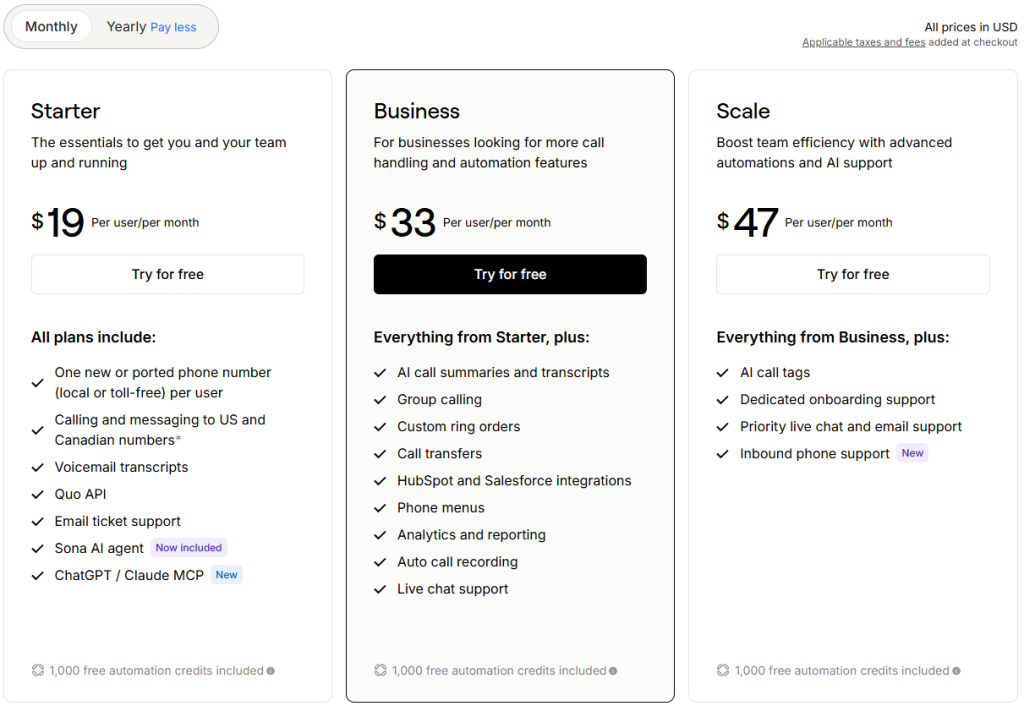
Quo publishes three tiers: Starter at $15/user/month annually ($19 monthly), Business at $23 annually ($33 monthly), and Scale at $35 annually ($47 monthly). Starter covers core calling and messaging; Business adds features such as AI call summaries, advanced call handling, CRM integrations, and reporting; Scale adds further AI and onboarding/support capabilities. Each plan lists 1,000 included automation credits for Sona, with additional usage options.
Aircall pricing
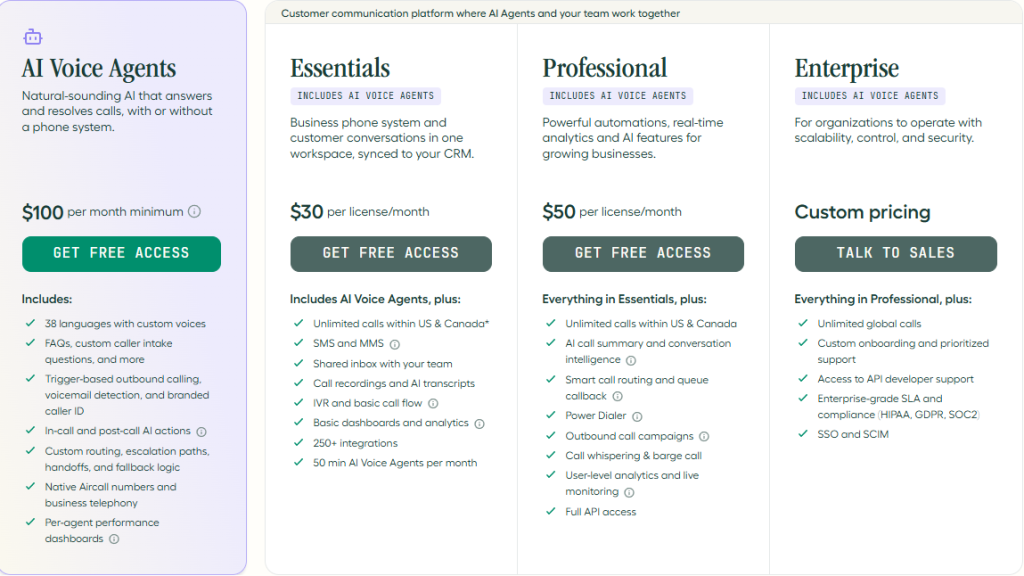
Aircall lists Essentials starting at $30/license/month billed annually and Professional starting at $50/license/month, both with a three-license minimum. Essentials now advertises shared inbox, SMS/MMS, IVR, call recording and AI transcripts, 250+ integrations, and 50 AI Voice Agent minutes per month. Professional adds capabilities oriented toward higher-volume sales and support teams. Higher-tier features and paid add-ons can affect the final bill.
Illustrative base subscription costs
For one user, Quo Starter costs $15/month on annual billing, while Aircall Essentials’ three-license minimum implies a $90/month starting commitment. For three users, Quo Business is $69/month versus Aircall Essentials at $90/month. For ten users, Quo Business is $230/month versus Aircall Essentials at $300/month. These are simple plan-price calculations, not quotes, and exclude taxes, international calling, numbers, usage, and optional services.
Aircall AI Voice Agents are usage-priced beyond the included allowance; Quo Sona has a separate credit-based usage structure. Always model the number of AI-handled calls or minutes you expect before comparing final costs.
Pricing verdict: Quo usually offers a lower financial entry point. Aircall becomes more compelling when its agent tooling and integration breadth offset the higher baseline.
Find the Right Quo Plan for Your Team
Whether you are a solo professional or managing a growing team, compare Starter, Business, and Scale to find the right balance of calling, messaging, AI, and cost.
Review current pricing, terms, and included features before subscribing.
Feature Comparison: What Each Platform Actually Offers
Business calling: Both platforms provide cloud calling, voicemail, recording, and call routing. Quo emphasizes a lightweight shared workspace; Aircall offers more extensive agent-focused workflows.
Shared inbox and SMS: Quo combines calls and texts around shared numbers, with internal threads, scheduled messages, snippets, and auto-replies. Aircall’s current Essentials plan also lists a shared inbox and SMS/MMS. However, automation depth, country coverage, and messaging workflows are not identical; verify your exact requirements in a trial.
Call routing: Quo Business adds phone menus, custom ring orders, transfers, and advanced forwarding. Aircall Essentials includes IVR/basic call flows, while Professional targets more sophisticated routing needs.
CRM and integrations: Quo supports tools such as HubSpot, Salesforce, Zapier, Make, and Slack, with access varying by plan. Aircall advertises more than 250 integrations, an advantage if your business already relies on a specialized CRM or help desk.
Analytics: Quo Business provides operational reporting suitable for small teams. Aircall’s analytics offering is more strongly oriented toward agent and contact-center performance, with advanced analytics options.
International needs: Check supported numbers, calling destinations, SMS availability, and local regulations before buying. Quo’s core offer is particularly focused on US and Canadian communication; Aircall markets broader international workflows, but exact coverage varies by service and country.
Feature verdict: Quo is stronger when unified conversations and low-friction collaboration are the priority. Aircall is stronger when complex agent operations and a large integration catalog are essential.
Why Businesses Switch from Aircall to Quo
A business phone system without a three-seat minimum
For consultants, independent professionals, and very small service companies, paying only for active users is a meaningful advantage. Quo’s lower commitment also makes it easier to experiment before standardizing across a team.
Shared numbers that support teamwork
Multiple employees can work from a shared business identity rather than asking customers to remember individual staff numbers. Conversation history and internal notes help the next person continue the discussion.
Built-in messaging productivity
Scheduled SMS, auto-replies, and reusable message snippets can support appointment reminders, lead follow-ups, and missed-call responses. These features are especially valuable for businesses where a short text often resolves a customer issue faster than another phone call.
Less complexity for everyday users
Quo’s simpler focus may reduce the learning curve for owners and employees who need to answer calls and messages but do not work as full-time contact-center agents. Aircall’s additional controls can be an advantage for a dedicated operations manager, but unnecessary for a three-person agency.
Save Time With AI: Sona vs Aircall AI
AI is one of the most important areas where the 2025 vendor comparison needs updating. Both Quo and Aircall offer AI-powered call handling in 2026. The real questions are what is included, how usage is billed, and how much human oversight remains necessary.
Quo: Sona AI Receptionist and conversation intelligence
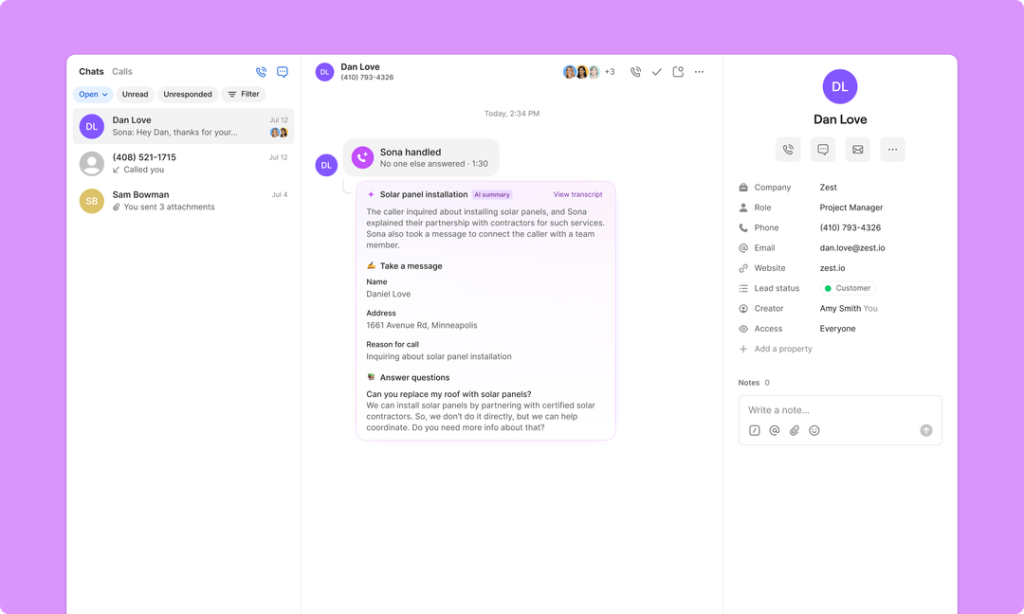
Sona can answer inbound calls when your team is unavailable, capture information, and support lead qualification. Quo’s Business tier also includes AI call summaries, transcripts, and suggested contacts. This is appealing for small teams that want fewer missed opportunities without hiring a dedicated receptionist.
Aircall: AI Voice Agents and AI Assist
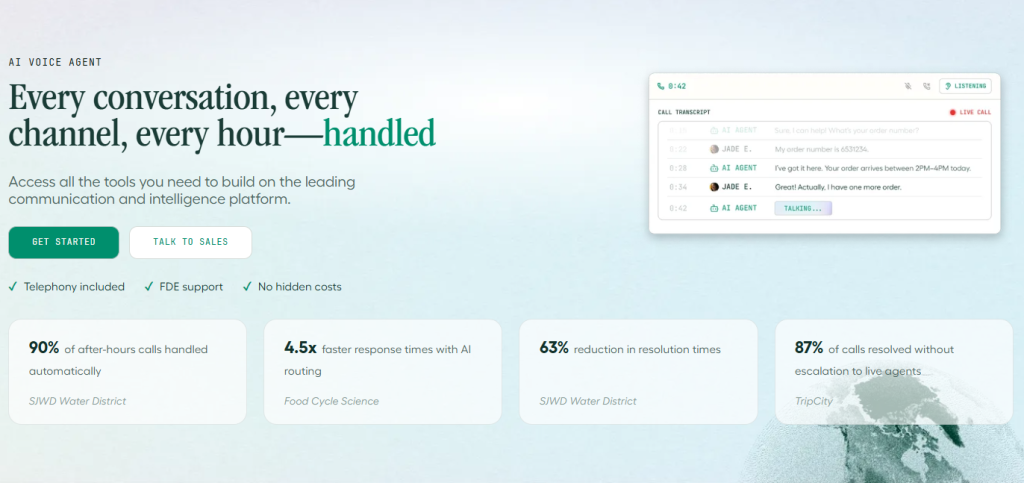
Aircall’s Essentials pricing now lists AI Voice Agents and an included monthly allowance. Aircall also offers conversation intelligence and agent-assistance products. In February 2026, Aircall began including AI Assist as a core feature of the Professional plan, so older claims that AI Assist always requires a separate purchase are outdated. Higher-end AI Assist Pro capabilities remain a separate consideration.
How to compare the real AI cost
Quo’s Sona uses automation credits and paid tiers; Aircall’s AI Voice Agents use a minute-based model and include a limited allowance on Essentials. A business with many short calls may experience a different cost profile from one with fewer, longer conversations. Run a test using your actual call lengths and volumes.
Where AI still needs human review
Neither AI receptionist should be assumed to resolve sensitive billing disputes, complex customer complaints, or regulated conversations without oversight. Test accuracy, escalation, consent and recording requirements, and the quality of summaries with realistic calls.
AI verdict: Sona is attractive for straightforward receptionist and follow-up use cases. Aircall deserves consideration for teams combining automated call handling with structured agent coaching and sales operations.
Explore Quo’s AI-Powered Business Phone
See how Quo combines shared calling, messaging, and Sona AI Receptionist—and compare what is included in each subscription tier.
Explore Quo Features & Plans ↗
Review current pricing, terms, and included features before subscribing.
Move Your Aircall Number to Quo: Step-by-Step
Keeping your existing business number is often the most important part of a phone-system migration. Quo advertises free number porting, but eligibility, timelines, and documentation depend on the number and current carrier.
Step 1: Audit your current setup
List every active number, owner, call flow, voicemail, SMS workflow, and integration. Identify any numbers used for login verification or regulated customer messaging.
Step 2: Test Quo with a temporary number
Set up users, shared inboxes, routing, and AI behavior before moving your production line. Run inbound and outbound calls and confirm that texts reach the right teammates.
Step 3: Submit the porting request
Use Quo’s porting workflow and provide the requested account details. Avoid canceling Aircall until the port is completed and confirmed; early cancellation can complicate number ownership or service continuity.
Step 4: Prepare your team
Export permitted customer records, train employees, update CRM workflows, and create a contingency plan for missed calls during the cutover.
Step 5: Verify after transfer
Test calls, SMS, voicemail, routing, recordings, and automated messages. Confirm that billing and old-number assignments are cleaned up after successful migration.
Quo’s comparison page describes a transition without service downtime, but treat that as the provider’s intended process rather than an unconditional guarantee for every carrier and number.
More Key Reasons to Consider Quo
Fast onboarding: Quo advertises a seven-day trial and a relatively quick setup process. A trial is particularly useful when the owner—not an IT department—will configure the phone system.
Centralized customer context: A shared history of calls, texts, and notes can help staff avoid asking customers to repeat information.
Practical integrations: Native CRM options and automation platforms can reduce repetitive contact updates. Confirm which integrations are included in your selected tier.
Predictable starting point: The absence of a minimum seat count is valuable for teams whose staffing changes seasonally.
These advantages do not eliminate trade-offs. Businesses requiring highly specialized contact-center analytics, global coverage, or sophisticated outbound dialing should benchmark Aircall as well.
Quo Pros and Cons
Advantages
- Low starting price and no three-user minimum.
- Shared calling and messaging experience designed around customer conversations.
- Useful SMS productivity features, including scheduled messages and snippets.
- Sona AI Receptionist with usage options and included credits.
- AI summaries, transcripts, CRM connections, and analytics on higher tiers.
- Free number porting advertised by the provider.
Disadvantages
- Most compelling call-management and AI analysis features require Business or higher.
- Sona usage beyond the included credits may increase monthly costs.
- US/Canada-centered offering may not suit every multinational team.
- Smaller integration catalog than Aircall’s advertised 250+ options.
- Less tailored to large, complex contact-center operations.
Aircall Pros and Cons
Advantages
- Strong orientation toward sales and support teams with structured call workflows.
- IVR, shared inbox, recording, analytics, and AI Voice Agents on Essentials.
- More than 250 advertised integrations.
- Professional tier adds capabilities for larger, performance-focused teams.
- AI Assist included in Professional from February 2026.
- International communications options that may suit distributed organizations.
Disadvantages
- Three-license minimum can be costly for solo users and two-person teams.
- Higher published starting price than Quo.
- Premium analytics, coaching, and other add-ons can raise the total cost.
- AI Voice Agent usage beyond the included allowance needs careful budgeting.
- More features and configuration choices can create unnecessary complexity for a small business.
Who Should Choose Quo — and Who Should Choose Aircall?
Choose Quo if…
- You run a small business, agency, local service company, or startup.
- Your team primarily serves customers in the US and Canada.
- Shared SMS, missed-call follow-ups, and internal collaboration matter more than advanced dialer tools.
- You want an AI receptionist without committing to a three-seat contact-center platform.
- You prefer a lower starting subscription and simpler rollout.
Choose Aircall if…
- You manage a dedicated sales or customer support team with at least three agents.
- Your processes rely on advanced routing, agent performance measurement, or outbound sales workflows.
- You need a specific integration from Aircall’s broad ecosystem.
- Your organization has international telephony needs that Aircall can support in your target markets.
- You can demonstrate that agent productivity gains outweigh the higher base price.
If you’re leaning toward Quo, {review} examines its strengths and limitations in more detail before you commit.
Considering Quo for Your Business?
Compare the current Starter, Business, and Scale plans, then use a trial to test shared numbers, messaging, routing, and AI with your real workflows.
Review current pricing, terms, and included features before subscribing.
Frequently Asked Questions
Is Quo cheaper than Aircall?
At published annual-billing entry prices, yes: Quo Starter begins at $15 per user per month, while Aircall Essentials starts at $30 per license per month with a three-license minimum. Compare total costs after AI usage, add-ons, and any international services.
Does Aircall have an AI receptionist in 2026?
Aircall’s current Essentials page advertises AI Voice Agents and an included monthly allowance. This is an important change from older Quo-versus-Aircall comparisons.
Does Quo include Sona AI?
Quo’s current pricing page lists Sona AI and 1,000 free automation credits across plans, with paid usage options available. Check the credit rules and current limits before purchasing.
Does Aircall require three users?
Its published pricing FAQ says the Essentials and Professional core plans have a minimum of three licenses.
Can I transfer my Aircall phone number to Quo?
Quo offers number porting, subject to eligibility and the information required by the carriers. Keep your current service active until the port is confirmed.
Which platform is better for SMS?
Quo’s built-in scheduled texts, snippets, and shared-number workflow make it particularly appealing for small teams. Aircall also offers SMS/MMS and a shared inbox; verify regional availability and automation requirements.
Which is better for sales teams?
Aircall may be a stronger fit for structured outbound sales and agent-management workflows. Quo may be enough for small sales teams that mainly need a reliable shared number, CRM synchronization, and fast follow-ups.
Which is easier for a small business to set up?
Quo is generally positioned for a lightweight rollout, but ease of use is subjective. Trial both platforms with a realistic workflow before deciding.
Are the prices guaranteed for all customers?
No. Published prices are starting points and can vary with billing period, region, taxes, usage, add-ons, and sales agreements.
Final Verdict: Which Business Phone System Is Better in 2026?
Quo is our preferred starting point for a small business that wants one workspace for calls, texts, customer context, and AI receptionist coverage. Its lower entry price, no minimum seat requirement, and messaging-focused collaboration are tangible advantages.
Aircall is the stronger candidate for more specialized sales and support organizations. Its broad integration library, structured call operations, and AI-enabled agent tooling may be worth the higher cost when you have enough agents and volume to benefit.
Don’t decide from the sticker price alone. Calculate a realistic monthly bill, test your call routing and SMS workflows, and evaluate AI quality with actual customer scenarios. For a deeper product-specific assessment, read our in-depth Quo Review 2026.
Ready to Explore Quo?
Review the latest plan features and pricing, then decide whether Quo fits your team’s communication needs.
Review current pricing, terms, and included features before subscribing.
Sources and Editorial Notes
This article draws on current official product and pricing pages. Vendor claims, customer testimonials, and advertised feature counts should be treated as vendor-reported information. Prices and entitlements may change after publication.