
What Is TheEditorConnection?
The short answer: a “hire a video editing team, not a freelancer” subscription, built specifically around volume.
The Editor’s Connection (also searched as “TheEditorsConnection” or “TEC”) is a Los Angeles–based unlimited video editing service. Instead of paying per project or per hour, customers pay a flat monthly membership fee and submit as many editing requests as they want. Those requests are processed one at a time by a dedicated editor and project manager, using footage the customer uploads to their own cloud storage — Google Drive, Dropbox, or similar, with no storage caps enforced by TEC.
The core problem TEC is trying to solve is a familiar one for anyone managing video content at scale: editing is time-consuming, hiring an in-house editor is expensive and slow, and freelance marketplaces are inconsistent. TEC’s pitch is a “systemized” alternative — the same editor and project manager on every job, a flat predictable bill, and a workflow built to absorb high volumes of reels, long-form videos, and brand content without the customer needing to manage a hiring pipeline.
The company says its editing staff — more than 80 people — work under direct contract rather than being sourced from an open freelance marketplace, and that customers are matched with the same editor and project manager for consistency across projects (with a backup process if that specific editor’s contract ends). According to the official site, the team has delivered more than 150,000 videos to date.
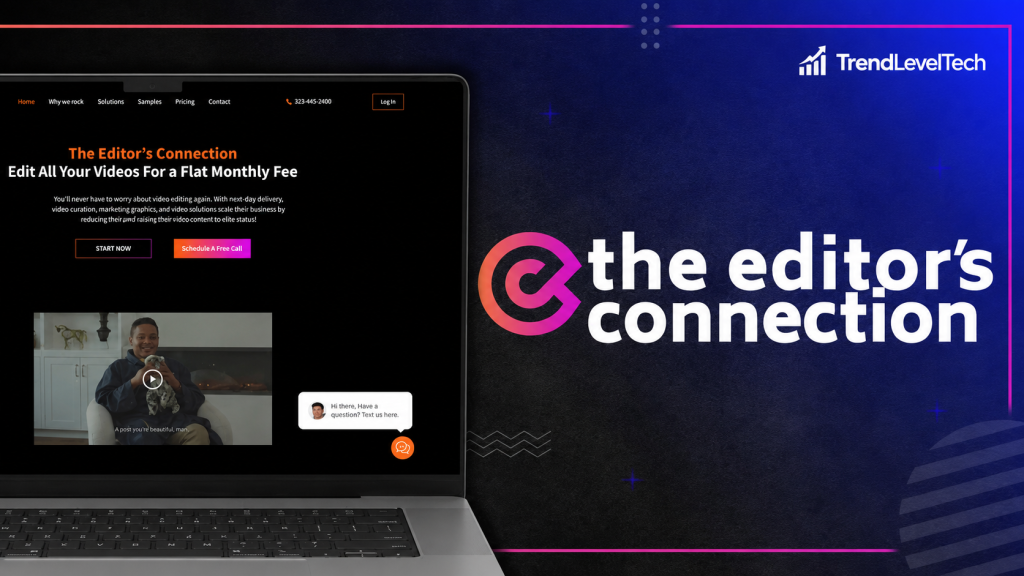
TEC is not a self-serve editing app or an AI editing tool — it’s a human editing service delivered through a subscription. That distinction matters: you’re not learning new software, you’re outsourcing the work entirely to a team while retaining creative direction over style, pacing, and brand.
Key Features
Rather than repeating TEC’s own feature list, here’s editorial analysis of what actually matters in each one.
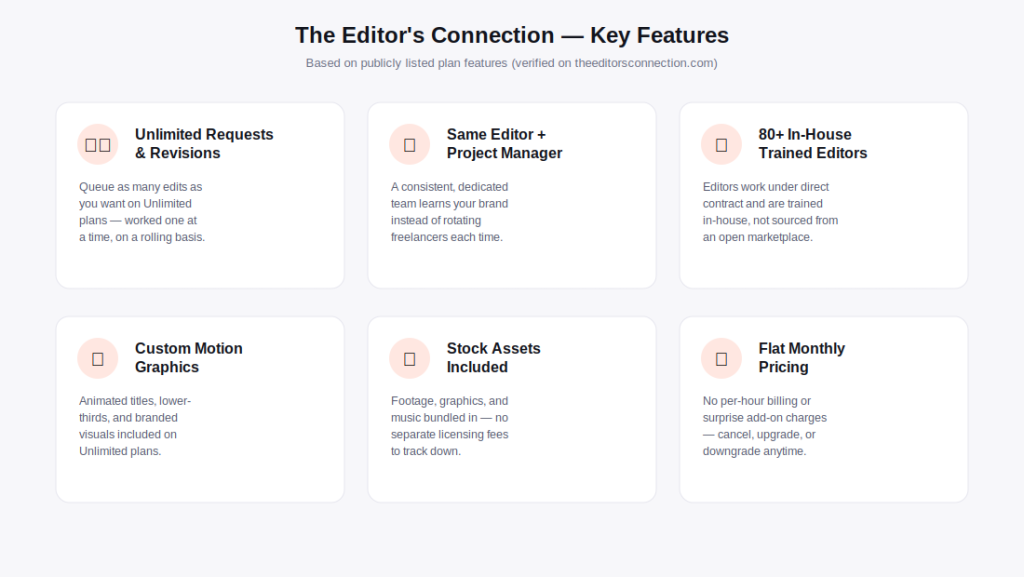
Unlimited Requests and Revisions
What it does: on the three Unlimited tiers, you can queue as many editing requests and revision rounds as you want, with no per-video billing. How it works: requests are handled in a rolling, one-at-a-time queue — as soon as one is approved, the next begins. Why it matters: this removes the anxiety of “does this edit count against my budget,” which is the single biggest complaint creators have about per-video or capped services. Who benefits: teams with unpredictable or bursty content needs. Limitation: “unlimited” doesn’t mean parallel — a single active project moves through the queue at a time, so raw output is still bounded by turnaround speed, not by request volume.
Same Dedicated Editor and Project Manager
What it does: assigns one editor and one project manager to your account across projects, rather than a different freelancer each time. Why it matters: brand consistency compounds — an editor who already knows your pacing, music taste, and caption style produces better first drafts and needs fewer revision rounds over time. Limitation: TEC is transparent that this depends on the specific editor’s ongoing contract; if that editor leaves, you’re reassigned, which can mean a short adjustment period.
In-House Trained Editing Team
What it does: TEC states its 80+ editors are under direct contract and trained internally, rather than pulled from an open freelance marketplace on a per-job basis. Why it matters: internal training standards tend to produce more consistent output quality than marketplace-sourced freelancers, where skill and reliability vary widely from job to job.
Custom Motion Graphics and Branded Visuals
What it does: animated titles, lower-thirds, and branded visual elements are included as part of the Unlimited plans rather than billed as an add-on. Who benefits: brands and agencies that need consistent on-screen branding across every video, not just a clean cut.
Included Stock Assets
What it does: stock footage, graphics, and music are bundled into the subscription. Why it matters: several competitors in this category — Vidchops and Video Husky among them — charge extra for subtitles, thumbnails, or premium stock, which quietly inflates the real monthly cost well above the advertised price. Bundling these into TEC’s flat rate is a genuine differentiator worth weighing when comparing sticker prices across services.
Flat, Predictable Monthly Pricing
What it does: one flat rate per plan, no per-hour billing, no line-item invoices. Limitation: flat pricing is only predictable if your usage stays within what a plan’s average output realistically supports — heavy, highly complex requests (VFX-heavy edits, extensive revisions) can still stretch turnaround times even though the bill doesn’t change.
How The Editor’s Connection Works
The workflow is described consistently across TEC’s own site as a four-step loop.
Step 1 — Request an Edit
You share raw footage through your own cloud storage account (Google Drive, Dropbox, or similar) and describe the style you want — matching an existing brand style or referencing content you like. TEC does not cap storage or file sizes on its end.
Step 2 — The Team Edits
Your dedicated editor cuts the footage, handles color grading, cleans audio, and builds any graphics needed, turning raw clips into a finished draft.
Step 3 — Request and Approve Changes
You review the draft and request revisions. Because revisions are unlimited on the Unlimited plans, there’s no hard cap on how many rounds you can request, though each round still takes queue time to turn around.
Step 4 — Deliver and Scale
Once approved, the final video is delivered and the next project in your queue begins automatically — the continuous, rolling model is what allows “unlimited requests” to function without a formal per-video limit.
Practical note: Because editing happens one project at a time per account, the realistic ceiling on your monthly output is set by turnaround speed and plan tier, not by how many requests you submit. TEC publishes average monthly output ranges per plan (see the pricing section below) specifically because of this.
.png "The Editor's Connection — official site preview image")
The Editor’s Connection vs. Top Alternatives
To make these TheEditorsConnection reviews genuinely useful, here’s how it stacks up against three of the most-cited names in the unlimited video editing category: Vidchops, Video Husky, and Vidpros.
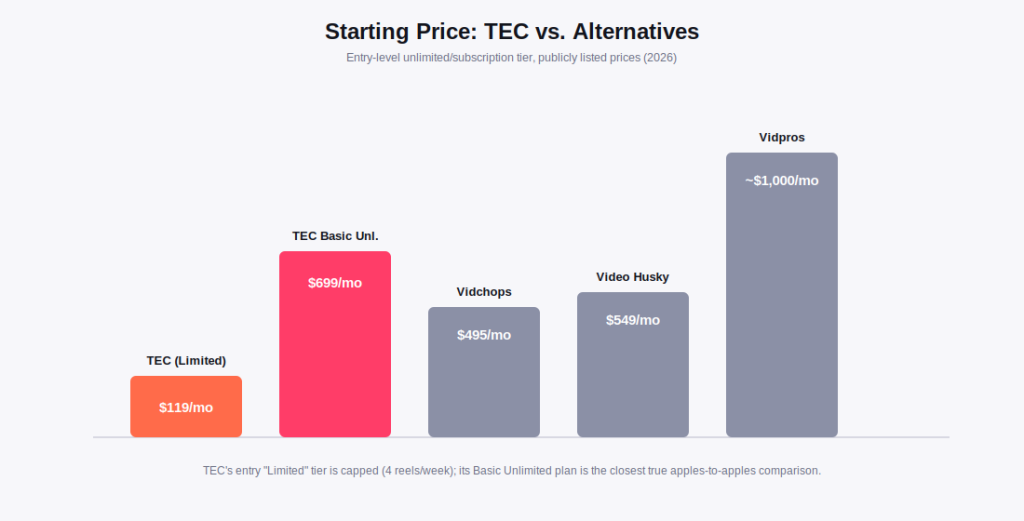
| Criteria | The Editor’s Connection | Vidchops | Video Husky | Vidpros |
|---|---|---|---|---|
| Starting Price | $119/mo (capped) / $699/mo (unlimited) | $495/mo | $549/mo | ~$1,000/mo |
| Truly Unlimited Requests | ✓ Yes (Unlimited tiers) | ✗ Credit-based | ✓ Yes, one at a time | ✗ Fractional hours model |
| Free Trial | ✗ None | ✗ None | ✗ None | ✗ None |
| Dedicated Editor | ✓ Yes + PM | ✓ Yes | ✓ Yes | ✓ Yes |
| Stock Assets Included | ✓ Included | ✓ Included | ✓ Included | ✓ Included |
| Subtitles / Thumbnails | ✓ Included | ✗ Paid add-on | ✗ Paid add-on | ✓ Included |
| Video Length Limits | ✓ No stated cap | ✗ 15-minute cap | ✗ 10–20 min by plan | ✓ No stated cap |
| Wedding Editing | ✓ Plus/Ultra only | ✗ Not a focus | ✗ Not a focus | ✗ Not a focus |
| Money-Back Guarantee | 15 days | 14 days | Not published | Not published |
Comparison Verdict
None of these four services is a universal winner — the right choice depends on your volume and priorities. Vidchops is the cheapest entry point and reasonable for short, straightforward YouTube content, but its 15-minute length cap and paid subtitle/thumbnail add-ons push the real monthly cost higher than the advertised $495. Video Husky is similar in structure and price to Vidchops, with slightly more generous render-length limits on its higher tier, but shares the same “one editor, weekday-only” bottleneck and add-on pricing pattern.
Vidpros takes a different, more transparent approach — capping editor workload at four clients for guaranteed daily attention rather than claiming unlimited capacity — which suits customers who specifically distrust the “unlimited” framing used elsewhere in this category, at a higher starting price. The Editor’s Connection sits in between: its entry Limited plan at $119/month is the cheapest way to test the service (though capped at four reels weekly, so not directly comparable to the others’ unlimited plans), while its Basic Unlimited plan at $699/month is priced above Vidchops and Video Husky but includes subtitles, thumbnails, and stock assets that those two charge extra for, plus no stated video-length cap and wedding editing support on higher tiers.
Pros and Cons
A balanced look based on verified plan details rather than marketing claims.
✓ What We Like
- ✅ No add-on upsells for subtitles, thumbnails, or stock assets — competitors like Vidchops and Video Husky charge extra for these on their entry plans
- ✅ Same editor and project manager assigned per account, which compounds into better brand-consistent output over time
- ✅ No stated cap on final video length, unlike Vidchops’ 15-minute limit
- ✅ Genuinely broad content coverage — social reels, long-form YouTube, course content, real estate, and (on higher tiers) weddings
- ✅ 15-day money-back guarantee on Unlimited plans, giving a low-risk way to test the service without a free trial
- ✅ Quarterly and semi-annual billing meaningfully lowers the effective monthly rate for teams that can commit
✗ What Could Be Better
- ⚠️ No free trial — you’re committing to at least one billing cycle (or relying on the money-back guarantee) before you can judge fit
- ⚠️ Support and active editing operate Monday–Friday, 10 AM–6 PM Central Time only, which can matter for urgent weekend turnarounds
- ⚠️ Pricing climbs steeply at the top end — Ultra Unlimited is $2,099/month, a meaningful jump from Basic Unlimited
- ⚠️ “Unlimited” still means one active project at a time; published average-output ranges make clear that raw throughput is capped in practice
- ⚠️ Software/tool integrations are listed only as “BETA” on the top Ultra tier, with no public API or Zapier documentation for lower plans
- ⚠️ The entry-level Limited plan ($119/mo) is capped at 4 reels/week — it is not directly comparable to the Unlimited tiers and may undersell what most buyers actually need
Pricing and Plans 2026
Pricing below reflects what’s publicly listed on theeditorsconnection.com/pricing at the time of writing. Always confirm current rates before purchasing, as SaaS and subscription pricing changes over time.
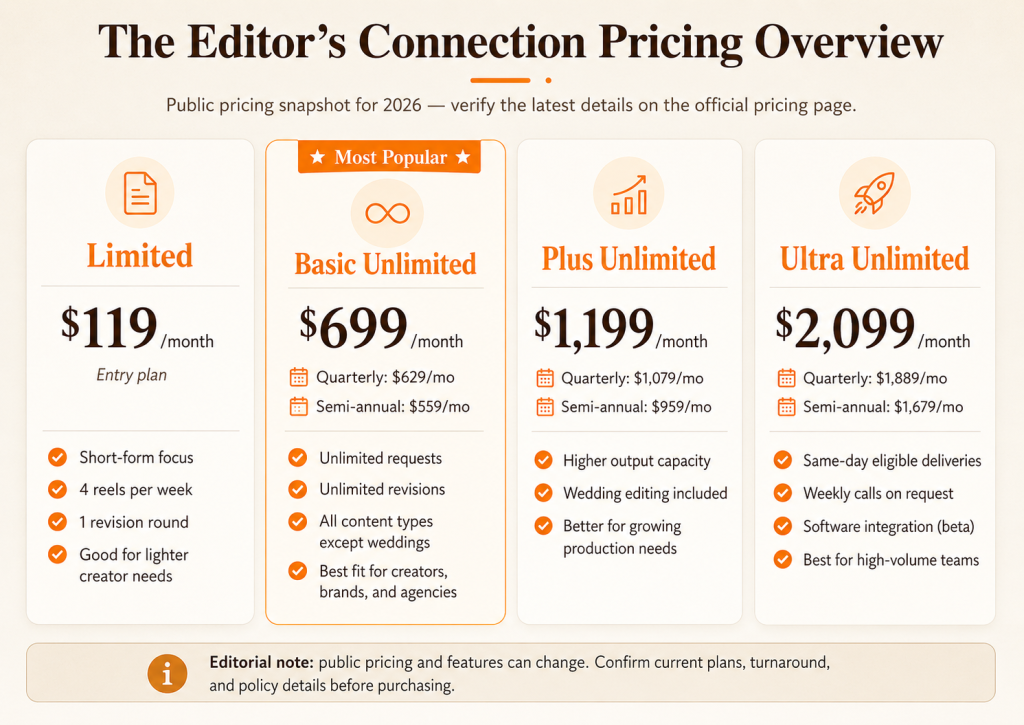
All three Unlimited plans (Basic, Plus, Ultra) offer meaningful discounts for longer commitments: roughly 10% off with quarterly billing and 20% off with semi-annual billing compared to the monthly rate. For example, Basic Unlimited drops from $699/month billed monthly to $559/month billed semi-annually. The Limited plan follows the same pattern, from $119/month down to $99/month on semi-annual billing.
No public free trial: Unlike some SaaS tools, The Editor’s Connection does not list a free trial on its pricing page. The 15-day money-back guarantee on Unlimited plans is the closest equivalent — confirm the current terms directly on the official site before subscribing.
Pricing Reality Check
For a solo content creator or small business publishing a handful of reels weekly, the $119/month Limited plan is a reasonable, low-commitment entry point — though it’s worth noting this tier is capped, not unlimited, and includes only one revision round. For agencies and creators publishing consistently at higher volume, Basic Unlimited at $699/month is the plan most directly comparable to competitors like Vidchops ($495/mo) and Video Husky ($549/mo) — TEC costs more up front, but bundles subtitles, thumbnails, and stock assets that those competitors bill separately, which can close or reverse the price gap depending on how many add-ons you’d otherwise need.
The Ultra plan’s $2,099/month price point only makes financial sense for teams with genuinely heavy, near-daily output — agencies managing several client accounts or high-volume creators publishing multiple times per day. For most individual creators and small teams, Basic or Plus Unlimited will cover realistic output needs without paying for Ultra-tier same-day capacity you may not use.
How to Get Started
A straightforward, low-friction setup process based on TEC’s published onboarding flow.
- Pick a plan. Choose Limited, Basic, Plus, or Ultra based on your expected weekly or monthly output, and decide between monthly, quarterly, or semi-annual billing.
- Book an intro call (optional) or check out directly. TEC offers a “Schedule Video Call” option if you want to talk through your needs before subscribing, or you can go straight to checkout on the pricing page.
- Share your first batch of footage. Upload raw footage to your own Google Drive, Dropbox, or similar storage, and share access with your assigned editor.
- Describe your style. Reference your existing brand guidelines or example content you like — TEC’s team will match your style or help establish one.
- Review your first draft and request revisions. Use the feedback/approval workflow to fine-tune pacing, graphics, and audio until it matches your vision.
- Approve, and the queue moves to your next request. As soon as one project is approved, editing on your next queued request begins automatically.
How to Get Started
A straightforward, low-friction setup process based on TEC’s published onboarding flow.
- Pick a plan. Choose Limited, Basic, Plus, or Ultra based on your expected weekly or monthly output, and decide between monthly, quarterly, or semi-annual billing.
- Book an intro call (optional) or check out directly. TEC offers a “Schedule Video Call” option if you want to talk through your needs before subscribing, or you can go straight to checkout on the pricing page.
- Share your first batch of footage. Upload raw footage to your own Google Drive, Dropbox, or similar storage, and share access with your assigned editor.
- Describe your style. Reference your existing brand guidelines or example content you like — TEC’s team will match your style or help establish one.
- Review your first draft and request revisions. Use the feedback/approval workflow to fine-tune pacing, graphics, and audio until it matches your vision.
- Approve, and the queue moves to your next request. As soon as one project is approved, editing on your next queued request begins automatically.
Best Alternatives
If The Editor’s Connection doesn’t fit your specific situation, here are three legitimate alternatives worth considering.
Vidchops — Best for Short, Simple YouTube Content on a Budget
Vidchops is the cheapest entry point in this comparison at $495/month for its Weekly plan. It’s a reasonable choice if your content is consistently under 15 minutes and you don’t need subtitles or thumbnails included, since both are paid add-ons. Creators who need longer-form content or bundled extras will likely find the real monthly cost creeps upward once add-ons are factored in.
Video Husky — Best for Straightforward YouTube-Style Editing
Video Husky’s Eskimo plan ($749/month) offers unlimited revisions and a 20-minute render cap, positioned similarly to TEC’s Basic tier but without wedding support or bundled subtitles/thumbnails. It’s a solid option for creators whose needs map closely to standard YouTube-style talking-head or vlog content.
Vidpros — Best for Buyers Who Want Transparent, Capped Editor Hours
Vidpros explicitly rejects the “unlimited” framing, capping editors at four clients each for roughly two guaranteed hours of daily editing time. Starting around $1,000/month, it costs more than TEC’s Basic tier but appeals specifically to buyers skeptical of vague “unlimited” claims and who want clearly defined capacity instead.
For teams evaluating broader marketing and content tooling alongside video editing, it’s also worth reviewing complementary tools like a social media scheduler for distribution, or a AI slide/presentation tool if your video content originates from course or webinar decks.
Who Should Use The Editor’s Connection?
Based on the plan structure and content types TEC explicitly supports.
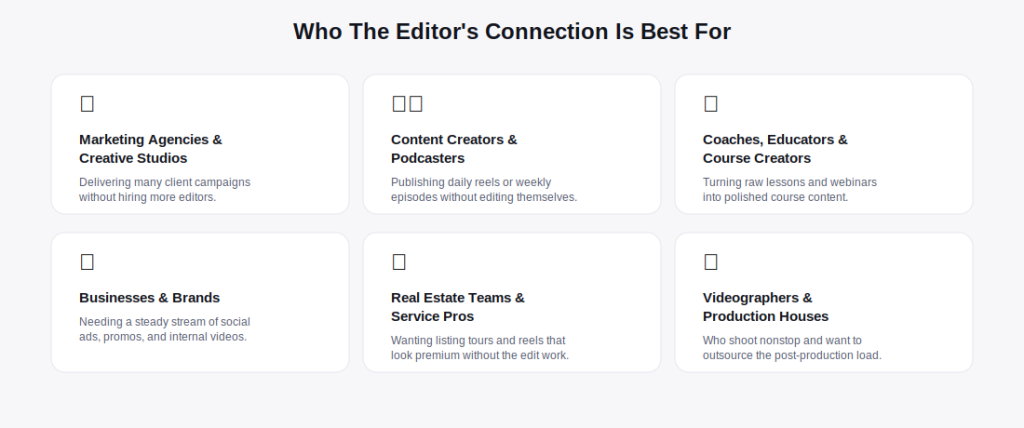
- → A marketing agency delivering multiple client campaigns without hiring more editors
- → A content creator or podcaster publishing daily reels or weekly episodes
- → A coach, educator, or course creator turning raw lessons into polished content
- → A brand needing a steady stream of social ads, promos, and internal videos
- → A real estate team or service pro wanting premium-looking listing tours and reels
- → Comfortable with weekday-only (Central Time) support and turnaround windows
- → You need guaranteed weekend or after-hours turnaround for urgent content
- → You want to test the service with a genuine free trial before paying anything
- → Your workflow depends on a public API or confirmed Zapier/Make integration today
- → You need multiple videos edited in true parallel rather than a rolling queue
- → Your budget realistically caps out below $119/month with no room to scale into Unlimited tiers
- → You specifically want a transparently capped-hours model like Vidpros rather than an “unlimited” framing
Integrations, Support & Resources
What’s actually confirmed publicly, without inventing capabilities that aren’t documented.
File Sharing and Workflow
TEC does not require a proprietary upload tool — footage is shared through whichever cloud storage the customer already uses (Google Drive, Dropbox, etc.), with no storage caps enforced on TEC’s end.
Software Integrations
A “Software integration (BETA)” feature is listed exclusively on the Ultra Unlimited plan. No specific integrations, API documentation, or Zapier/Make support are published for the other plans, so buyers who need confirmed workflow automation should ask directly during onboarding rather than assume it’s included.
Customer Support
The Editor’s Connection operates Monday through Friday, 10:00 AM to 6:00 PM Central Time. Support channels include a contact form and a video-call scheduling widget for pre-sales conversations; there’s no indication of 24/7 or weekend live support.
Community and Onboarding
TEC does not appear to run a public community forum or knowledge base separate from its own marketing site. Onboarding is handled directly by the assigned project manager rather than through self-serve documentation, consistent with its white-glove, human-first service model.
Frequently Asked Questions
The questions buyer intent shows up most often in TheEditorsConnection reviews searches.