An In-Depth Review of Quo (Formerly OpenPhone), the AI-Powered Business Phone System for Growing Teams
Last Updated: June, 2026
Category: Business Phone Systems, VoIP, AI Receptionists
Starting Price: $15 per user/month, billed annually
Free Trial: 7 days
Overall Editorial Rating: 4.7/5
Best For: Small businesses, startups, agencies, service providers, and customer-facing teams
Affiliate Disclosure: This article may contain affiliate links. Trendleveltech may earn a commission if you sign up or purchase through qualifying links, at no additional cost to you. Our recommendations are based on product research and editorial evaluation.
Quick Verdict: Is Quo Worth It in 2026?
Quo is one of the business phone platforms worth considering if your company needs to manage calls, text messages, customer conversations, and team collaboration in one place.
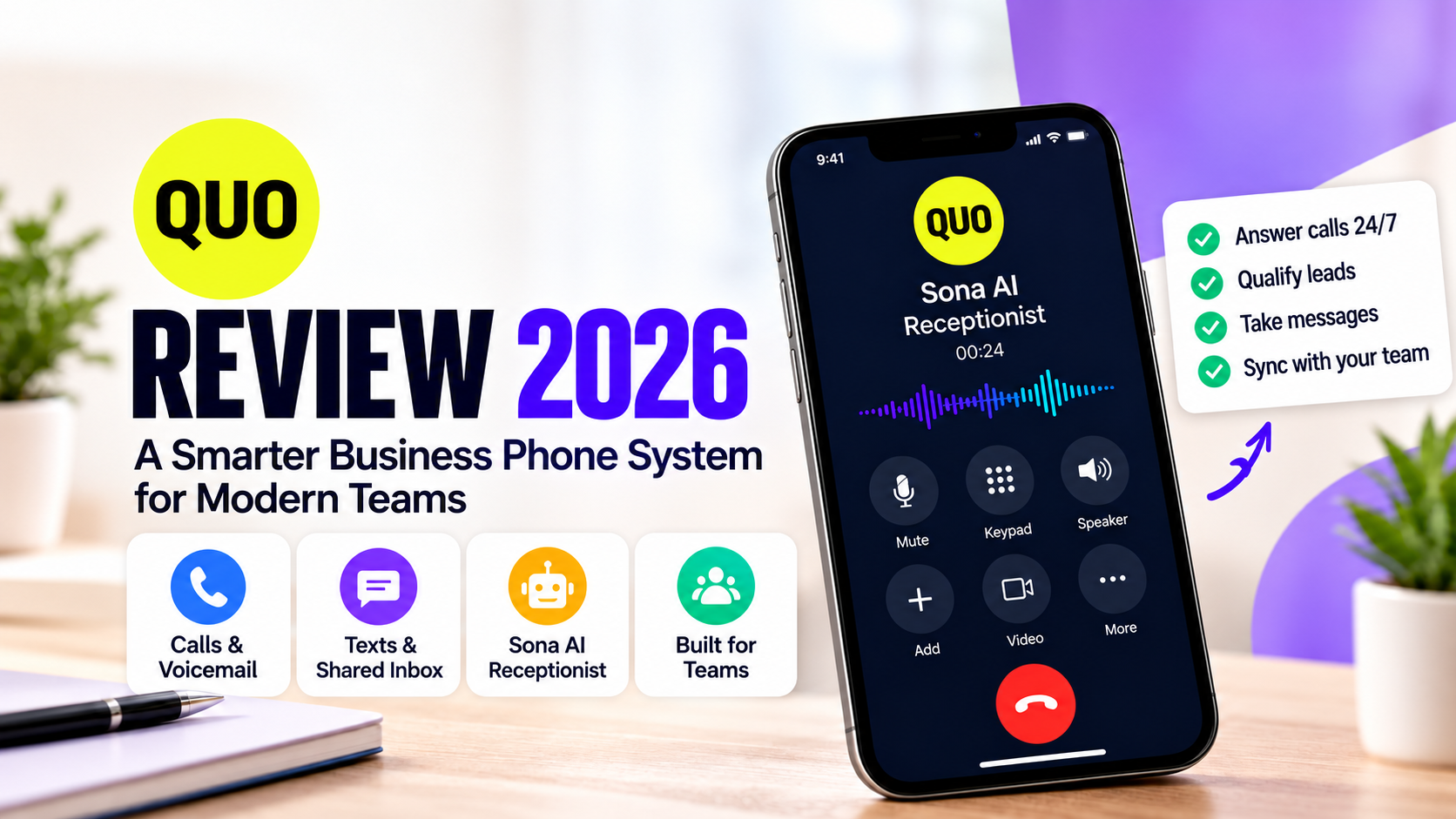
Formerly known as OpenPhone, Quo has evolved beyond a basic virtual phone number service. It now combines business VoIP, shared inboxes, internal collaboration, flexible call routing, CRM integrations, and Sona, an AI agent designed to handle incoming calls and support customer workflows.
The platform is particularly compelling for small and growing businesses where multiple employees communicate with the same customers.
Instead of keeping important conversations on individual phones, Quo allows teams to work from shared numbers and conversation histories.
Its Sona AI agent adds another dimension by answering calls when employees are unavailable, collecting information, identifying caller intent, sending text messages, and routing conversations.
However, Quo is not the best fit for every organization.
Advanced calling features require higher subscription tiers, AI usage can generate additional charges, and companies with extensive international requirements or sophisticated enterprise contact-center needs may prefer alternative platforms.
Overall Rating: 4.7/5 — Excellent for Collaborative Business Communication
Core Calling and Messaging — 4.7/5. Quo offers a well-rounded combination of business calling, messaging, and voicemail capabilities for everyday customer communication.
Shared Inbox and Collaboration — 4.8/5. Shared numbers, conversation histories, and internal coordination are among the platform’s strongest advantages for growing teams.
Sona AI Capabilities — 4.7/5. Sona adds AI-powered call answering, information collection, SMS actions, and configured routing, with usage limits and a need for human oversight.
Call Routing and Automation — 4.6/5. Phone menus, group calling, transfers, and automation workflows provide useful flexibility, especially on higher subscription tiers.
Ease of Adoption — 4.5/5. Quo’s cloud-based approach is accessible for smaller teams, although advanced routing, porting, and integrations still require configuration.
Pricing and Value — 4.6/5. Starter provides an affordable entry point, while Business offers a stronger feature set for growing teams. Additional AI usage and other fees should be included in the budget.
Integrations — 4.5/5. Supported CRM connections, Zapier, Make, API access, and newer integrations expand workflow possibilities, subject to plan and technical limitations.
Security and Privacy Features — 4.6/5. Quo publishes information about encryption, authentication, access controls, and compliance-related practices. Buyers with formal obligations should verify the relevant documentation.
Overall Editorial Rating — 4.6/5. This score reflects our qualitative assessment of Quo’s documented capabilities and suitability for its intended audience.
Ratings represent our qualitative assessment of documented features, value, and suitability for the intended audience. They are not measurements from independent hands-on testing.
What We Like Most: Shared customer conversations, team collaboration, Sona AI, flexible routing, and integration options.
What Could Be Better: More advanced features on the entry-level plan, clearer budgeting for AI usage, and broader suitability for international or enterprise-heavy deployments.
Our Recommendation: Quo Business is the first plan we would evaluate for a growing customer-facing team. Starter is a sensible option for individuals with simpler needs.
Ready to Simplify Your Business Communication?
Quo brings business calls, text messages, shared inboxes, and AI-powered assistance into one workspace. Explore how it can help your team stay connected and manage customer conversations more efficiently.
Explore Quo & Start Your Free Trial ↗
Explore available plans and see whether Quo fits your business.
5 Things to Know Before Buying Quo
Before subscribing, these are the five most important considerations.
1. Quo Is More Than a Virtual Phone Number
Quo is designed around shared business communication.
You can use a business number to call and text customers, but its greater value comes from giving team members access to the same conversations.
This makes it particularly useful when multiple employees manage customer relationships.
2. Sona AI Is Included, but Usage Is Limited
Quo includes Sona on its published plans.
The included allowance is 1,000 automation credits, described as approximately 10 AI-handled calls.
Businesses expecting significant AI call volume should examine the additional usage tiers and overage rates.
3. The Business Plan Unlocks Important Features
Starter includes the essential phone system.
However, features such as AI call summaries, automatic call recording, phone menus, advanced routing, analytics, and certain CRM integrations are available on Business and higher plans.
The cheapest plan is not necessarily the best value.
4. Your Final Bill May Exceed the Advertised Price
Additional phone numbers, international communication, messaging registration, automated SMS, and Sona usage can increase costs.
Businesses should estimate their total monthly spending rather than comparing only the per-user subscription rate.
5. Quo Is Best for Small and Growing Teams
Quo’s strongest fit is a business that needs a collaborative phone system without the complexity of a large enterprise communications deployment.
Organizations with advanced contact-center, regulatory, or international requirements should verify compatibility before committing.
What Is Quo?
Quo is a cloud-based business phone and customer communication platform.
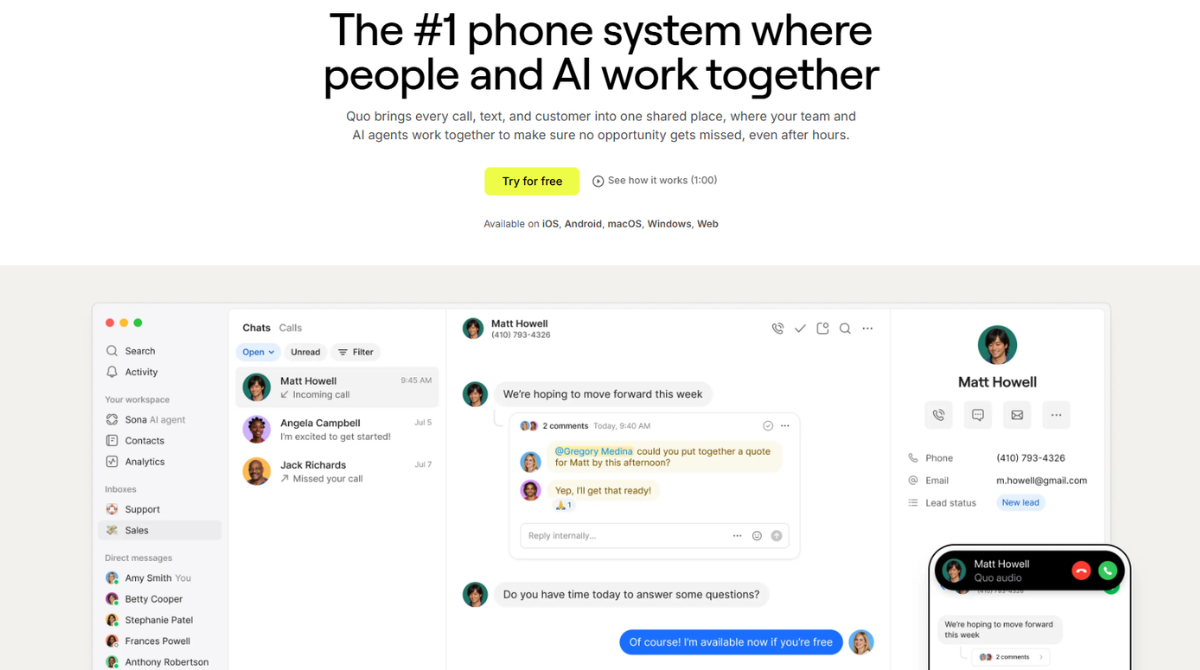
Previously known as OpenPhone, it provides businesses with phone numbers, calling, messaging, shared customer inboxes, internal collaboration, and AI-assisted workflows.
The platform is designed to help businesses manage customer conversations without depending on traditional office phone hardware.
Employees can communicate through supported desktop, mobile, and web applications.
Quo also supports integrations with external business tools, allowing communication information to connect with CRM and automation workflows.
Why Did OpenPhone Become Quo?
The Quo brand reflects the company’s broader product direction.
The platform has expanded from a business phone service into a system focused on customer communication, collaboration, and AI-powered assistance.
The underlying objective remains helping businesses communicate professionally.
However, Quo increasingly emphasizes the coordination of customer interactions across employees and AI agents.
What Problem Does Quo Solve?
Consider a growing service business.
One employee receives a customer call.
Another employee sends a follow-up message.
A third employee needs to review the customer’s requirements before scheduling an appointment.
Without a shared communication system, the information may be scattered across personal phones, email threads, or separate applications.
Quo brings these interactions into a more centralized workspace.
Team members can review relevant conversation histories, coordinate internally, and respond through shared business numbers.
This can reduce information fragmentation and support more consistent customer communication.
Who Is Quo Designed For?
Quo is particularly relevant to:
- Small businesses needing professional phone numbers.
- Startups building customer-facing operations.
- Agencies managing client communication.
- Home services businesses handling appointment inquiries.
- Remote teams requiring shared access.
- Sales teams coordinating customer follow-ups.
- Service providers receiving after-hours calls.
Quo is not a complete replacement for every business communication tool.
For example, organizations requiring sophisticated CRM forecasting, advanced contact-center workforce management, or extensive international phone infrastructure may still need additional platforms.
How We Evaluated Quo
Trustworthy software reviews should explain how conclusions were reached.
For this review, we evaluated Quo using publicly available product documentation, published pricing, official feature descriptions, security information, and comparisons with competing business communication platforms.
Our Evaluation Framework
We considered seven main areas.
1. Core functionality
We examined Quo’s documented calling, messaging, voicemail, shared numbers, and communication-management capabilities.
2. Collaboration
We evaluated the relevance of shared inboxes, internal threads, contact histories, and team workflows.
3. AI capabilities
We reviewed Sona’s published features, including call answering, information collection, caller-intent detection, SMS actions, and routing.
4. Pricing and value
We compared subscription tiers, included functionality, usage-based charges, and example business costs.
5. Integrations
We examined the platform’s supported CRM connections, automation tools, and API capabilities.
6. Security and privacy
We reviewed Quo’s published security documentation, encryption claims, access controls, privacy practices, and compliance information.
7. Competitive positioning
We compared Quo’s intended use cases with those of Dialpad, RingCentral, Grasshopper, and Nextiva.
What We Did Not Independently Test
This review does not claim that Trendleveltech conducted controlled call-quality testing, independently audited Quo’s infrastructure, measured uptime, or benchmarked AI transcription accuracy.
We also do not present hypothetical business workflows as actual customer results.
Where a claim comes from Quo, we identify it as a vendor-published capability or statement.
This distinction matters because a feature’s availability does not automatically establish its real-world performance.
How to Interpret Our Rating
Our 4.6/5 overall score represents editorial judgment about Quo’s documented capabilities and value for its intended audience.
It should not be interpreted as a verified customer satisfaction score, laboratory result, or guarantee of service quality.
For purchasing decisions, we recommend using Quo’s free trial to evaluate your actual workflows.
Quo Features: An In-Depth Analysis
Quo’s most important capabilities fall into three categories: communication, collaboration, and automation.
The following sections explain how each major feature works, why it matters, and when it may be less useful.
1. Business Phone Numbers
Quo provides eligible local and toll-free business phone numbers.
These numbers allow organizations to separate professional communication from employees’ personal phone numbers.
Businesses can also request to transfer supported existing numbers.
One new or ported phone number is included per user under the published plans.
Additional numbers are available for an extra monthly fee.
Why Business Numbers Matter
A dedicated business number helps companies establish a consistent point of contact.
For example, a consulting company can publish one number on its website, Google Business Profile, and marketing materials.
Customers can continue using that number even if the employee responsible for answering changes.
This reduces dependence on individual employees’ personal contact information.
What to Consider
Businesses should verify:
- Availability of their preferred area code.
- Eligibility to transfer an existing number.
- Local and toll-free number requirements.
- International communication charges.
- Messaging registration obligations.
A business operating primarily outside North America should carefully examine geographic support before subscribing.
2. Shared Phone Numbers and Unified Inbox
Shared communication is one of Quo’s strongest differentiators.
Traditional phone systems often associate a number with a specific person or device.
Quo allows authorized team members to collaborate around shared business numbers.
Calls, messages, and conversation histories can be accessed through a common communication environment.
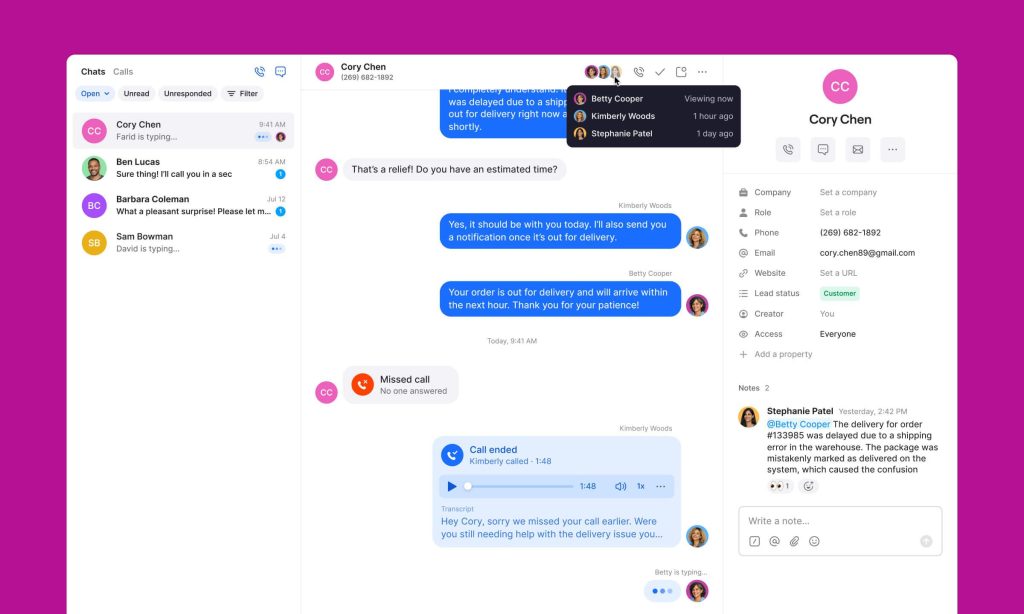
Example: A Five-Person Marketing Agency
Imagine an agency where three account managers regularly communicate with the same clients.
A client sends a message requesting an urgent campaign adjustment.
The primary account manager is unavailable.
Another authorized employee can review the existing conversation and respond with the necessary context.
The client does not need to repeat the entire request.
Main Benefits
Conversation continuity: Relevant interactions remain accessible to the team.
Better collaboration: Employees can coordinate around customer inquiries.
Business ownership: Customer communication is less dependent on personal devices.
Operational visibility: Managers can review communication activity where their permissions allow.
Flexible staffing: Different employees can respond as availability changes.
Potential Drawbacks
Shared inboxes still require clear internal procedures.
Without proper ownership rules, two employees may respond to the same customer or assume someone else is handling an inquiry.
Businesses should define responsibilities, permissions, and escalation procedures.
Our Assessment: 4.8/5
Shared communication is among Quo’s most valuable capabilities for growing teams.
3. Internal Threads and Team Collaboration
Quo includes internal collaboration features that allow employees to discuss customer conversations without sending those discussions to the customer.
This is useful when resolving an inquiry requires information from another department.
For example, a customer asks whether a service appointment can be moved to an earlier date.
The employee managing the conversation may need confirmation from the scheduling team.
Internal discussions help keep that coordination associated with the relevant customer context.
Quo also provides shared contact information and team-oriented communication features.
Why It Matters
Many customer communication problems are coordination problems.
The person answering a call may not be the person authorized to resolve the issue.
By making internal collaboration part of the communication workflow, Quo can reduce the need to copy information into separate messaging applications.
Limitations
Internal threads are not a complete project-management system.
Organizations managing complex projects may still need dedicated task-management software.
4. Business Calling and Messaging
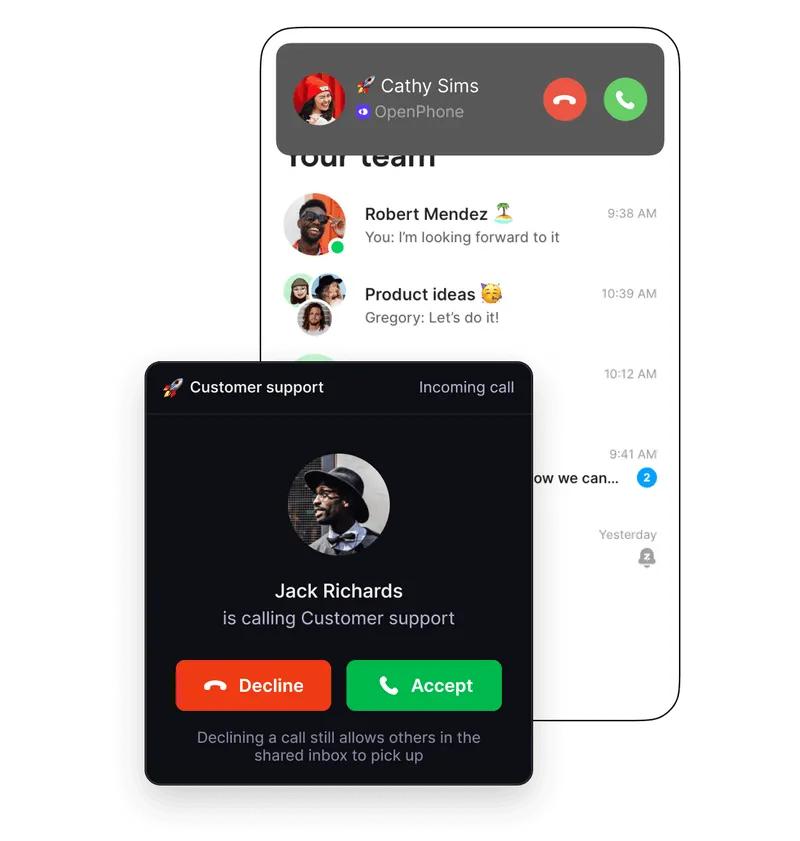
Quo supports internet-based calling and business SMS/MMS.
Employees can use supported devices rather than relying on traditional desk phones.
Core capabilities include:
- Incoming and outgoing calls.
- Business text messaging.
- Voicemail and voicemail transcripts.
- Business-hour settings.
- Call forwarding.
- Shared conversation histories.
- Contact management.
- Scheduled and automated messaging workflows.
Business Benefits
For remote teams, software-based calling can reduce dependence on a physical office.
For service businesses, text messaging can provide a convenient way to communicate appointment information or follow-up details.
For agencies, maintaining communication through a dedicated business number can help preserve professional boundaries.
Important Considerations
VoIP call quality depends on network conditions and device configuration.
Messaging can also be affected by carrier rules, geographic restrictions, registration requirements, and message-delivery policies.
Quo’s inclusion of US and Canadian communication does not mean that every possible destination or messaging scenario is free of additional charges.
5. Phone Menus and Advanced Call Routing
As businesses grow, incoming calls often need to reach different employees or departments.
Quo provides call-management features that support this process.
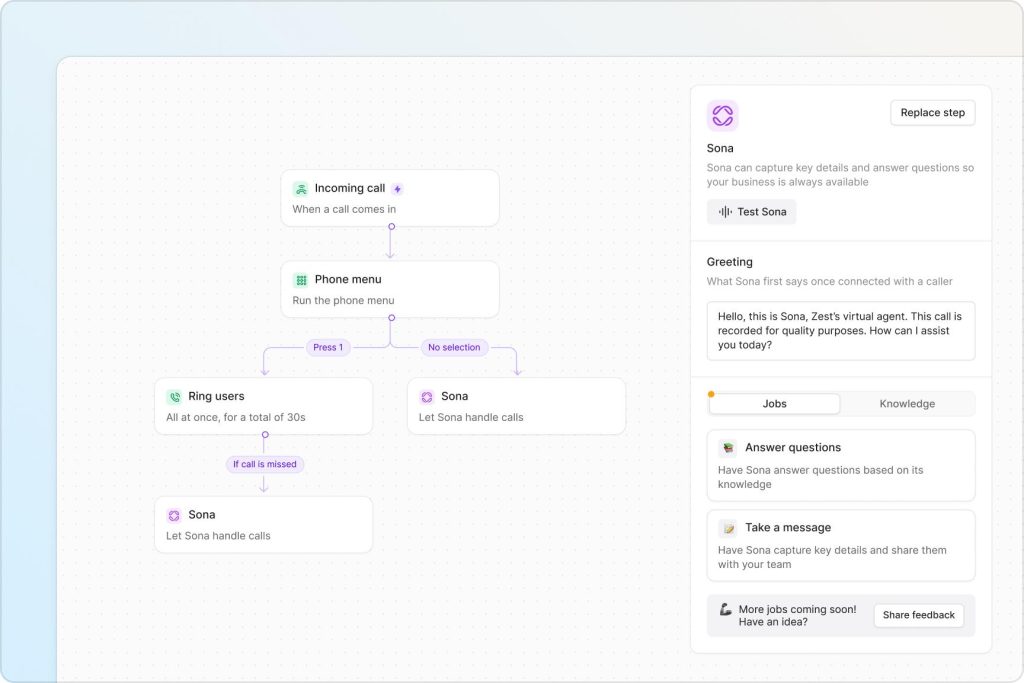
These include phone menus, group calling, custom ring orders, call transfers, and configurable call flows.
Its visual call-flow builder allows administrators to design routing behavior through a graphical interface.
Example: A Service Company
A company might configure the following workflow:
A caller contacts the main business number.
The phone menu offers options for new inquiries, existing appointments, and customer support.
Sales calls are directed to the sales team.
Appointment inquiries are directed to scheduling.
If employees are unavailable, selected calls can be routed to Sona.
This arrangement can reduce unnecessary transfers and make communication more predictable.
Advanced Routing Scenarios
Quo describes support for different routing configurations based on business requirements.
Examples include:
- Different call flows during holidays.
- Routing calls according to staff availability.
- Directing selected customers to designated employees.
- Configuring different rules for different departments.
What to Watch
Advanced routing is not equally available on every plan.
Businesses should confirm their required features before selecting Starter.
Our Assessment: 4.6/5
Quo provides a useful combination of call management and accessibility for small teams.
6. Call Recording, Transcription, and AI Summaries
Businesses often need to document customer conversations.
Quo offers automatic call recording and AI-assisted documentation on eligible plans.
AI summaries can help employees understand what was discussed without manually reviewing an entire conversation.
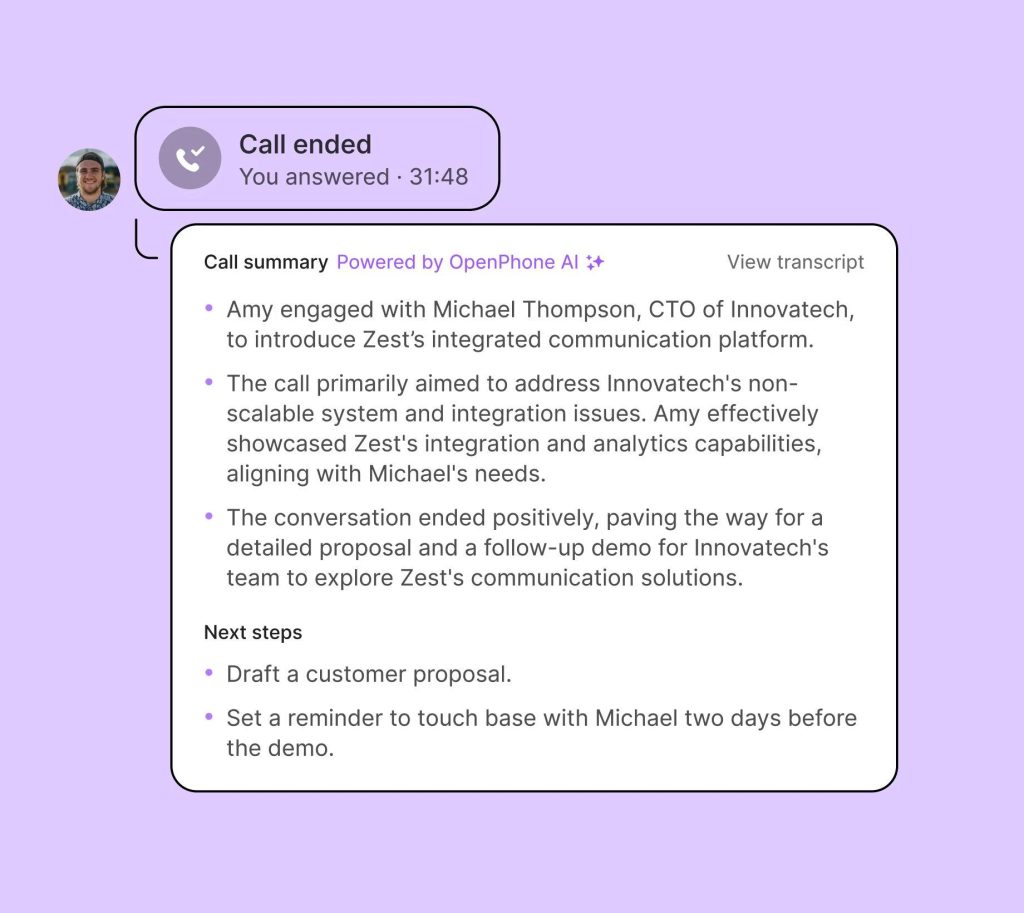
Example: A Sales Consultation
A sales representative discusses a prospective customer’s requirements during a 20-minute call.
Afterward, an AI summary may help the representative identify important topics and prepare follow-up actions.
This can be especially useful when employees handle many conversations throughout the day.
Benefits
- Easier review of previous discussions.
- Reduced manual note-taking.
- Better continuity between employees.
- Faster preparation for follow-up calls.
- More accessible communication records.
Limitations
AI transcription and summaries are not guaranteed to be accurate.
Names, numbers, technical terminology, and unusual accents may be interpreted incorrectly.
Employees should verify important details before relying on summaries for contracts, payments, or consequential decisions.
Businesses must also comply with applicable call-recording and consent laws.
7. Contact Management and Customer History
Quo allows teams to manage contacts alongside communication histories.
This makes it easier to understand the context of previous interactions.
For example, an employee receiving a repeat customer’s call may be able to review earlier messages and relevant notes.
This supports continuity without requiring every employee to maintain separate personal records.
However, Quo should not be confused with a complete CRM.
Businesses requiring complex pipeline management, revenue forecasting, account hierarchies, or advanced sales reporting may need additional software.
Sona AI Review: Can Quo’s AI Receptionist Handle Real Business Calls?
Sona is one of the most important reasons to consider Quo in 2026.
It is an AI voice agent designed to assist businesses with incoming phone calls.
Rather than functioning only as voicemail, Sona can interact with callers and support defined communication workflows.
Quo has expanded Sona’s capabilities during 2026, moving beyond basic message-taking toward more active customer assistance.
1. Answer Calls Around the Clock
Sona can answer calls when employees are unavailable.
This is useful for businesses that receive inquiries outside normal operating hours.
For example, a plumbing company may receive a call on a Sunday evening.
Rather than leaving the caller with an unanswered phone, Sona can collect information about the inquiry.
The business can then review the interaction and follow up.
This does not guarantee that every inquiry will become a customer.
However, it provides a structured alternative to missed calls.
2. Answer Frequently Asked Questions
Businesses can provide information that helps Sona answer common customer questions.
Examples include:
- Opening hours.
- Service areas.
- General service descriptions.
- Appointment procedures.
- Basic company policies.
- Frequently requested information.
Quo supports configuring Sona with business information and instructions.
The quality of responses depends on the accuracy and completeness of those materials.
A company should not expect reliable answers from an AI agent whose knowledge base is outdated.
3. Identify Caller Intent
One of Sona’s important 2026 developments is intent detection.
This allows the AI to distinguish between different reasons for calling and respond through configured workflows.
For example, a caller may be interested in requesting a quotation.
Another caller may need assistance with an existing appointment.
A third may have an urgent service issue.
Identifying these different intentions helps businesses determine what should happen next.
4. Qualify New Leads
Sona can ask configured questions to collect information from prospective customers.
For a marketing agency, these might include:
- What service is the caller interested in?
- What type of business do they operate?
- What is the main problem they want to solve?
- When would they like someone to follow up?
For a home services business, questions may concern location, service type, and preferred appointment time.
This information can help employees prepare for follow-up.
However, AI lead qualification should remain appropriately limited.
Complex negotiations, sensitive issues, and consequential decisions should be handled by qualified employees.
5. Send SMS During Calls
Quo introduced on-call SMS capabilities as part of Sona’s evolution.
This allows the AI to send relevant information through text messages during selected workflows.
For example, Sona may send:
- A booking link.
- A service-information page.
- A follow-up link.
- Instructions relevant to the caller’s inquiry.
This is valuable because callers often need information they can reference after ending the call.
6. Route Calls to Human Employees
A useful AI receptionist should know when a conversation requires human assistance.
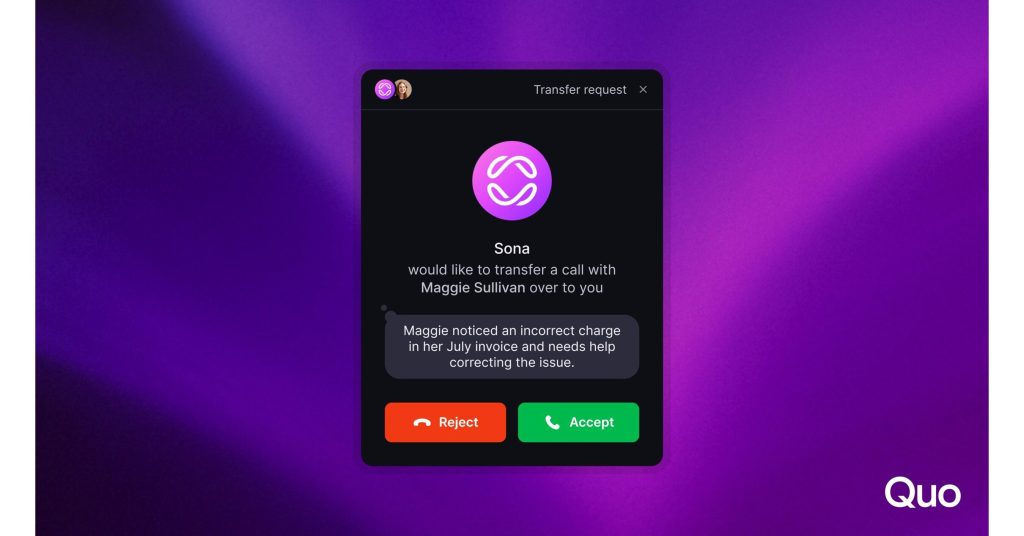
Sona can support call routing and human handoff through configured workflows.
For example, a customer reporting a complicated billing dispute may need to speak with an employee.
Rather than continuing an inappropriate automated conversation, the system can direct the caller according to the business’s rules.
Human escalation is particularly important for complaints, sensitive information, and exceptional situations.
7. Trigger Follow-Up Workflows
Quo describes Sona as increasingly capable of supporting actions beyond answering questions.
Depending on the configuration and connected tools, Sona-related workflows can help initiate follow-up activities.
This may include passing information to CRM systems or other business applications.
The exact actions available depend on supported integrations and configuration.
8. Sona’s Biggest Limitations
Despite its capabilities, Sona is not a complete replacement for a human receptionist.
Complex requests: Unusual situations may require human judgment.
Incorrect information: Outdated knowledge sources can lead to poor responses.
Sensitive conversations: Complaints or emotionally difficult situations may require human handling.
Configuration effort: Businesses must establish instructions and escalation rules.
Usage charges: High call volume may increase monthly costs.
Customer preferences: Some callers may prefer speaking directly with a person.
Our Sona AI Verdict
Rating: 4.7/5
Sona is a compelling addition to Quo because it operates within the same business communication environment as human employees.
Its strongest use cases involve repetitive questions, after-hours inquiries, information collection, and clearly defined call-routing workflows.
It is less suitable as an unsupervised replacement for employees handling complex customer situations.
Never Let an Important Customer Call Go Unanswered
Discover how Sona AI can answer incoming calls, collect customer details, respond to common questions, and support your team when employees are unavailable.
AI usage limits and additional charges may apply.
What’s New in Quo in 2026?
Quo’s development during 2026 has focused heavily on AI workflows and integrations.
Two particularly important updates were published in June 2026.
Sona’s Expanded Capabilities
Quo announced that Sona had evolved beyond answering FAQs and taking messages.
Newer capabilities include:
Intent detection: Identifying why a customer is calling.
On-call SMS: Sending relevant text messages during calls.
Call routing and actions: Directing callers and supporting configured next steps.
These changes make Sona more useful for businesses that want to move inquiries forward rather than simply collect voicemail messages.
New CRM Integrations
Quo also announced integrations with Attio, Pipedrive, and Zoho.
These additions broaden the platform’s usefulness for businesses that manage customer relationships through different CRM systems.
Expanded Zapier Capabilities
Quo described improvements to its Zapier integration, allowing more detailed workflow automation.
This can help businesses reduce repetitive tasks associated with communication.
ChatGPT and Claude Connectors
Quo announced official connectors for ChatGPT and Claude, alongside MCP-related capabilities.
These integrations may help organizations work with communication information through supported AI workflows.
However, businesses should verify supported permissions, actions, data access, and security controls before deploying these integrations.
Why These Updates Matter
The direction of development suggests that Quo is increasingly positioning itself as a connected customer communication platform rather than only a business phone service.
For buyers, the important question is whether these newer capabilities solve actual operational problems.
Businesses should avoid paying for AI functionality simply because it is new.
Quo Pricing 2026: Plans, Automation Credits, and Real Costs
Quo offers three primary subscription plans.
The main differences involve advanced call handling, AI documentation, integrations, analytics, and support.
Subscription Pricing
Starter costs $19 per user per month with monthly billing, or $15 per user per month when billed annually. The annual figure is the monthly equivalent of an annual commitment.
Business costs $33 per user per month with monthly billing, or $23 per user per month when billed annually. It adds advanced calling, AI documentation, reporting, and eligible CRM integrations.
Scale costs $47 per user per month with monthly billing, or $35 per user per month when billed annually. It builds on Business with additional AI-related capabilities, onboarding, and support.
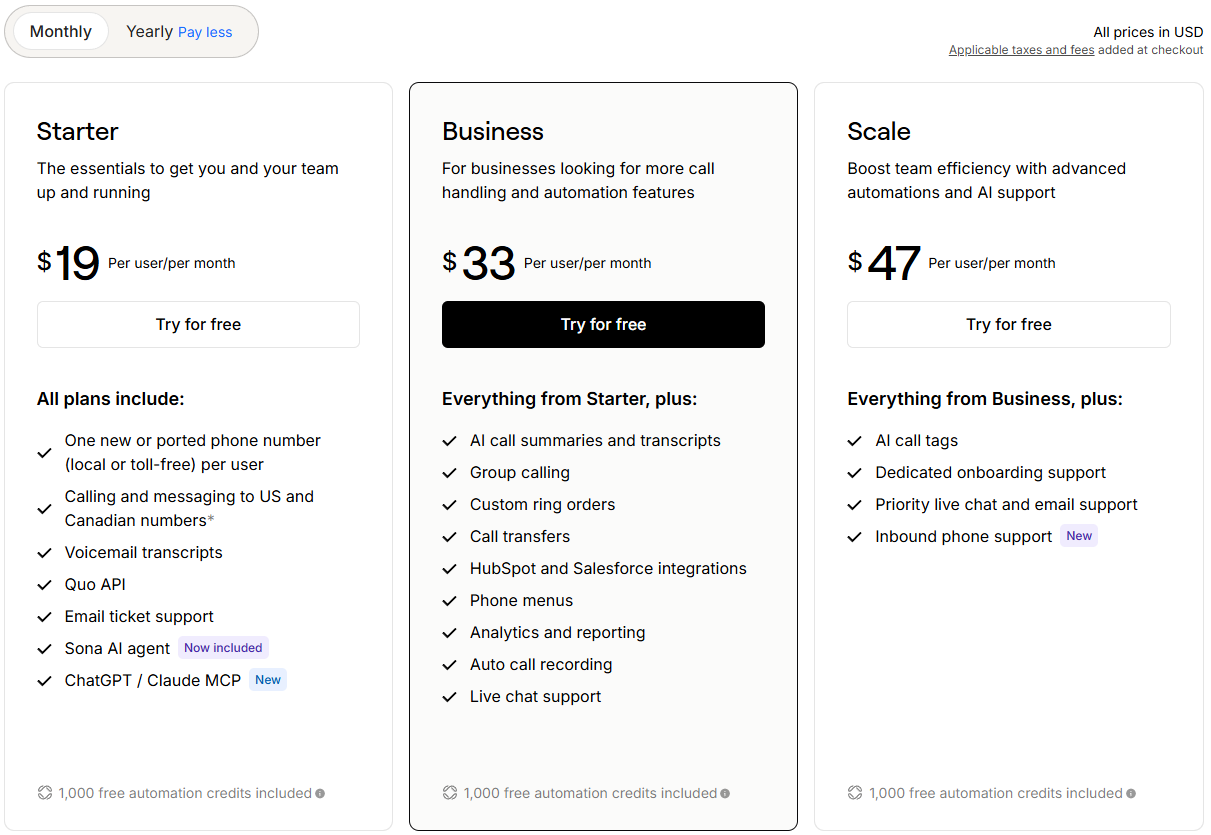
All prices are in USD. Annual-billing prices are monthly equivalents of an annual commitment.
Starter: Best for Individuals and Basic Business Communication
Starter provides the essential functionality required to establish a business phone presence.
It includes:
- One eligible phone number per user.
- Calling and messaging to US and Canadian numbers, subject to applicable terms.
- Voicemail transcripts.
- Quo API access.
- Email ticket support.
- Sona AI.
- Included automation credits.
Starter is most suitable for freelancers, consultants, and small businesses with straightforward communication requirements.
Its limitations become more noticeable when a team needs advanced routing, call recording, analytics, or CRM connectivity.
Business: Best for Growing Teams
Business includes Starter functionality and adds:
- AI call summaries and transcripts.
- Automatic call recording.
- Phone menus.
- Group calling.
- Custom ring orders.
- Call transfers.
- Analytics and reporting.
- Supported CRM integrations.
- Live chat support.
For many customer-facing teams, Business provides the most practical balance between price and functionality.
A company receiving regular customer calls may find the advanced routing and documentation capabilities worth the additional cost.
Scale: Best for Organizations Requiring Additional Support
Scale builds on Business with:
- AI call tags.
- Dedicated onboarding support.
- Priority chat and email support.
- Inbound phone support.
Scale is worth considering when these additional services provide operational value.
However, businesses should not automatically choose the most expensive plan.
Detailed Feature Comparison
Starter includes one eligible business number per user, calling and messaging, shared communication, voicemail transcripts, Sona AI, included automation credits, and API access. It does not include the full set of advanced features available on higher plans. In particular, the original comparison identifies AI call summaries, automatic call recording, phone menus, group calling, custom ring orders, call transfers, advanced analytics, AI call tags, and dedicated onboarding as unavailable at this level. Some CRM integration options are limited.
Business includes everything in Starter and adds AI call summaries, automatic call recording, phone menus, group calling, custom ring orders, call transfers, eligible CRM integrations, analytics, and reporting. It does not include the Scale-specific AI call tags, dedicated onboarding, or priority support listed in the original comparison.
Scale includes everything in Business and adds AI call tags, dedicated onboarding, and priority support. For teams that specifically need these capabilities, Scale offers the most comprehensive package of the three.
Features available across all three plans include business numbers, calling and SMS, shared communication, voicemail transcripts, Sona AI, included automation credits, and Quo API access. Verify the current limits and plan entitlements before subscribing.
Feature availability should be verified against the current official pricing page before purchase.
Understanding Sona Automation Credits
Quo’s AI usage system is based on automation credits.
These are different from employee seats or phone numbers.
A user seat determines how many people can access the platform.
A phone number provides a communication identity.
Automation credits are used for eligible AI-powered workflows.
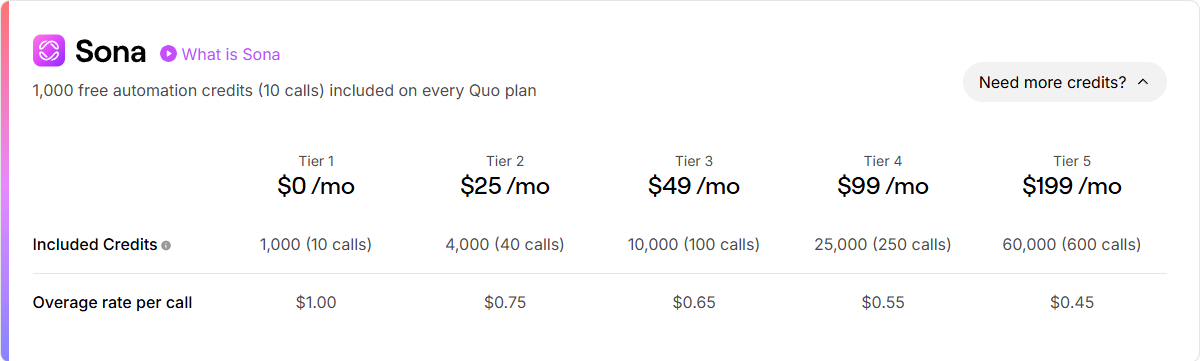
Quo’s published pricing describes 1,000 included automation credits as approximately 10 Sona calls.
That implies a planning estimate of about 100 credits per call.
However, businesses should not assume that every possible AI interaction consumes exactly the same number of credits.
Actual billing rules and usage should be verified.
Sona Credit Tiers
Included Sona allowance (Tier 1): $0 per month for 1,000 automation credits, described as approximately 10 calls. The listed overage rate is $1.00 per additional call.
Tier 2: $25 per month for 4,000 credits, equivalent to approximately 40 calls. The listed overage rate is $0.75 per call.
Tier 3: $49 per month for 10,000 credits, equivalent to approximately 100 calls. The listed overage rate is $0.65 per call.
Tier 4: $99 per month for 25,000 credits, equivalent to approximately 250 calls. The listed overage rate is $0.55 per call.
Tier 5: $199 per month for 60,000 credits, equivalent to approximately 600 calls. The listed overage rate is $0.45 per call.
The published tiers provide a starting point for budgeting.
Businesses should confirm how included credits, purchased allowances, and overage charges interact in their specific billing arrangement.
Example 1: A Freelancer Receiving 8 AI Calls per Month
Suppose a consultant uses Quo Starter and receives approximately eight Sona-handled calls each month.
If those calls fall within the included allowance, the consultant may not need a paid Sona upgrade.
With annual billing, the base subscription is equivalent to $15 per month.
The illustrative subscription cost would therefore be:
$15 per month, excluding other applicable charges.
This is a useful scenario for individuals who need occasional AI call coverage.
Example 2: A Small Agency Receiving 35 AI Calls
Consider a three-person agency using Business.
The base monthly equivalent is:
3 × $23 = $69.
The agency expects approximately 35 AI-handled calls monthly.
The published $25 Sona tier provides an allowance described as approximately 40 calls.
Assuming that tier is sufficient for the agency’s usage, the illustrative total is:
$69 + $25 = $94 per month.
This excludes taxes, additional numbers, messaging fees, and other usage.
Example 3: A Five-Person Service Company Receiving 90 AI Calls
Suppose a five-person home services company uses Business.
Its base monthly equivalent is:
5 × $23 = $115.
The company expects approximately 90 Sona-handled calls.
The published $49 Sona tier provides approximately 100 calls.
The illustrative total becomes:
$115 + $49 = $164 per month.
This estimate assumes the selected Sona tier covers the relevant usage.
Example 4: A Growing Company with Additional Numbers
A company has ten employees on Business.
Base subscription:
10 × $23 = $230 per month.
It also needs three additional phone numbers:
3 × $5 = $15 per month.
The company selects the $99 Sona tier.
Illustrative monthly equivalent:
$230 + $15 + $99 = $344 per month.
This excludes other charges and assumes annual billing for the user subscriptions.
Other Costs to Consider
Additional numbers: Currently $5 per number per month.
International communication: Destination-based calling and messaging charges may apply.
US messaging registration: Carrier review and recurring registration-related fees may apply.
Automated SMS: Quo lists $0.01 per outgoing text segment for certain messages sent through Zapier, Make, or the API.
Sona overages: Additional AI usage may generate charges beyond the selected allowance.
Taxes: Applicable taxes and fees can affect the final invoice.
Does Quo Require an Annual Contract?
Quo offers monthly and annual billing options.
Annual billing provides a lower monthly-equivalent price but involves a longer billing commitment.
Businesses should review the current subscription terms, renewal conditions, cancellation procedures, and refund policy before purchasing.
The availability of monthly billing should not be confused with a guarantee that every charge is refundable or that an annual commitment can be terminated without financial consequences.
Which Quo Plan Offers the Best Value?
For solo professionals, Starter is a reasonable choice.
For growing teams, Business is our preferred plan to evaluate because it unlocks many of the features that make Quo more than a basic phone service.
Scale is best suited to organizations that specifically need its additional onboarding, support, and AI-related functionality.
Find the Right Quo Plan for Your Team
Whether you’re a solo professional or managing a growing team, Quo offers plans for different communication needs. Compare Starter, Business, and Scale to find the right balance of features and cost.
Review current pricing and included features before subscribing.
Security & Privacy: Is Quo Safe for Business Communication?
Security is an important consideration when selecting a business phone platform.
Calls, messages, contact information, and recordings may contain sensitive customer data.
Quo publishes information about its security controls, compliance practices, and privacy commitments.
These claims should be evaluated alongside the organization’s own regulatory and operational requirements.
Data Encryption
Quo states that it encrypts data in transit using TLS 1.2 or higher.
It also states that data at rest is protected using AES-256 encryption.
These are widely used security technologies.
However, encryption does not eliminate every risk associated with account compromise, access permissions, or data handling.
SOC 2 Type II
Quo states that it has SOC 2 Type II certification.
SOC 2 Type II reports evaluate the design and operating effectiveness of specified controls over a defined period.
For businesses evaluating vendors, the existence of a SOC 2 Type II report can provide useful assurance.
However, the report’s scope, exceptions, and covered systems matter.
Organizations with formal vendor-risk requirements should request and review the actual report.
GDPR and Privacy
Quo’s privacy documentation addresses rights under GDPR and related data-protection requirements.
The company describes its responsibilities when acting as a controller and when processing information on behalf of customers.
Businesses handling EU or UK personal data should verify the applicable contractual terms, data-processing arrangements, and transfer requirements.
A vendor’s statement about GDPR practices does not automatically make every customer’s use of the service compliant.
HIPAA
Quo describes HIPAA-related safeguards and the availability of Business Associate Agreements.
Healthcare organizations should verify whether their specific plan, configuration, and intended workflows are covered by appropriate agreements.
They should not assume that purchasing a subscription alone satisfies HIPAA requirements.
Single Sign-On and Multi-Factor Authentication
Quo’s security documentation describes support for SSO and MFA.
These features can help organizations manage authentication and reduce certain account-access risks.
However, businesses should verify SSO availability, supported identity providers, and any plan restrictions before relying on it as a purchasing requirement.
Role-Based Access Controls
Quo describes role-based permissions that allow administrators to manage employee access.
This is especially important for shared inboxes.
Organizations should ensure that employees only access conversations and information necessary for their roles.
Infrastructure and Reliability
Quo states that it uses infrastructure from AWS and Google Cloud Platform.
The company also publishes a 99.999% uptime claim.
This is a vendor statement, not a reliability figure independently measured by Trendleveltech.
Businesses with strict availability requirements should review service-level commitments, incident history, support procedures, and backup communication plans.
Data Export and Retention
Quo states that customers can export conversation, contact, and call-history information.
Its privacy policy also describes data-retention practices.
Businesses should verify the export formats, applicable restrictions, deletion procedures, and retention terms relevant to their operations.
Our Security Verdict
Editorial Rating: 4.6/5
Quo publishes a meaningful set of business security controls, including encryption, SOC 2 Type II, MFA, SSO, and role-based access management.
These are positive indicators.
However, organizations with formal compliance obligations should examine the actual contractual and technical documentation rather than relying exclusively on marketing summaries.
Ease of Use: How Difficult Is Quo to Set Up?
Quo is designed to provide business communication without requiring traditional on-premises phone equipment.
A small business can begin with a relatively straightforward setup.
Initial Setup
The typical process involves:
- Creating an account.
- Choosing an eligible phone number.
- Inviting team members.
- Configuring shared access.
- Setting business hours.
- Establishing voicemail and routing.
- Testing calls and messages.
Businesses with simple requirements may find this process manageable.
Advanced Setup
More complex organizations may need to:
- Transfer multiple existing numbers.
- Complete messaging registration.
- Configure phone menus.
- Establish employee permissions.
- Connect CRM systems.
- Create automation workflows.
- Configure Sona’s knowledge sources.
- Establish human escalation procedures.
These requirements can increase implementation time.
What to Test During the Free Trial
We recommend evaluating the following:
Call quality: Test calls using your actual internet connection and devices.
Notifications: Confirm that incoming calls and messages are delivered reliably.
Shared inbox: Have multiple employees handle a realistic customer inquiry.
Call routing: Test the phone menus and transfers your business needs.
Sona: Ask common, unusual, and ambiguous customer questions.
CRM integrations: Confirm that the required communication information is synchronized correctly.
Billing: Estimate total costs based on expected usage.
Our Assessment: 4.5/5
Quo’s software-based approach is accessible, but advanced configuration still requires planning.
Quo Integrations and Automation
Quo’s integrations can help businesses connect communication workflows with other applications.
HubSpot and Salesforce
Quo supports integrations with established CRM platforms.
These connections can help teams associate communication activity with customer records.
The exact functionality depends on the integration and subscription plan.
Attio, Pipedrive, and Zoho
Quo announced additional CRM integrations in 2026.
These additions expand the range of business systems that can connect with Quo.
For companies already using one of these CRMs, integration availability may reduce the need for manual information transfer.
Zapier and Make
Quo supports automation through platforms such as Zapier and Make.
Potential workflows include:
- Sending follow-up text messages.
- Creating tasks.
- Updating supported records.
- Sending internal notifications.
- Connecting communication events with other business processes.
Businesses should verify the available triggers, actions, and pricing before implementing these workflows.
API Access
Quo provides API access.
Developers can use supported endpoints to build custom workflows.
However, the availability of an API does not guarantee support for every desired action.
Technical teams should review documentation, authentication, permissions, and rate limits.
ChatGPT and Claude
Quo announced official connectors for ChatGPT and Claude in 2026.
These integrations may support AI-assisted workflows involving communication information.
Organizations should carefully evaluate what information the connectors can access and what actions they are permitted to perform.
Our Integration Rating: 4.5/5
Quo offers useful options for small businesses, although complex integration requirements should be validated before purchase.
Quo vs Competitors: Which Business Phone System Is Better?
Quo competes with several business communication providers.
Its closest alternatives depend on whether the buyer prioritizes collaborative calling, AI assistance, enterprise communications, or basic virtual phone functionality.
Quo vs Dialpad
Dialpad offers AI-enabled business communication products and additional solutions for organizations with more extensive communication requirements.
Quo focuses heavily on shared customer conversations, collaborative workflows, and integrated AI call handling.
Choose Quo if: Your priority is a shared business phone environment with team collaboration and Sona AI.
Consider Dialpad if: You want to evaluate a broader portfolio of AI communications or contact-center products.
The best choice depends on the specific subscription tiers and features being compared.
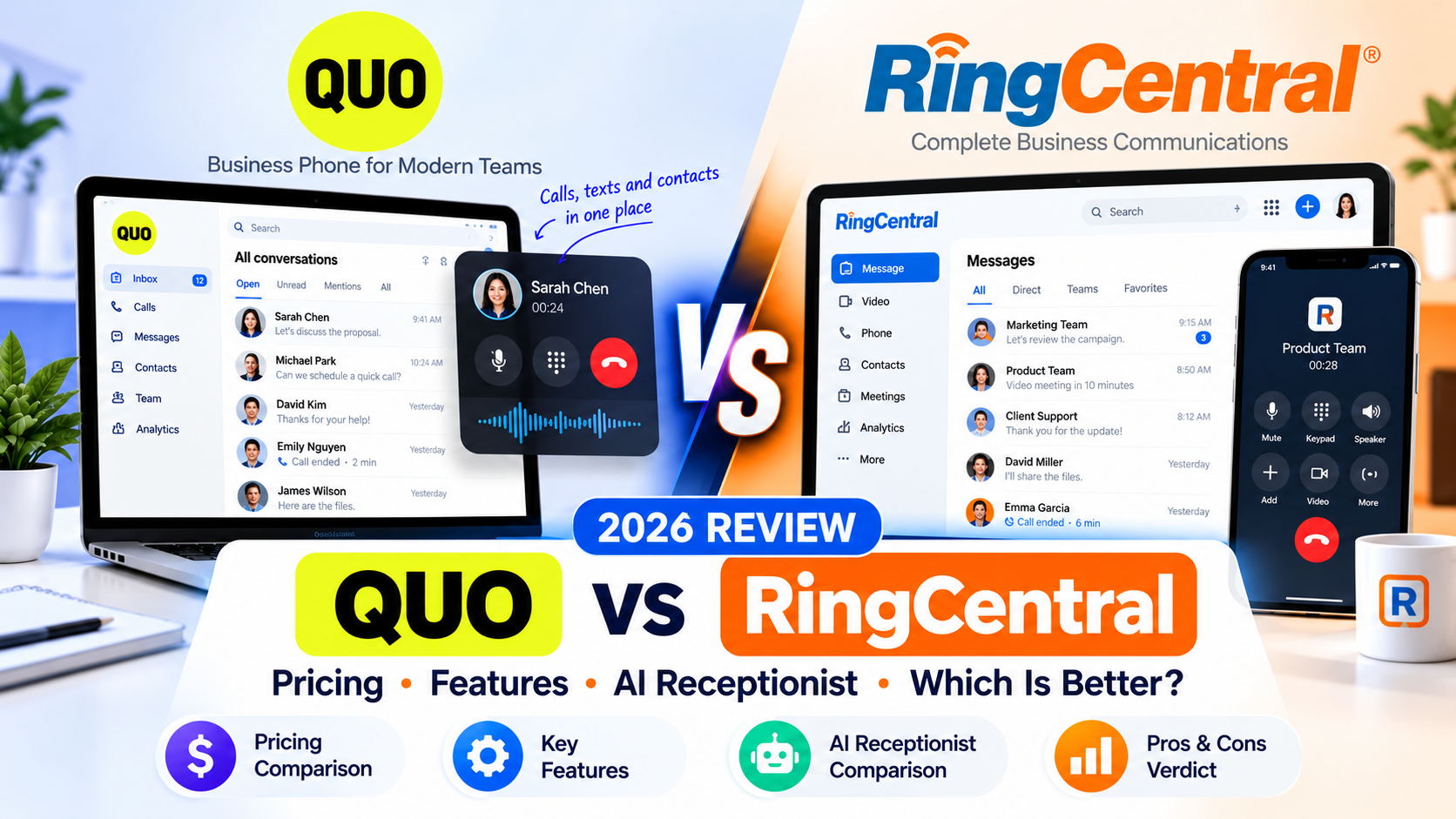
Quo vs RingCentral
RingCentral offers a broad communications portfolio, including solutions designed for larger organizations.
Quo may appeal more to small teams seeking a focused business phone system.
Choose Quo if: You value straightforward shared communication and integrated AI assistance.
Consider RingCentral if: Your organization has complex enterprise telephony or communications requirements.
Quo vs Grasshopper
Grasshopper is commonly considered by entrepreneurs who need virtual phone functionality.
Quo provides a more collaboration-focused environment.
Choose Quo if: Multiple employees need access to shared conversations and coordinated workflows.
Consider Grasshopper if: Your requirements center on straightforward virtual phone functionality.
Quo vs Nextiva
Nextiva offers business communications solutions across different organizational needs.
Quo’s distinguishing focus is collaborative customer communication and integrated AI assistance.
Choose Quo if: Shared inboxes and team coordination are priorities.
Consider Nextiva if: You need to evaluate a different combination of calling, communications, and operational features.
Comparison Summary
Quo — Shared communication and Sona AI. Quo is particularly relevant to small and growing teams that want collaborative customer conversations alongside an integrated AI voice agent.
Dialpad — AI communications and broader product offerings. Dialpad is worth evaluating for teams considering more extensive AI-enabled communications and contact-center options.
RingCentral — Broad enterprise communications portfolio. RingCentral may be more appropriate for larger or more complex organizations with extensive communications requirements.
Grasshopper — Virtual phone functionality. Grasshopper is an alternative for solopreneurs and smaller businesses seeking a more straightforward virtual phone solution.
Nextiva — Business communications solutions. Nextiva is another option for growing organizations comparing calling, operational workflows, and communications features.
This comparison reflects product positioning rather than independently measured superiority.
For a final decision, compare the exact plans, contract terms, support options, and total costs.
Quo Pros and Cons
What We Like
Excellent shared communication capabilities
Quo helps teams maintain customer conversation histories in a collaborative environment.
Integrated Sona AI
The AI agent can handle selected incoming calls and support follow-up workflows.
Useful call routing
Phone menus, group calling, transfers, and configurable call flows support growing businesses.
Strong collaboration features
Internal discussions and shared contact information help employees coordinate.
Flexible device access
Quo supports desktop, mobile, and web-based communication.
CRM and automation options
Integrations can connect communication activity with other business systems.
Accessible starting price
Starter offers an entry point for businesses with simpler requirements.
What Could Be Better
Advanced features cost more
Some of Quo’s most useful capabilities require Business or Scale.
AI usage needs budgeting
Sona’s included allowance may be insufficient for businesses with high call volume.
Additional fees can increase spending
Extra numbers, messaging charges, and international communication may affect the total cost.
International suitability varies
Organizations with extensive international requirements should verify support.
AI requires oversight
Sona is not a complete replacement for employees handling complicated situations.
Not a full CRM
Advanced sales management still requires dedicated CRM software.
Who Should Buy Quo?
Quo is a strong candidate for businesses where communication is shared among several people.
Small Businesses
A dedicated business number and shared inbox can help establish more organized customer communication.
Startups
Quo can support communication continuity as employees join and responsibilities change.
Marketing and Creative Agencies
Agencies can benefit from shared customer histories and internal collaboration.
Home Services Businesses
Sona may help collect inquiries outside business hours.
Remote Teams
Cloud-based communication allows employees to work from different locations.
Customer-Facing Teams
Teams that regularly coordinate customer inquiries may find Quo’s shared environment particularly valuable.
Who Should Avoid Quo?
Quo may be less suitable for the following organizations.
Businesses with Extensive International Requirements
Phone-number availability, international rates, and regional restrictions should be verified.
Large Enterprise Contact Centers
Organizations requiring specialized workforce management or highly advanced contact-center functionality may need dedicated solutions.
Individuals with Very Low Call Volume
A subscription may not be worthwhile for someone who rarely needs business calling.
Organizations Requiring a Complete CRM
Quo is a communication platform, not a replacement for every CRM capability.
Businesses Expecting Fully Autonomous AI
Sona should operate with clear instructions and appropriate human escalation.
Highly Regulated Organizations
Specialized security and compliance requirements should be verified through formal documentation and agreements.
Is Quo Worth It in 2026?
For the right business, Quo can provide meaningful value.
Its strongest advantage is not simply providing business phone numbers.
It is the ability to bring calls, messages, shared customer histories, internal collaboration, and AI assistance into one environment.
A business that relies on several employees to manage customer inquiries may benefit significantly from that structure.
Sona adds another option for handling calls when employees are unavailable.
However, value depends on actual requirements.
A freelancer who needs only a basic business number may be satisfied with Starter.
A growing customer-facing team may find Business more appropriate.
An organization with advanced support requirements may consider Scale.
The key is to compare the expected operational benefits with the complete cost.
Our Buying Recommendation
Best for individuals: Starter.
Best for most growing teams: Business.
Best for advanced support requirements: Scale.
Best approach: Use the seven-day trial to test actual communication workflows before making a long-term commitment.
Frequently Asked Questions
1. What is Quo, and what does it do?
Quo is a cloud-based business phone system that combines calling, SMS, shared inboxes, team collaboration, call routing, and AI-assisted communication.
2. Is Quo the same as OpenPhone?
Yes. Quo is the new brand identity of the business phone platform previously known as OpenPhone.
3. How much does Quo cost in 2026?
Quo starts at $15 per user per month with annual billing. Monthly billing starts at $19 per user per month. Business and Scale offer additional features at higher prices.
4. Does Quo offer a free trial?
Yes. Quo currently advertises a seven-day free trial.
5. Is Sona AI included with Quo?
Yes. Quo includes Sona with a limited automation-credit allowance. Additional usage tiers are available for businesses requiring more AI-handled calls.
6. What are Quo automation credits?
Automation credits are usage allowances for eligible AI-powered workflows. Quo describes its included 1,000-credit allowance as approximately 10 Sona calls. Actual billing should be verified against the current terms.
7. Is Quo secure and GDPR compliant?
Quo publishes information about encryption, SOC 2 Type II, MFA, SSO, and GDPR-related privacy practices. Organizations should verify the applicable contractual and technical requirements for their use cases.
8. Does Quo integrate with HubSpot and Salesforce?
Yes. Quo supports HubSpot and Salesforce integrations on eligible plans. It also offers other CRM and automation integrations.
9. Is Quo better than Dialpad?
Neither platform is universally better. Quo is particularly attractive for collaborative business communication and Sona AI, while Dialpad may appeal to organizations evaluating its broader communications offerings.
10. Which Quo plan is best for a small business?
Starter is suitable for basic calling and messaging. Business is generally the stronger option to evaluate when a team needs advanced routing, AI call summaries, automatic recording, analytics, and CRM integrations.
Final Verdict: Should You Choose Quo?
Quo earns our editorial rating of 4.6/5 as a compelling business phone platform for small and growing teams.
Its combination of business calling, shared inboxes, internal collaboration, call routing, CRM integrations, and Sona AI makes it more capable than a basic virtual phone service.
The platform is particularly attractive for businesses where several employees manage customer conversations.
Shared communication histories help maintain context.
Internal collaboration helps teams coordinate.
Sona provides an additional way to handle incoming calls and move selected customer inquiries forward.
Quo also publishes a meaningful set of security controls and continues to expand its AI and integration capabilities.
However, buyers should evaluate the limitations carefully.
Advanced features require higher plans.
AI usage may increase costs.
International communication and enterprise-specific requirements need additional verification.
For individuals with straightforward needs, Starter offers a sensible starting point.
For growing customer-facing teams, Business is our preferred plan to evaluate first.
Scale becomes more attractive when its additional support and administrative benefits justify the cost.
Final Recommendation
Choose Quo if your business needs a professional phone system that combines customer communication, collaboration, and AI assistance.
Consider alternatives if your primary requirements involve complex enterprise telephony, extensive international infrastructure, or specialized contact-center operations.
Overall Editorial Rating: 4.6/5
Best For: Small Businesses, Startups, Agencies, Service Providers, and Customer-Facing Teams
Give Your Business a Smarter Way to Communicate
From shared customer conversations to AI-assisted call handling, Quo offers a practical way to keep your team organized and responsive. See whether its features match your business needs with a 7-day free trial.
Trial eligibility and terms may apply.
Affiliate Disclosure: Trendleveltech may earn a commission from qualifying purchases made through eligible affiliate links. Our ratings reflect editorial analysis of published capabilities and pricing, not independently verified product-performance benchmarks.
Sources and Editorial References
This review is based on publicly available documentation and information published by Quo.
Official product and pricing information
- Quo website: https://www.quo.com/
- Quo pricing: https://www.quo.com/pricing
- Quo pricing guide: https://www.quo.com/blog/quo-pricing/
- Call routing: https://www.quo.com/product/menu-routing
2026 product updates
- The Evolution of Sona: https://www.quo.com/blog/evolution-of-sona/
- New Integrations, Less Manual Work: https://www.quo.com/blog/new-integrations-less-manual-work/
Security and privacy
- Quo security: https://www.quo.com/security
- Quo privacy policy: https://www.quo.com/privacy
Review Methodology: We evaluated documented functionality, plan differences, business suitability, AI capabilities, integration options, security disclosures, and total-cost considerations. We did not independently benchmark uptime, audio latency, AI accuracy, or other technical performance metrics.
Important: Prices, product capabilities, billing conditions, and integration availability may change. Confirm current details with Quo before purchasing.