
This magnific review evaluates whether the industry-leading generative upscaler justifies its subscription cost for digital artists, photographers, and creative agencies in 2026. After hands-on testing across Midjourney renders, 3D viewports, and commercial photos, I found that Magnific remains the gold standard for micro-detail synthesis, transforming low-resolution concepts into print-ready 8K assets via its dual Creative and Precision engines. While its credit-based pricing (€15 to €34+ per month) demands disciplined usage, its unmatched detail generation, bundled Topaz engine, and creative suite deliver clear commercial ROI for visual professionals.
Key Takeaway
- Bottom-line verdict
→ Magnific AI is the gold-standard generative upscaler for digital artists and 3D visualizers, fully justifying its price by hallucinating photorealistic micro-details (skin pores, fabrics, and foliage) that traditional sharpening tools cannot replicate. - Dual-engine flexibility
→ Creative Mode invents believable textures to fix waxy, low-resolution AI generations, while Precision Mode cleanly enlarges real photography and packaging without distorting facial likeness or typography. - Pricing and value
→ Following its platform rebrand, paid tiers start at €15/month (€10.50/month on annual billing) for Premium, scaling to €34/month for Premium+ and €83 to €215/month for high-volume Pro and Agency workflows. - Credit consumption warning
→ Advertised “unlimited” modes on higher plans only apply to select base image generation—all image and video upscalers (Creative, Precision, and Topaz) always deduct from your metered credit pool. - Top alternatives
→ Choose Topaz Gigapixel ($149/year) if you need 100% faithful photographic restoration on local desktop hardware, or Upscayl for completely free, basic open-source upscaling.
Is Magnific AI Worth It?
Before analyzing the underlying neural mechanics, it helps to understand where Magnific stands in the current generative landscape. I scored the platform across four foundational pillars based on prolonged daily production use.
Magnific remains the undisputed industry leader for generative micro-detail synthesis. Unlike traditional upscalers that strictly interpolate existing data, Magnific uses guided diffusion models to hallucinate believable missing details such as pores, intricate fabric weaves, foliage, and architectural textures. However, because it operates on a cloud-based credit consumption model, it demands deliberate usage and is priced primarily for professional creators and commercial studios rather than casual hobbyists.
| Evaluation Metric | Score | My Practical Take |
|---|---|---|
| Detail Generation | 4.9 / 5.0 | Unmatched ability to invent photorealistic micro-textures from scratch. |
| Precision Fidelity | 4.2 / 5.0 | Precision mode preserves likeness well, though minor generative drift can occur. |
| Platform Usability | 4.7 / 5.0 | Clean browser dashboard requiring zero local GPU hardware. |
| Value for Money | 4.1 / 5.0 | Far more accessible in 2026, but credit burn requires strict project budgeting. |
| Overall Score | 4.6 / 5.0 | The Gold Standard for AI Artists and Visual Agencies |
What Is Magnific AI?
To appreciate how Magnific functions today, you have to look at its evolution from a standalone tool into a comprehensive creative powerhouse. When founders Javi Lopez and Emilio Nicolas first launched the software, it shocked the digital art community by demonstrating that an upscaler could actively imagine missing visual information rather than simply sharpening existing edges.
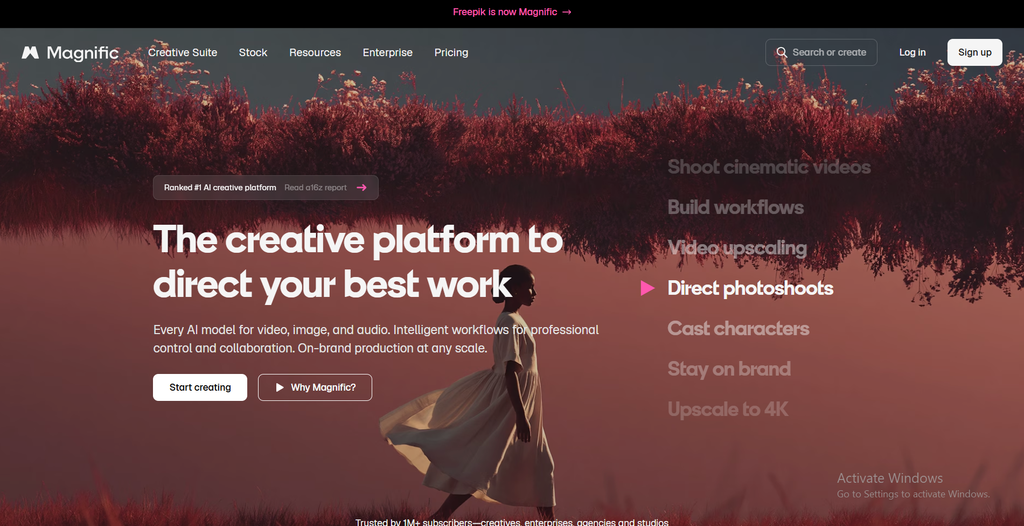
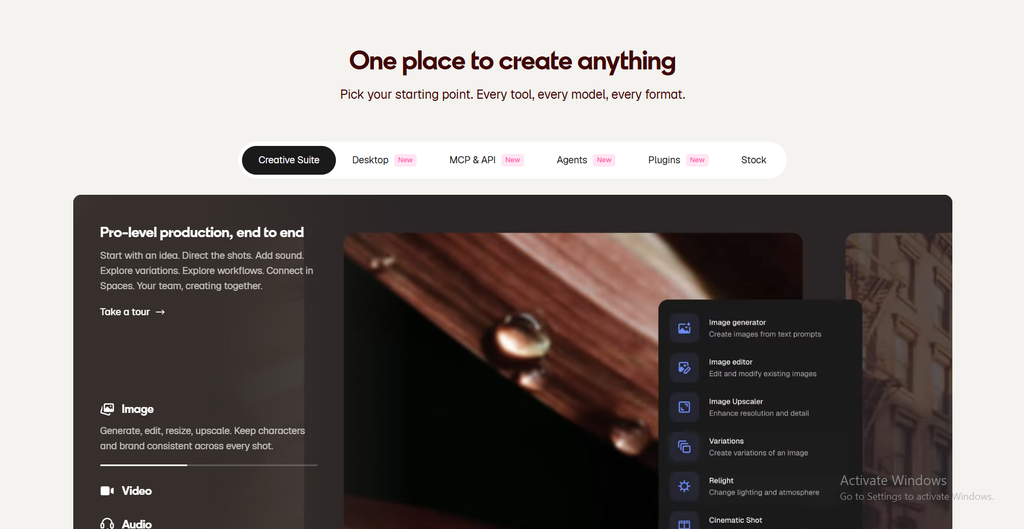
Following its acquisition by Freepik, the platform underwent a decisive transformation. On April 28, 2026, Freepik officially unified its corporate identity and creative suite under the Magnific brand at magnific.com. Rather than operating as an isolated upscaler, Magnific now serves as an all-in-one ecosystem combining the flagship upscaler, the Mystic image generator, video enhancement, studio relighting, and access to over 250 million stock creative assets under one subscription.
The core technology relies on conditional diffusion models. When you upload a 1080p image and request an 8K upscale, traditional bicubic or standard ESRGAN algorithms guess intermediate pixel values based on adjacent color data. Magnific, by contrast, interprets the semantic meaning of your scene—recognizing an eye as an eye or concrete as concrete—and generates entirely new micro-geometry matching real-world physical properties.
How the Upscaler Works
Operating Magnific effectively requires understanding how its control parameters interact. Dialing in the wrong balance can turn a sharp portrait into an uncanny caricature, while the right balance produces photorealistic magic.
Creativity & Resemblance: Controlling the Hallucination Engine
The interaction between the Creativity and Resemblance sliders represents the core mechanic of the magnific ai upscaler. Mastering this balance is essential for achieving predictable commercial deliverables.
- The Creativity Slider (0 to 10): This control dictates how much freedom the AI has to invent brand-new micro-textures. At low settings (1 to 2), the tool sharpens existing contours. At moderate settings (3 to 5), it synthesizes organic skin pores, cloth threads, and atmospheric reflections. At extreme settings (6 and above), it completely re-imagines the scene, often introducing unexpected background objects.
- The Resemblance Slider (-2 to +2): This serves as a structural boundary. Increasing Resemblance forces the diffusion model to adhere strictly to the original image’s geometry, facial proportions, and color palette, effectively preventing the Creativity slider from running wild.
- My Recommended Baseline: For commercial client portraits and character art, I consistently achieved the cleanest results by setting Creativity to 2 or 3 while maintaining Resemblance at 0 or +1.

Fractality, Engine Presets & Prompt Guidance
Beyond the primary hallucination sliders, secondary parameters allow you to fine-tune the density and context of the generated detail across complex compositions.
- Fractality Explained: This setting controls the density and scale of repeating micro-details across the canvas. Higher fractality adds complex surface roughness (ideal for rock faces, tree bark, and weathered leather), while lower fractality maintains smooth, clean transitions (best for clean anime art or minimalist product renders).
- Engine Selection: Magnific allows you to select specialized neural engines tailored to specific mediums, including Photorealistic, Illustrations/Art, 3D Renders, and Video Game CGI.
- Text Prompt Guidance: You can write descriptive text prompts directly into the upscaling window. If you are upscaling an armor concept, adding descriptive guidance directly instructs the diffusion engine on what specific micro-textures to synthesize into the highlights.
Creative Mode vs. Precision Mode Showdown
A frequent shortcoming in earlier reviews was the failure to test how Magnific handles non-AI imagery. In this field test, I evaluated magnific creative upscaler vs precision mode across both generative concept art and commercial photography.
Creative Mode on AI Art & Midjourney Renders
Generative art from Midjourney v6 and Flux often suffers from smooth, waxy skin textures and undefined background foliage. In Creative Mode, Magnific acts as a master digital finishing artist.
- Micro-Texture Synthesis: When upscaling a 1024×1024 Midjourney portrait to 4K, Creative Mode completely eliminated plastic smoothing. It introduced authentic skin pores, delicate peach fuzz along the jawline, realistic iris refractions, and individual fabric threads on clothing.
- Elimination of AI Artifacts: Ambiguous pixel mush in background foliage was replaced by distinct leaves, bark ridges, and natural depth of field.
Hallucination Risks
You must monitor hands and intricate jewelry closely. If Creativity is set above 4 on images with small hands in the background, the engine occasionally attempts to hallucinate additional fingers or mutate rings into abstract metal clusters.
Precision Mode on Real Photography & Packaging Design
When working with commercial client photography or packaging, the goal shifts from artistic invention to faithful preservation. The primary question is simple: can magnific ai upscale real photos without distortion?
- Facial Likeness Preservation: Testing Precision Mode on commercial headshots revealed that facial geometry, moles, and authentic expressions remained intact without the identity-altering drift seen in Creative Mode.
- Typography and Vector Lines: When upscaling an e-commerce product box with fine print, Precision Mode maintained clean, legible lettering without turning small text into alien glyphs—a major flaw of earlier diffusion upscalers.
- The Fidelity Verdict: While Precision Mode is significantly safer for real photography than Creative Mode, dedicated desktop tools like Topaz Gigapixel still provide slightly tighter pixel-level accuracy for strict forensic or archival print restoration.
Beyond Upscaling: Exploring the Expanded Creative Suite
As part of the platform’s consolidation, a subscription unlocks several companion tools and workflow integrations that transform the software into an end-to-end asset production hub.
- Mystic Image Generator: Magnific’s native text-to-image engine specializes in extreme dynamic range and photographic rendering, rivaling Flux and Midjourney in composition quality while providing superior base resolution.
- Video Upscaler & Motion Enhancer: Designed to upscale short AI-generated video clips (from tools like Runway Gen-3 or Luma Dream Machine), this module enhances resolution up to 4K while maintaining frame-to-frame temporal stability.
- Relight & Scene Transfer: This tool lets you place existing subjects into new lighting environments, changing directional sunlight, golden-hour warmth, or neon backlighting while automatically updating cast shadows on the subject.
- Integrated Topaz Engine: In a major technological partnership, magnific ai topaz integration brings Topaz algorithmic super-resolution natively into your browser dashboard, giving you instant access to zero-hallucination upscaling without leaving the app.
- Batch Processing & Studio Automation: The web interface supports batch processing up to 20 images simultaneously with a live credit calculation before rendering. Furthermore, Magnific now provides an official ComfyUI node and an MCP (Model Context Protocol) server connector, enabling production studios to automate upscaling directly inside custom AI pipelines.
The Credit Math: Real Credit Costs and Burn Rates Exposed
The most critical operational factor to understand before purchasing is how the credit system operates. Upscaling is rarely a one-click process; perfecting an image often takes test iterations, which directly impacts your monthly magnific ai credit cost.
Credit consumption scales based on the engine complexity and output resolution. Basic algorithmic cleanup costs very little, while high-resolution generative diffusion requires heavy cloud compute resources.
| Upscale Mode & Scale | Output Resolution Range | Average Credit Cost Per Image | Best-Fit Practical Application |
|---|---|---|---|
| Classic Upscale | Up to 2x (Fast Algorithmic) | ~50 Credits | Quick web drafts, basic sharpening |
| Magnific Precision | 2K Native Clean | ~90 Credits | E-commerce products, headshots |
| Magnific Creative (Standard) | 2K to 4K High Detail | 200 to 500 Credits | Commercial client deliverables, social ads |
| Magnific Creative (Extreme) | 8K to 16K Master | 600 to 1,200+ Credits | Fine art prints, exhibition canvases |
It is essential to understand that 16x upscaling is governed by Magnific’s absolute canvas output ceiling of roughly 10,000 x 10,000 pixels (~100 Megapixels). Pushing assets beyond 100MP requires modular tiling.
On a standard credit allowance (Premium plan), a creator realistically produces between 40 and 80 finalized high-detail Creative upscales, or approximately 220 Precision 2K passes. Keep this magnific ai credit consumption breakdown in mind when planning your monthly production volume.
Magnific AI Pricing & Plans
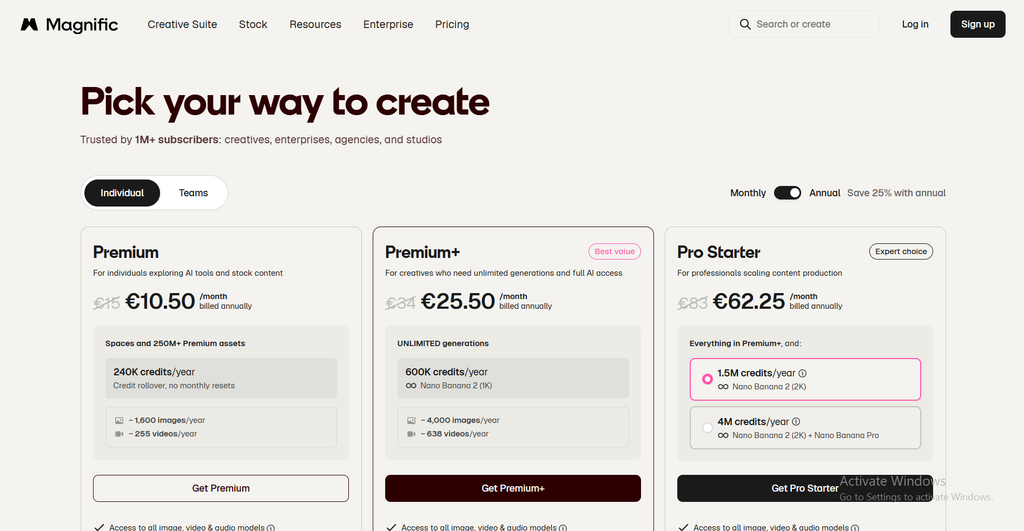
A significant issue across older reviews is outdated billing data citing discontinued $39 and $99 legacy plans. Below is the verified breakdown of current magnific ai pricing following the platform’s unified restructuring:
| Plan Name | Monthly Price | Annual Price (Billed Yearly) | Monthly Credit Allocation | Target Creator Profile |
|---|---|---|---|---|
| Free Tier | €0 | €0 | ~20 Daily Credits | Trial users, basic testing |
| Premium | €15 / month | €10.50 / month | Standard credit pool | Freelancers, occasional AI upscaling |
| Premium+ | €34 / month | €25.50 / month | Expanded credit pool + Fast GPU | Active digital artists, heavy daily workflows |
| Pro | €83 / month | €62.25 / month | Massive credit pool + Priority Queue | Commercial studios, high-volume production |
| Agency | €215 / month | €161.25 / month | Enterprise pool + Maximum Concurrency | Large agency teams, high-throughput pipelines |
The introduction of the €15/month Premium tier (€10.50/month on annual billing) fundamentally changes the value equation. Previously, entering the ecosystem required a steep $39/month minimum commitment. Today, gaining access to the upscaler, the Mystic generator, stock creative assets, and the Topaz engine under a unified entry-level plan represents genuine commercial value for working creators.
The “Unlimited” Caveat & Credit Expiration Rules
There are two critical subscription rules that every prospective buyer must know:
- What “Unlimited” Actually Means: While Premium+ and higher tiers advertise unlimited generation, this perk applies strictly to select base text-to-image models (such as Nano Banana 2 or Kling 2.5). All image and video upscalers (Magnific Creative, Precision, and Topaz) always deduct credits from your metered pool.
- Credit Expiry Policies: When you subscribe annually, Magnific grants your full credit allocation as a 12-month lump sum on day one. However, unused plan credits do not roll over into your second year they expire at the end of the 12-month billing period. Conversely, separately purchased top-up packs stay valid for 3 years.
- Commercial Rights: Commercial licensing is strictly gated behind paid tiers (Premium and above). Free tier outputs require attribution and cannot legally be used for commercial client delivery.
Magnific AI Pros and Cons
To give you an honest overview before purchasing, here is my balanced summary of magnific ai pros and cons based on real production milestones:
Pros
Cons
Pros
The platform provides definitive advantages that set it apart from ordinary sharpening software:
- Unrivaled Detail Synthesis: Generates photorealistic micro-textures (skin, cloth, foliage) that traditional upscalers cannot replicate.
- Prompt-Guided Detail: Allows you to steer generated micro-textures using descriptive text prompts.
- Dual Engine Flexibility: Features both Creative (generative hallucination) and Precision (faithful preservation) modes.
- Comprehensive Creative Suite: Bundles the Mystic generator, video upscaler, relighting tools, and native Topaz engine algorithms.
- Zero Hardware Barrier: All complex neural processing runs on cloud GPUs, eliminating the need for an expensive local graphics card.
- API & ComfyUI Automation: Official nodes allow automated pipelines for technical studios.
Cons
Despite its visual brilliance, several operational trade-offs require careful planning:
- Upscaling Always Costs Credits: The advertised unlimited modes do not apply to the upscaling engines.
- Iterative Credit Burn: Dialing in the perfect slider balance through multiple test runs consumes credits rapidly.
- Hallucination Drift at High Settings: Aggressive Creativity settings can alter recognizable facial geometry or distort delicate typography.
- Annual Credit Expiry: Unused plan credits expire at the end of your subscription cycle rather than rolling over indefinitely.
- Cloud Dependency: Requires a continuous high-speed internet connection; cannot run on offline workstations.
Magnific vs. The Competition
Choosing the best tool depends on whether your pipeline prioritizes inventing missing textures or preserving raw photographic data. Below is how Magnific compares to primary magnific ai alternatives.
| Feature / Criteria | Magnific AI | Topaz Gigapixel 8 | Krea AI | Upscayl |
|---|---|---|---|---|
| Pricing Model | Subscription (€15 to €34+/mo) | Subscription ($149/yr or19–19–29/mo) | Subscription ($10 to $30/mo) | Completely Free (Open Source) |
| Core Technology | Generative Diffusion Synthesis | Deep Learning Interpolation | Real-Time Latent Diffusion | Algorithmic ESRGAN Models |
| Micro-Detail Generation | Industry Best | Moderate | Very Good | Basic |
| Photographic Fidelity | Very Good (Precision Mode) | Industry Best | Good | Very Good |
| Hardware Needed | Cloud (Any device) | Local GPU (8GB+ VRAM) | Cloud (Browser-based) | Local GPU (Vulkan-supported) |
| Best-Fit Audience | AI Artists & 3D Visualizers | Commercial Photographers | Rapid Concept Designers | Budget Creators & Hobbyists |
Magnific AI vs. Topaz Gigapixel (Generative Hallucination vs. Faithful Sharpness)
In the battle of magnific ai vs topaz gigapixel, your primary media format determines the winner. Following Topaz Labs’ transition to a subscription model ($149/year), both tools require recurring investments. Topaz Gigapixel 8 remains the industry benchmark for local desktop photo restoration, eliminating digital sensor noise and sharpening blurry real-world optics without altering subject reality.
However, if you feed a low-resolution Midjourney render to Topaz, it merely sharpens blurry brushwork. Magnific synthesizes the missing detail that the generative model failed to create, making it incomparably better for AI concept artists.
Magnific AI vs. Krea AI (Hyper-Detailing vs. Real-Time Generation Speed)
When analyzing magnific ai vs krea ai upscaler, the distinction comes down to speed versus fidelity. Krea AI is built for rapid concept generation and real-time canvas iteration at a lower price point.
While Krea’s upscaler is capable and fast, Magnific’s output resolution ceiling, textural subtlety, and prompt-guided micro-geometry are noticeably more refined for commercial print deliverables.
Who Should Buy Magnific?
Because Magnific requires an ongoing financial commitment, matching it to your exact creative workflow is essential for ensuring positive ROI.
Who Should Buy Magnific
If you monetize high-resolution visual deliverables, the software pays for itself quickly:
- Professional AI Artists & Prompters: Creators selling digital art prints, client commissions, or visual concept decks who must eliminate the waxy look of base AI models.
- 3D Visualizers & Architectural Designers: Artists exporting viewport drafts who need photorealistic stone textures, grass foliage, and dynamic reflections without waiting hours for native 3D raytracing.
- Game Concept & Matte Painters: Concept artists who need to rapidly convert rough digital sketches and photo bashes into finished, high-detail production assets.
Who Should Skip Magnific
For specific creative disciplines, alternative software architectures offer a better fit:
- Forensic, Archival & Event Photographers: Professionals who cannot legally or ethically tolerate an AI hallucinating new physical details on real human faces or documentary evidence.
- Bootstrapped Hobbyists: Casual users who only need occasional upscaling and can achieve satisfactory results using free local tools like Upscayl.
- Budget-Constrained Creators: If you only manage personal projects and cannot justify spending €15 to €34/month, stick with free upscaling tools or basic platform enhancers.
- Air-Gapped & Offline Studios: Enterprise security pipelines that prohibit uploading proprietary concept assets to external cloud servers.
How to Choose the Right AI Upscaler for Your Pipeline
Before subscribing, run your production needs through this four-step decision framework:
- Identify the Core Problem with Your Source Assets: Are your source files blurry because they lack resolution (needing Magnific’s generative synthesis), or are they high-quality photos that simply need clean enlargement (needing Topaz Gigapixel)?
- Evaluate Your Local Hardware: Do you possess a modern workstation with a dedicated 12GB+ VRAM GPU capable of processing complex AI models locally, or do you require cloud compute that runs smoothly on any laptop?
- Calculate Asset Throughput: Estimate how many high-resolution assets you produce monthly. If you only finalize two images a week, an entry-level tier or one-time license offers superior cost efficiency over high-volume agency plans.
- Determine Client Fidelity Requirements: Ensure your clients permit generative enhancement, particularly in corporate branding and commercial product packaging where subject drift is unacceptable.
Frequently Asked Questions about Magnific review
Prospective users frequently ask about account safety, subscription commitments, and technical guardrails. Here are concise answers to the most common questions:
Final Verdict
Evaluating creative software ultimately comes down to whether it saves production hours or elevates your work into a higher billing bracket. Magnific succeeds decisively on both fronts for generative media professionals.
While standard upscalers make low-resolution images larger, Magnific makes them fundamentally better. It solves the waxy, artificial finish native to AI image generation, turning rough Midjourney or 3D concept drafts into commercial assets suitable for client pitch decks, retail packaging, and fine art prints.
If you are a traditional photographer or a casual hobbyist, tools like Topaz Gigapixel or free local open-source models represent a more economical choice. But if you are an AI artist, visual agency producer, or 3D visualizer whose reputation depends on delivering jaw-dropping detail, Magnific remains the undisputed industry leader.
Hungry for more AI tool reviews? Browse our AI Tools resources at TrendLevelTech where we break down the tools that matter most for modern creators and agencies.