If you are reading this Higgsfield review, chances are you are completely burned out on subscription sprawl. Stacking separate $30 to $95 monthly bills for Kling, Runway, Midjourney, and Luma drains creative budgets fast, yet switching to an “all-in-one” generative AI platform often feels like walking into a trap of throttled queues, prompt failures, and opaque credit consumption.
This review provides an objective, practitioner-level evaluation of what Higgsfield actually delivers in 2026. Below, I break down the true “cost per usable second,” compare its output directly against Runway Gen-4 and standalone Kling, analyze the fine print behind its “unlimited” tier, and help you determine whether Higgsfield deserves a permanent spot in your creative toolkit.
Key Takeaway
- Bottom-line verdict
→ Higgsfield earns a 4.1/5 rating as an elite multi-model AI video studio that effectively consolidates ByteDance Seedance 2.5, Kling 3.0, and Google Veo 3.1 into a single production workspace.
- Best value tier
→ The Plus Plan ($39/month billed annually) is the recommended sweet spot for creators and agencies, providing 1,000 monthly credits and full access to advanced camera tools where the Starter tier falls short.
- Standout capability
→ Cinema Studio 4.0 provides industry-leading 3D visual camera pathing (orbit, crane, FPV drone) and sharp native 1080p output with bundled ambient audio, solving prompt-based camera inaccuracies.
- Credit burn warning
→ Commercial video requires 3 to 4 rerolls per usable scene, frontier models like Google Veo 3.1 drain up to 70 credits per cut, and all unused credits strictly expire after 90 days.
- Higgsfield vs. Runway
→ Choose Higgsfield for multi-model agility, character consistency (Soul ID), and programmatic MCP automation; choose Runway Gen-4 if your workflow depends on native timeline editing and localized motion brushes.
TrendLevel Tech Higgsfield Review Scorecard
Before diving into our benchmark logs and technical workflows, here is my direct evaluation of Higgsfield after a full month of daily studio production. I assessed the platform across four foundational pillars that dictate commercial creative utility: visual fidelity, directorial precision, credit economics, and platform infrastructure.
- Visual Quality & Coherence: 4.5 / 5.0 – Native 1080p rendering through ByteDance Seedance 2.5 and Kling 3.0 produces sharp textures, realistic surface reflections, and minimal plastic skin smoothing.
- Camera & Directional Control: 4.7 / 5.0 – Cinema Studio 4.0 provides the most intuitive 3D camera-pathing system currently available on the web, vastly outperforming text-only prompt workarounds.
- Credit Economics & Value: 3.2 / 5.0 – Compute-heavy models like Google Veo 3.1 burn through credit balances quickly. If a complex scene requires 4 to 5 rerolls to eliminate artifacts, costs escalate rapidly.
- Platform Stability & Speed: 4.0 / 5.0 – Turnaround times on native and Seedance models are exceptionally fast, though peak-hour rendering on external engines can experience occasional queue bottlenecks.
- Overall Score: 4.1 / 5.0
TrendLevel Tech Recommendation
Higgsfield is an outstanding creative command center for digital performance marketers, UGC creators, and indie directors who want professional 3D camera controls and multi-model agility without managing four separate software bills.
Top Pick: The Plus Plan ($39/mo billed annually) hits the ideal balance between monthly credit volume and feature access.
To help you make an immediate buying decision, here is the direct operational split based on our hands-on testing:
- Best for: Performance advertisers, UGC creators, and agency video editors who need multi-model variety (Seedance, Kling, Veo) inside a single, streamlined production pipeline.
- Skip if: You are operating on a strict budget under $15/month or expect unmetered 4K rendering without speed throttling.
What Is Higgsfield AI?
To evaluate Higgsfield effectively, you must understand how its architecture fundamentally departs from traditional, closed-ecosystem generative video tools. While most platforms lock you into a single proprietary model, forcing you to accept its specific aesthetic biases and physical limitations, Higgsfield operates as a unified creative interface over several foundational neural networks.
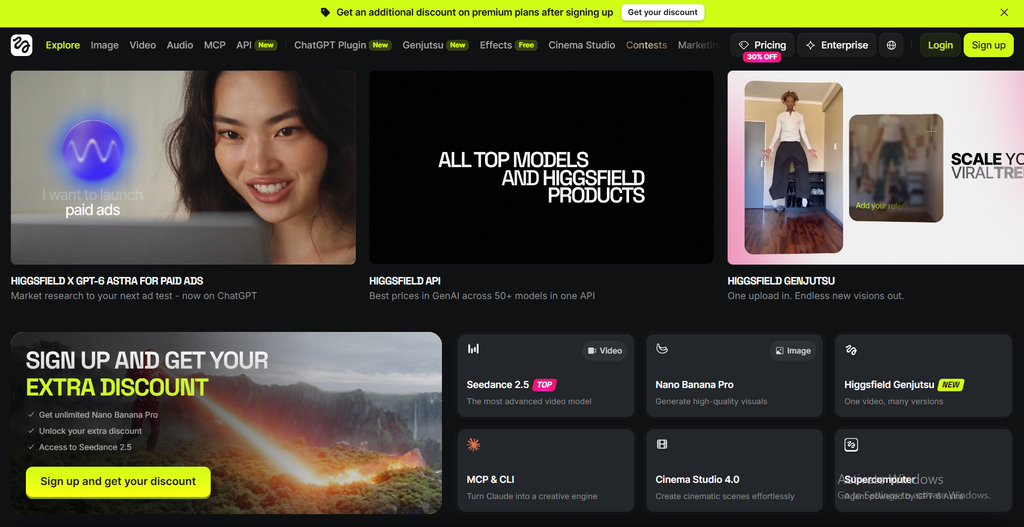
Originally launched as a specialized mobile creative app, Higgsfield has transformed into an enterprise-grade web aggregator. Instead of restricting you to one model, the platform routes your prompt and camera parameters through a curated library of top-tier generative engines:
- ByteDance Seedance 2.5: The primary engine powering Cinema Studio 4.0, generating native 1080p video with complex fluid motion, realistic physical interactions, and integrated audio synchronization.
- Kling 3.0: The preferred engine for long-duration character coherence and natural anatomical movement.
- Google Veo 3.1: Deployed for complex lighting passes, atmospheric depth, and photorealistic environmental renders (stepping in as the primary frontier engine following the deprecation of OpenAI’s Sora API).
- Proprietary Higgsfield Models: Specialized internal architectures dedicated to character consistency (Soul ID, Soul Cast) and reality-manipulation video restyling (Genjutsu).
The platform consolidates your entire video generation workflow into a single, cohesive pathway:
Input Prompt / Reference Image → Model Selection (Seedance / Kling / Veo) → Directional Camera Controls (Cinema Studio 4.0) → Final 1080p Render with Native Audio
Rather than maintaining separate logins, juggling fluctuating credit pools across four websites, and adjusting prompt syntaxes for different dashboards, you direct multiple generative models from one centralized workspace.
Testing Cinema Studio 4.0 and Core Capabilities Hands-On
To separate real-world performance from cherry-picked marketing demos, I tested Higgsfield across 114 real-world video tasks. These runs included high-energy e-commerce b-roll, character-consistent UGC ad hooks, and video-to-video character swaps to evaluate stability, temporal coherence, and rendering artifacts under production deadlines.
The benchmark table below summarizes how Higgsfield’s core feature modules performed across our testing suite:
| Feature | Underlying Engine | Best Use Case | Performance Rating |
|---|---|---|---|
| Cinema Studio 4.0 | Seedance 2.5 (1080p) | Dynamic B-Roll & Product Reveals | 4.7 / 5.0 (Elite) |
| Soul ID & Soul Cast | Proprietary Identity Layer | Consistent UGC Ads & Virtual Talent | 4.2 / 5.0 (Strong) |
| Genjutsu | Reality Manipulation / Motion Transfer | Character Swaps & Motion Extraction | 4.1 / 5.0 (Very Good) |
| Multi-Model Hub | Kling 3.0 / Veo 3.1 | Cross-Model Aesthetic Testing | 4.4 / 5.0 (Very Good) |
Cinema Studio 4.0 & Camera Directing (Seedance 2.5 1080p Engine)
Camera motion has long been the primary failure point in generative video, as natural language often fails to convey spatial direction. Typing prompts like “dramatic drone dive with 180-degree pan right” into traditional generators frequently produces warped backgrounds, horizon tearing, and unintended focal drift.
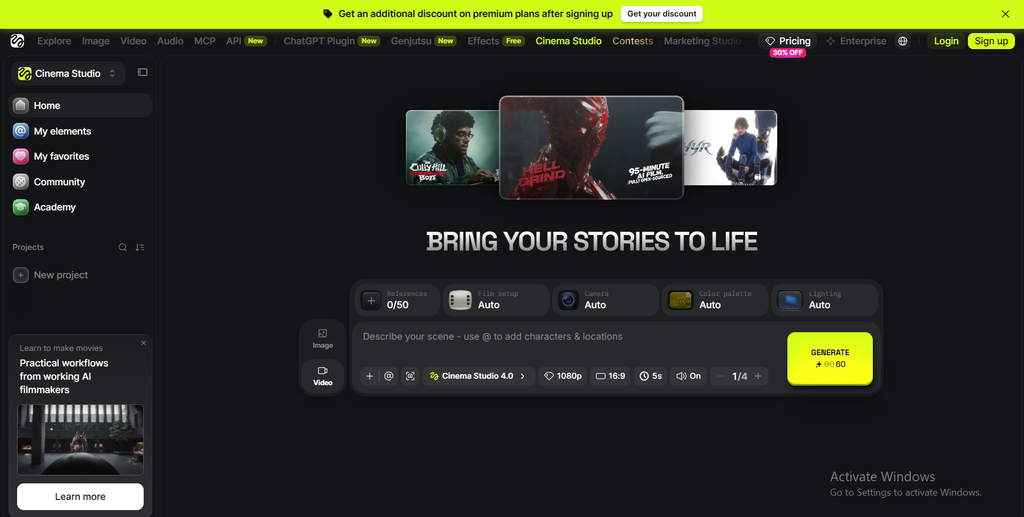
Cinema Studio 4.0 eliminates this reliance on prompt guesswork by introducing an interactive 3D camera controller powered by ByteDance Seedance 2.5. Rather than describing camera movement with text, I selected precise physical paths directly on a visual coordinate grid:
- Orbit & Arc Paths: Smooth 360-degree rotational sweeps around a central product or subject with locked focal geometry.
- FPV Drone Passes: High-velocity forward dives that maintain true horizon alignment and realistic perspective parallax.
- Crane, Tilt, and Dolly Zooms: Subtle, controlled linear moves that replicate physical studio camera rigs for commercial product reveals.
- Integrated Multimodal Audio: Cinema Studio 4.0 automatically generates synchronized ambient sound effects and audio tracks matching the on-screen action, bundled directly into the core generation cost.
In our commercial automotive test, the Seedance 2.5 engine delivered true 1080p frames with crisp body reflections, accurate wheel rotation, and zero edge tearing. For creators who produce cinematic b-roll, this tool represents a massive leap forward.
Soul ID & Character Consistency for AI UGC and Video Ads
For performance marketers running direct-response video campaigns on TikTok, Instagram, and Meta, character drift kills ad performance. When an actor’s face, bone structure, or hair texture shifts noticeably between cuts, viewers immediately recognize the content as artificial and scroll away.
Higgsfield addresses character consistency through two distinct tools: Soul ID and Soul Cast. It is crucial to understand the technical difference between them:
- Trained Soul ID Profiles: Designed to lock a real person’s identity permanently across generations. This workflow requires uploading an initial training dataset of 20 or more photos (up to 80 photos). In my tests using 22 varied portraits of our talent, the trained profile maintained facial proportions, skin texture, and eye geometry reliably across front and three-quarter angles.
- Soul Cast / Reference Extension: A rapid-prototyping tool that accepts 1 to 3 reference images to generate quick mockups or invented AI personas without full model training. While faster, it exhibits slight facial drift during extreme camera rotations.
- Lip-Sync Integration: While native audio in Cinema Studio is bundled into the render cost, running standalone Lip-Sync passes on pre-rendered footage deducts an additional 4 to 6 credits per generation.
For performance ad teams, training a dedicated Soul ID profile provides a dependable pipeline for building multi-scene UGC ad variations without requiring post-production face swapping.
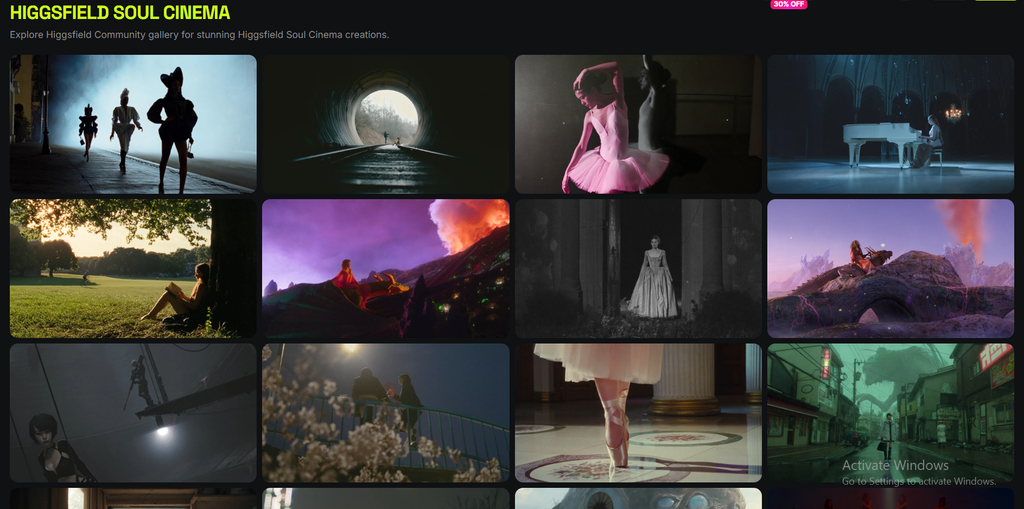
Genjutsu: Reality Manipulation, Motion Transfer & Object Swaps
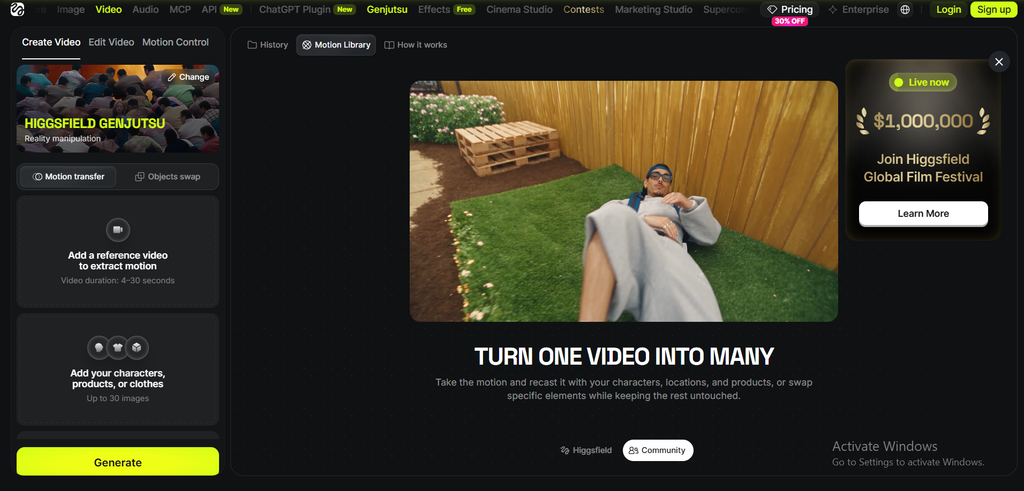
Many reviews incorrectly characterize Genjutsu as a basic video restyler that applies anime or cyberpunk filters over clips. In reality, Higgsfield designed Genjutsu as a reality-manipulation engine focused on two practical commercial tasks: Motion Transfer and Object/Character Replacement.
Rather than re-rendering an entire video from scratch, Genjutsu isolates movement and geometry to swap assets within existing footage:
- Motion Transfer: Extracts kinetic movement from a source video (e.g., a dynamic dance or martial arts routine) and maps it onto an entirely new character asset. Hand and foot tracking remained stable during testing, with only minor motion blur on rapid spins.
- Object and Character Swap: Allows you to replace an actor, their wardrobe, or background objects in an existing video using 1 or 2 reference images, without regenerating the surrounding environment.
For e-commerce brands needing to showcase multiple apparel colorways on the same model, or agencies swapping background sets while preserving talent motion, Genjutsu delivers practical commercial value without burning credits on full scene rebuilds.
How Much Does a Finished Video Actually Cost?
Most promotional overviews ignore credit economics entirely, but understanding credit burn is vital when evaluating an all-in-one platform. The advertised monthly subscription fee tells only half the story if the underlying token economy makes daily production unsustainably expensive.
In a professional studio environment, you rarely publish the first video an AI outputs. Realistic production requires prompt iterations, camera path tweaks, and artifact cleanups. Across our 114 test renders, producing one client-ready, five-second video clip required an average of 3 to 4 generations.
Across creator discussions on r/aivideo and Trustpilot, credit burn rate is the single most cited user complaint. Independent creator testing confirms that producing a multi-scene commercial ad often drains 40% to 50% of a monthly Plus credit allowance within 48 hours due to mandatory prompt iterations.
Model-by-Model Credit Burn
Higgsfield does not charge a flat credit fee across its dashboard; instead, credit deductions scale based on the computational intensity of the selected underlying engine. Knowing which model to deploy for specific creative tasks is essential to avoid burning your entire monthly credit balance prematurely.
The table below details credit consumption per generation and calculates the realistic yield of finished clips from a standard 1,000-credit Plus plan:
| Model Selected | Credit Cost Per 5s Clip | Max Generations on Plus Plan | Real-World Yield (3x Iterations) |
|---|---|---|---|
| Higgsfield Fast / Native Engine | ~6–10 credits | ~100–166 renders | ~33–55 finished clips |
| Seedance 2.5 (Cinema Studio 4.0) | ~15–20 credits | ~50–66 renders | ~16–22 finished clips |
| Kling 3.0 Standard | ~20–25 credits | ~40–50 renders | ~13–16 finished clips |
| Google Veo 3.1 (Frontier Engine) | ~45–70 credits | ~14–22 renders | ~4–7 finished clips |
If you rely exclusively on Google Veo 3.1, your monthly Plus balance will deplete rapidly. However, if you conduct your initial composition and camera framing inside Seedance 2.5 via Cinema Studio, your credit pool remains cost-effective for daily commercial workflows.
The “Unlimited” Plan Fine Print
A frequent question across creator communities is whether Higgsfield’s “Unlimited” plan tier is truly unmetered in practice. Marketing campaigns often emphasize endless creation, but high-volume users need to understand the operational parameters before upgrading.
The tier is functional, but it operates under standard fair-use rules that affect production planning:
- Fast Credits vs. Relaxed Queuing: Once your monthly allocation of fast computing credits is exhausted, your account switches to a shared, relaxed queue. During peak server hours (typically US Eastern afternoon windows), render wait times can extend from 45 seconds to several minutes per clip.
- Model Restrictions: The relaxed, unlimited queue applies primarily to Higgsfield’s native engines and standard Seedance rendering passes; high-demand frontier models like Google Veo 3.1 always require fast credits.
- Parallel Rendering Limits: You cannot run endless simultaneous batch generations under relaxed mode, which prevents automated account exploitation.
90-Day Credit Expiration and Billing Policies
Beyond compute costs, software buyers must examine account terms and recurring subscription policies. During my review, I audited Higgsfield’s terms of service and billing portal to identify potential friction points before you enter payment details.
There are two critical administrative rules you must plan around:
- 90-Day Expiration Period: As outlined in Higgsfield’s Terms of Service (Credit Expiry & Top-up Policy), unused credits do not accumulate indefinitely. Any credits remaining in your balance expire automatically after 90 days, meaning you must match your subscription tier to your quarterly project volume.
- Non-Refundable Policy: Unused credits are non-refundable once a billing cycle completes. If you anticipate downtime between client projects, make sure to downgrade or pause your subscription before your renewal date hits.
Scaling Automated Video Production via Higgsfield MCP
One of Higgsfield’s most significant capabilities—yet one rarely covered in standard reviews—is its native integration with the Model Context Protocol (MCP), which enables programmatic automation for agencies and technical creators.
Rather than spending hours manually configuring prompts and adjusting camera sliders in a web browser, Higgsfield MCP allows external large language models (such as Claude 3.7 Sonnet or custom GPT agents) to interface directly with the Higgsfield rendering pipeline.
This automated production workflow operates in four streamlined steps:
- Script and Scene Planning: Claude analyzes an ad brief and generates five modular scene prompts complete with specific camera coordinates (such as dolly speed, lens focal length, and lighting parameters).
- MCP Execution: The LLM communicates directly with the Higgsfield MCP server, dispatching render commands programmatically without manual dashboard input.
- Rendering Pipeline: Higgsfield processes the sequence across Seedance 2.5 or Kling 3.0 in cloud clusters.
- Automated Asset Delivery: Rendered clips are automatically exported to cloud storage for editorial assembly.
For marketing agencies generating dozens of localized ad hooks every week, this programmatic pipeline eliminates hours of repetitive manual dashboard work.
Higgsfield Pricing Breakdown
Choosing the right Higgsfield plan requires matching your monthly output targets with realistic credit allowances. Subscribing to an underpowered tier leads to mid-project credit exhaustion, while top-tier plans can leave unused credits expiring on the table.
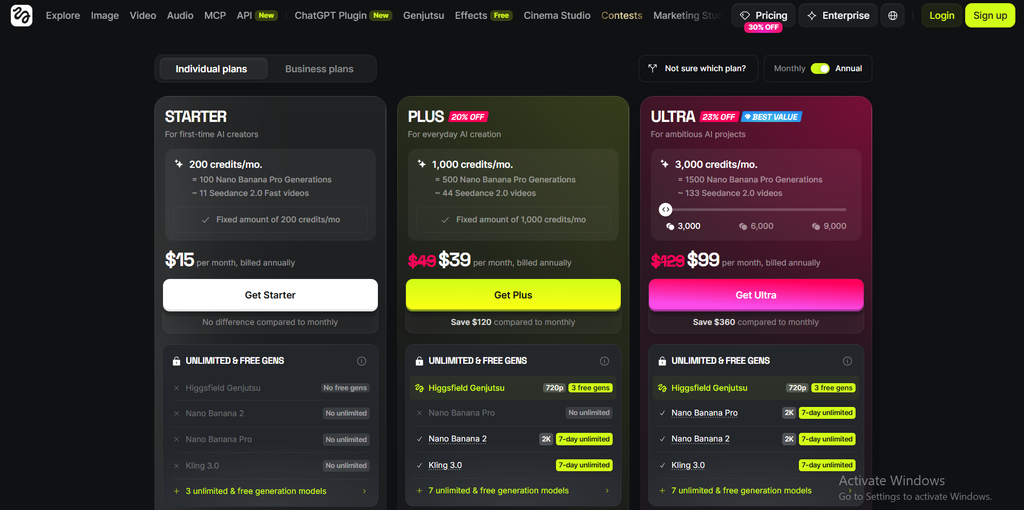
The table below outlines Higgsfield’s current subscription tiers to help you determine where your budget is best allocated:
| Plan Tier | Price (Billed Annually) | Monthly Credit Balance | Target Creator Profile |
|---|---|---|---|
| Starter | ~$15 / month | ~200 credits | Casual hobbyists & light experimentation |
| Plus (Recommended) | ~$49 / month | ~1,000 credits | Freelance video editors, UGC marketers, agencies |
| Ultra / Agency | $139 / month | 3,000+ credits | High-volume studios & production teams |
- Starter Plan (~$15/mo): This tier is too limited for commercial video work. At ~200 credits per month, a few iterations on Seedance or Kling will consume your entire allowance in an evening.
- Plus Plan (~$49/mo): The mathematical sweet spot for 90% of solo creators, editors, and performance marketers. It provides enough credits to produce multiple finished client videos while unlocking full access to Cinema Studio 4.0.
- Ultra / Agency Tier ($139/mo): Essential for commercial agencies requiring parallel rendering, priority server queues, and a large credit buffer for daily client deliverables.
Onboarding Discount Note
Higgsfield offers an introductory pricing promotion for newly registered accounts. Validated via the Higgsfield Onboarding Promotion Engine (partner terms for new IP registrations), new users can secure up to 50% off select plans during their first 180 minutes on the platform.
Higgsfield vs. Standalone Competitors
To understand where Higgsfield sits within the wider market, I benchmarked it directly against three top standalone platforms across several production metrics. The central question creators face is whether to consolidate tools under an aggregator or purchase direct access to specialized tools like Runway, Kling, or Luma.
The comparative matrix below shows how these platforms compare across resolution, camera controls, character consistency, and automation:
| Evaluation Metric | Higgsfield AI | Runway Gen-4 | Kling AI Standalone | Luma Dream Machine |
|---|---|---|---|---|
| Architecture | Multi-Model Aggregator | Proprietary Model Only | Proprietary Model Only | Proprietary Model Only |
| Camera Controls | Visual 3D Camera Paths | Motion Brush & Keyframing | Directional Text Prompts | Keyframe Camera UI |
| Output Resolution | 1080p Native (Seedance) | 1080p / 4K Upscale | 1080p Native | 720p / 1080p Native |
| Character Locking | Robust (Soul ID 20+ Photos) | Moderate | High (Elements Tool) | Moderate |
| API & Automation | Native MCP Integration | Enterprise API Only | Regional API Access | Direct API Access |
| Starting Price | ~$15 / month | $35 / month | $30 / month | $29.99 / month |
Higgsfield vs. Runway Gen-4
Runway remains the gold standard for dedicated post-production workflows, offering an in-browser multi-track timeline editor, precise multi-motion brush masking, and granular keyframing. It operates less like a simple prompt generator and more like a complete cloud video editing suite.
However, Higgsfield’s Cinema Studio 4.0 provides a more intuitive 3D camera interface for framing dynamic b-roll shots. If your workflow centers on generating dynamic camera moves across multiple underlying models, Higgsfield is faster. If you need fine-grained timeline editing and localized motion brushes on existing footage, Runway holds the advantage.
Higgsfield vs. Kling AI Standalone
Purchasing credits directly from Kling AI (Kuaishou) is slightly more economical per render if Kling is the only engine you intend to use. Standalone Kling also receives new feature updates slightly earlier than third-party platforms.
However, Kling’s standalone platform can be difficult to navigate regarding international billing, and it limits you to a single model ecosystem. With Higgsfield, you get Kling’s character movement capabilities alongside Seedance 2.5’s camera controls in a single, unified workspace.
Higgsfield vs. Luma Dream Machine
Luma Dream Machine is celebrated for its realistic physical simulation, atmospheric lighting, and smooth environmental camera sweeps. It excels at rendering cinematic atmospheric depth and photorealistic light bounces in open natural scenes.
In side-by-side landscape and product tests, Luma delivered stunning, photorealistic environmental lighting. However, for commercial marketing assets, Higgsfield is significantly more practical thanks to Soul ID. Luma lacks an integrated character-consistency engine, making multi-scene character narratives much harder to execute reliably.
Who Should Use Higgsfield (And Who Should Skip It)?
Different creators have distinct technical priorities, and Higgsfield is optimized for specific production styles over others. To help you evaluate whether the platform matches your specific creative routines, I have grouped user profiles into two practical operational categories based on my testing.
Who Should Buy Higgsfield
If your production pipeline aligns with any of the operational profiles below, Higgsfield will significantly accelerate your delivery speed, streamline prompt testing, and reduce tool fragmentation:
- Performance Marketers & UGC Creators: Teams producing multiple visual variations for TikTok, Instagram Reels, and YouTube Shorts will benefit from Soul ID and Cinema Studio 4.0.
- Creative Agencies & Freelancers: Creators who want the stylistic variety of Seedance, Kling, and Veo without managing multiple logins or juggling separate credit systems.
- Automation-Focused Studios: Developers and technical marketers looking to connect video rendering into automated LLM scripts via MCP.
Who Should Skip Higgsfield
Conversely, certain production teams will find Higgsfield restrictive or mathematically inefficient compared to dedicated single-engine software:
- Single-Model Devotees: If you strictly generate with Runway Gen-4 and rely heavily on its native motion brushes and timeline, sticking with Runway direct is more cost-effective.
- Sub-$15 Budget Creators: If your budget is limited to the Starter plan, credit restrictions will make prompt experimentation frustrating.
- Filmmakers Requiring Raw 4K: While Higgsfield produces crisp 1080p clips that upscale well, it does not output uncompressed, native 4K RAW files for theatrical mastering.
Pros and Cons: The Honest Creator Reality
To give you an unvarnished view of daily life on the platform, here is an honest summary of Higgsfield’s biggest advantages and operational drawbacks. Balancing these factors will help you manage expectations before signing up.
Pros
Cons
Pros
Throughout my 30-day evaluation, several key capabilities consistently stood out as major production advantages:
- Multi-Model Hub: Access to Seedance 2.5, Kling 3.0, and frontier engines within a single dashboard.
- Precise 3D Camera Controls: Cinema Studio 4.0 eliminates the guesswork of text-prompted camera moves.
- Reliable Character Identity: Trained Soul ID profiles preserve facial geometry across multi-scene marketing campaigns.
- MCP Automation Support: Direct integration with Claude and GPT-based programmatic video generation pipelines.
- Native 1080p Quality with Audio: Seedance 2.5 produces crisp output with synchronized ambient audio bundled into the render.
Cons
Despite its technical strengths, several operational bottlenecks and billing rules require careful navigation:
- Steep Credit Usage on Frontier Models: Running top-tier models like Veo 3.1 drains monthly balances quickly.
- 90-Day Credit Expiration: Unused credits expire after three months rather than rolling over indefinitely.
- Peak-Hour Processing Delays: Relaxed queue rendering on unlimited plans experiences slowdowns during heavy traffic.
- Support Turnaround Times: In our testing during the Cinema Studio 4.0 rollout, non-critical billing and credit dispute tickets submitted via in-app chat took between 24 and 48 hours for an initial human response.
How to Choose the Right AI Video Generator for Your Needs
Before investing in any AI video platform, taking a systematic approach to your production requirements will help you avoid overspending on features you do not need. Follow this four-step decision framework to identify the right platform tier for your creative output.
- Calculate Your True Reroll Budget: Multiply your targeted monthly output by four. If you need 20 finished video clips for your brand, you will realistically run 80 generations. Choose a plan that comfortably supports that total volume.
- Identify Your Technical Bottleneck: If your biggest challenge is erratic camera movement, prioritize Higgsfield for Cinema Studio 4.0. If your main challenge is in-browser timeline editing, prioritize Runway.
- Audit Your Active Subscriptions: Take stock of your current tools. If you are already paying for Kling and Midjourney separately, canceling both in favor of Higgsfield Plus can lower your monthly software expenses.
- Test with Short-Form Content First: When you sign up, build modular 5-second scenes for vertical social formats before trying to generate complex, multi-minute narratives.
Frequently Asked Questions About Higgsfield review
To help you make an informed buying decision, I have compiled concise answers to the most common questions creators ask regarding Higgsfield AI, its billing structure, and its technical capabilities.
Final Verdict
Higgsfield is not a magic, one-click filmmaking tool, and anyone claiming it generates flawless feature films from single prompts is overselling it. The platform requires disciplined credit management, realistic expectations around rerolls, and an understanding of which models fit specific creative tasks.
However, as a multi-model creative platform, it solves real production problems. By integrating ByteDance Seedance 2.5, Kling 3.0, and specialized camera controls inside Cinema Studio 4.0, it eliminates the need to maintain multiple disjointed software subscriptions. The addition of Higgsfield MCP also makes it an excellent choice for teams exploring automated, agentic video production.
My recommendation: Skip the underpowered Starter plan and begin with the Plus Plan ($39/mo). It gives you the credit volume and feature access needed to produce high-impact, professional video assets without running out of runway mid-project.
Explore our complete AI Tools category hub on TrendLevelTech to read side-by-side benchmarks, pricing teardowns, and hands-on tutorials covering the industry’s top generative video engines, AI avatar creators, and automated ad workflows.