
This Recruit CRM review evaluates whether Recruit CRM (recruitcrm.io) delivers on its promise of an intuitive, all-in-one applicant tracking system (ATS) and customer relationship management (CRM) platform for modern recruitment agencies in 2026. After hands-on testing across candidate sourcing, visual deal pipelines, and automated resume reformatting, I found that Recruit CRM stands out for its zero-friction LinkedIn sourcing and industry-leading customer support.
Key Takeaway
Before diving into the detailed hands-on testing, here are the essential findings and buying recommendations from our Recruit CRM evaluation. These core points highlight what the platform does best and where alternative systems might serve you better:
- Bottom-line verdict
→ Recruit CRM is an outstanding, intuitive cloud ATS and CRM designed specifically for recruitment agencies and executive search firms, eliminating the painful onboarding curves and multi-year contract lock-ins common to legacy platforms. - Dual-pipeline advantage
→ The software manages candidate hiring stages on one side and client business development deals on the other, allowing recruiters to manage placements and client sales from a single dashboard. - Sourcing speed
→ Its Chrome extension extracts complete candidate profiles, resumes, and contact details from LinkedIn and Sales Navigator in one click while automatically preventing duplicate entries in your database. - Pricing and credit economy
→ Plans start at $95 per user per month on annual billing, with the $135 per user per month Business tier serving as the true sweet spot for scaling agencies needing multiple pipelines, open API access, and the AI Resume Formatting Agent. - Key limitations
→Recruit CRM does not include native back-office shift scheduling or gross-to-net payroll processing, making it less suitable for high-volume blue-collar temporary staffing desks.
Quick Verdict: Is Recruit CRM Worth It?
Before analyzing the platform’s individual sourcing tools and pipeline mechanics, it helps to understand where Recruit CRM sits in the competitive recruitment software landscape. I evaluated the software across five core operational categories based on real-world placement workflows, client submittals, and verified user consensus across more than 800 reviews on G2, where Recruit CRM maintains a 4.8 out of 5 rating.
Recruit CRM is one of the most dependable, user-friendly recruitment platforms on the market for permanent placement agencies and executive search teams. Its standout asset is the seamless combination of recruitment tracking and business development in a single workspace. Supported by 24/7 human live chat with average response times under two minutes, it resolves the customer service frustrations that drive agency owners away from legacy enterprise systems. However, high-volume temporary staffing firms with complex payroll requirements will find its back-office tooling limited.
| Evaluation Metric | Score | My Practical Take |
|---|---|---|
| Platform Usability | 4.8 / 5.0 | Clean, modern interface with zero learning curve for new recruiters. |
| Customer Support | 4.9 / 5.0 | Best-in-class 24/7 human live chat with verified sub-two-minute response times. |
| Candidate Sourcing | 4.6 / 5.0 | Highly reliable Chrome extension for LinkedIn and Sales Navigator data extraction. |
| Reporting & Analytics | 3.8 / 5.0 | Solid operational pipeline metrics, but advanced custom reporting consumes credits. |
| Value for Money | 4.3 / 5.0 | Higher entry cost than generic tools, but far more affordable than legacy enterprise suites. |
| Overall Score | 4.5 / 5.0 | Top Pick for Boutique Agencies & Executive Search Firms |
For boutique recruitment firms, retained search consultants, and headhunters managing one to fifty desks, Recruit CRM delivers immediate operational lift. It eliminates the friction of maintaining separate software for candidate management and client sales tracking. By combining fast implementation with flexible month-to-month contracts, it represents one of the lowest-risk investments an agency owner can make.
What Is Recruit CRM?
To appreciate why Recruit CRM has grown rapidly across more than one hundred countries, you have to look at the historical divide in recruitment technology. Traditionally, recruitment agency owners were forced to purchase two disconnected software suites: an ATS to track candidate resumes and a general-purpose sales CRM like HubSpot or Salesforce to manage client outreach and fee negotiations.
Founded in 2017 by Sean and Ajay Mallapurkar, Recruit CRM was built from the ground up as a bootstrapped, agency-first platform designed to bridge this divide. It treats candidates and client hiring managers as two sides of the same commercial coin. Instead of exporting data back and forth between incompatible systems, recruiters manage job requisitions, candidate interviews, client billing terms, and placement revenue within a unified ecosystem.
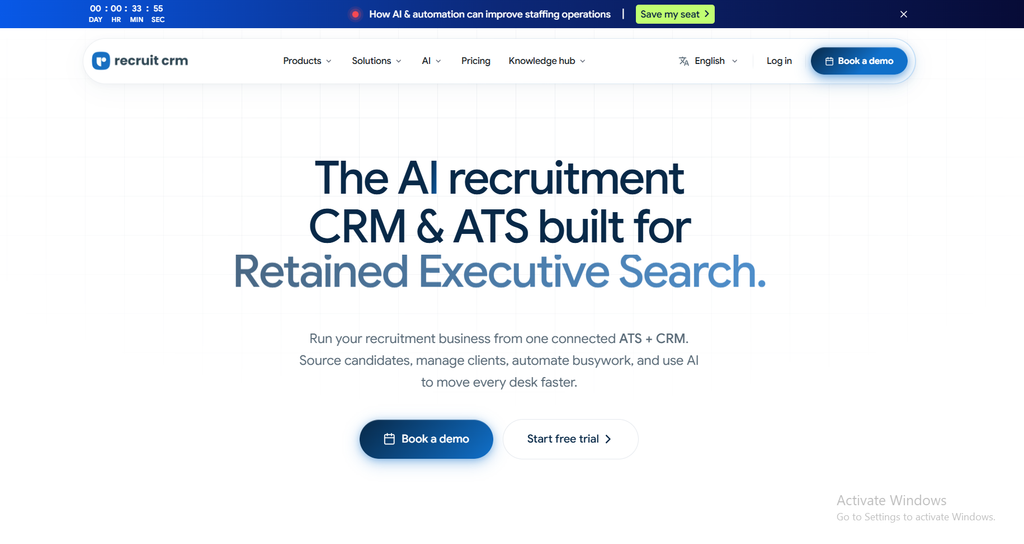
The platform specializes in three core recruitment models: permanent direct-hire placement, retained executive search, and white-collar professional contract staffing. Because it is completely cloud-based, implementation takes days rather than the three to six months required by older legacy systems, allowing growing search firms to modernize their technical infrastructure without disrupting billable recruiter desks.
Hands-On Test: Recruit CRM Review of Core Features
To separate marketing claims from daily recruitment reality, I tested Recruit CRM across active sourcing sprints, pipeline management tasks, and client submittal presentations. The following breakdown covers how its primary tools perform under actual agency operating conditions.
The Chrome Sourcing Extension
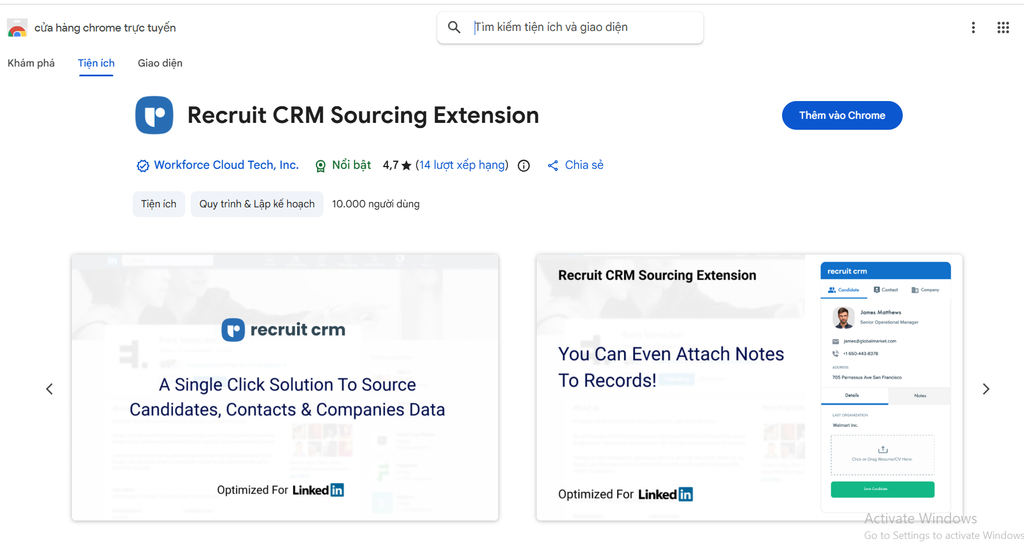
Candidate sourcing is where agency recruiters spend the majority of their early morning hours. Recruit CRM’s Chrome sourcing extension is easily one of the most refined browser utilities in the recruitment technology space, operating seamlessly across LinkedIn, LinkedIn Sales Navigator, and Xing.
- One-Click Profile Parsing: When viewing a prospective candidate on LinkedIn, opening the extension automatically pulls their full work history, current title, educational background, and location directly into a clean candidate card.
- Contact Enrichment: The extension integrates native data enrichment, allowing you to reveal verified work emails and direct phone numbers without leaving the browser tab.
- Instant Duplicate Prevention: Before saving a profile, the extension checks your existing database in real time. If a colleague has already spoken with the candidate, it alerts you immediately, preventing awkward duplicate outreach to the same professional.
Visual Kanban Pipeline & Deal Management
Recruitment is momentum-driven, and losing track of where a candidate sits in an interview process directly costs agency revenue. Recruit CRM utilizes visual drag-and-drop Kanban boards that mirror the operational flow of a modern recruitment desk.
- Dual Pipeline Visibility: You can toggle between your candidate hiring stages on one side and your client business development deals on the other. This ensures junior recruiters stay focused on fill ratios while senior billers track incoming client contracts.
- Automated Stage Actions: Dragging a candidate card from Client Submission to First Round Interview can trigger automated calendar invites, prep emails, and WhatsApp reminders to ensure candidates show up on time.
- Customizable Stage Configuration: You can tailor stages to match specific agency niches, creating dedicated checkpoints for background checks, technical assessments, or final executive compensation sign-offs.
AI Agents and Resume Formatting
Manual resume reformatting is one of the most frustrating, non-billable chores in recruitment agency life. Recruit CRM’s updated AI agents tackle this bottleneck directly, saving consultants hours of administrative formatting each week.
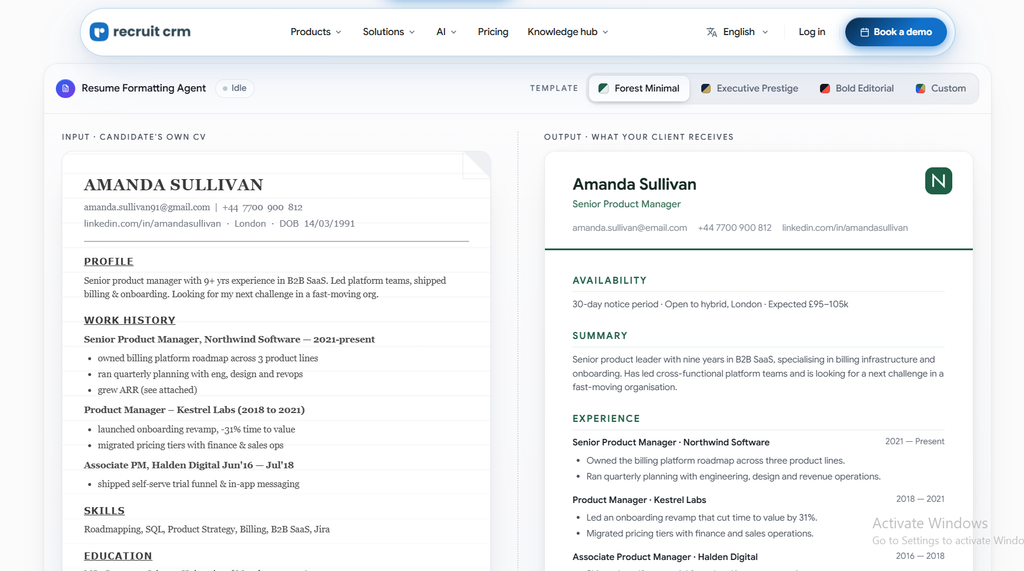
- The AI Resume Formatting Agent: With a single click, this tool strips candidate contact details, corrects typography errors, aligns employment dates, and applies your agency logo and custom branding to produce a standardized, client-ready PDF submittal.
- Bimetric Candidate Matching: The system reads active job requisitions and scores database candidates based on semantic skill alignment, industry tenure, and compensation expectations, surfacing relevant past applicants who might otherwise sit forgotten in your database.
- Model Context Protocol Integration: For technical agencies using cutting-edge AI assistants, Recruit CRM includes an official MCP server connector, enabling tools like Claude to query database records, schedule interviews, and draft customized candidate pitch emails safely.
The 2026 Credit Model: How Pricing and Add-Ons Work
A frequent shortcoming in older software reviews is outdated billing information. Recruit CRM has recently transitioned to an account-level pooled credit system, moving away from fragmented, individual feature paywalls toward a unified usage balance shared across all active recruiter seats.
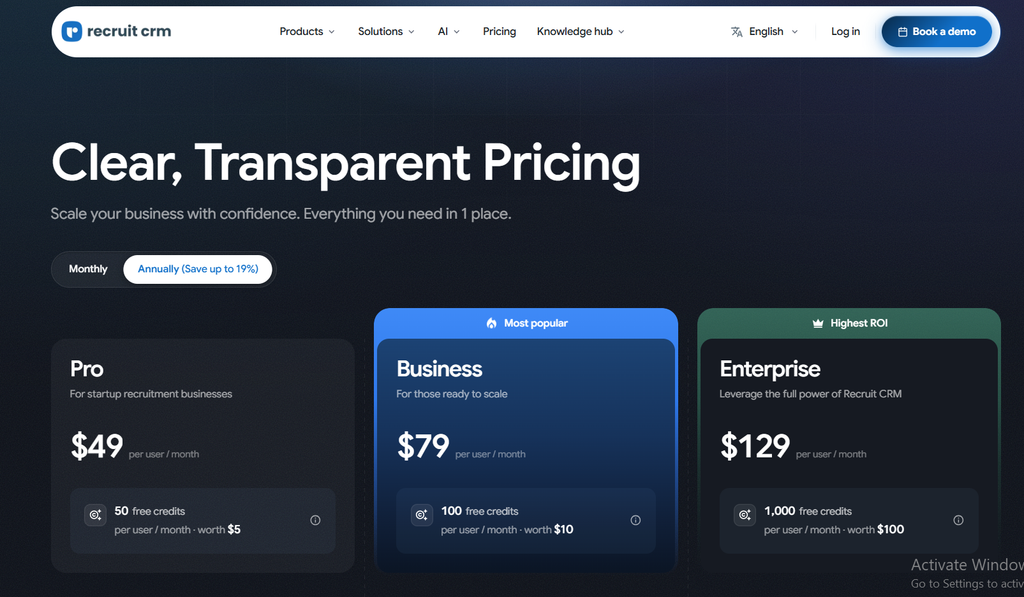
Below is the verified breakdown of current Recruit CRM pricing tiers, monthly seat rates, and included credit allocations:
| Plan Tier | Annual Billing (Per User / Mo) | Monthly Billing (Per User / Mo) | Included Pooled Credits | Core Capabilities Included |
|---|---|---|---|---|
| Pro Plan | $95 / user / month | $109 / user / month | 100 Credits / user / mo | Core ATS+CRM, 1 Pipeline, 1 Mailbox, Basic Sourcing |
| Business Plan | $135 / user / month | $159 / user / month | 200 Credits / user / mo | Multiple Pipelines, AI Resume Formatting, Open API, Sequences |
| Enterprise Plan | $215 / user / month | $259 / user / month | 2,000 Credits / user / mo | Custom Careers Site, Dedicated Account Manager, Priority SLA |
The Shift to Pooled Credits
Under the updated credit economy, your agency receives a monthly pool of credits based on total active seats. These credits are spent flexibly across high-compute tasks, such as finding verified candidate contact details, running deep AI candidate matching, or activating automated document reformatting. If one recruiter focuses heavily on sourcing while another focuses on client relationships, your team shares the credit pool seamlessly without wasting unused individual allowances.
The Pro Plan vs. Business Plan Reality
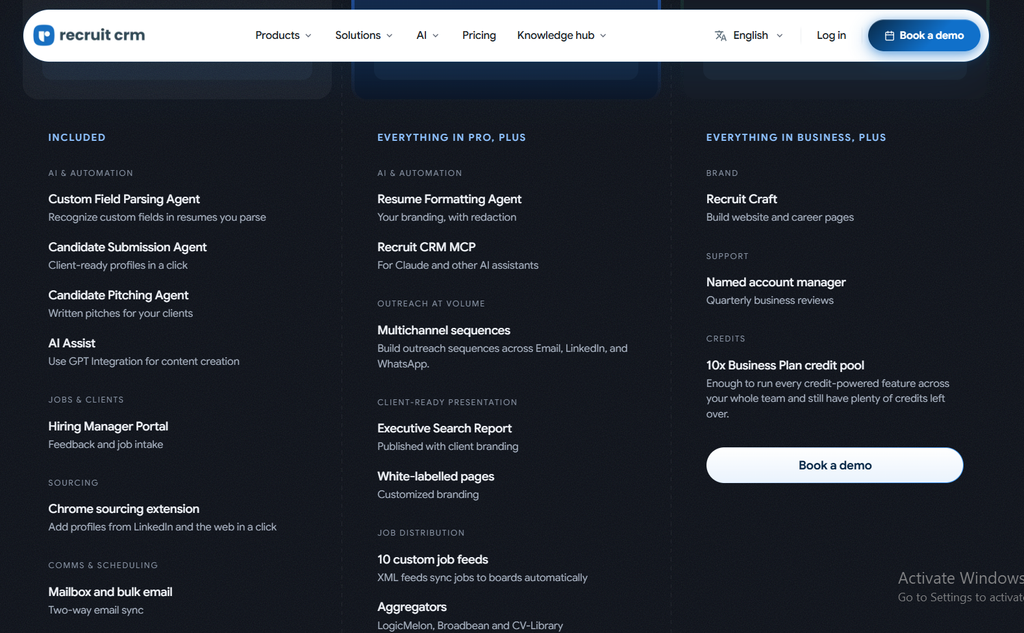
While the $95 per user per month Pro plan appears attractive for solo operators, growing agencies must understand its architectural constraints. The Pro tier restricts users to a single pipeline, a single connected mailbox, and excludes the open API.
For any agency managing multiple recruiters or offering distinct service lines, the $135 per user per month Business plan is the true baseline. It unlocks unlimited custom pipelines, multichannel email and SMS sequences, custom user permission roles, and the AI Resume Formatting Agent. Fortunately, Recruit CRM offers an unlimited-duration free trial allowing teams to test up to fifty candidates and four active jobs before committing capital.
Recruit CRM Pros and Cons
To provide an objective, balanced assessment before you schedule a sales demo, I compiled an unvarnished summary of Recruit CRM’s primary operational strengths alongside its practical limitations:
Pros
Cons
Pros
The platform delivers several industry-leading advantages that help agency recruiters bill faster and stay organized:
- Unmatched Customer Support: Round-the-clock 24/7 human live chat with verified response times under two minutes, eliminating costly operational downtime.
- Unified ATS and CRM Architecture: Eliminates the need to pay for and synchronize external sales software alongside candidate databases.
- High-Speed Chrome Extension: Sourcing from LinkedIn, Sales Navigator, and Xing takes seconds and includes real-time duplicate checking.
- AI-Powered Administrative Relief: The AI Resume Formatting Agent turns messy candidate resumes into branded, standardized client submittals automatically.
- Contract Flexibility: Available on transparent month-to-month terms without the multi-year lock-in contracts enforced by legacy competitors.
Cons
Despite its practical strengths, there are several workflow trade-offs to evaluate before making an agency-wide commitment:
- Restricted Entry-Level Tier: The Pro plan limits users to a single pipeline and lacks open API access, pushing most teams to the Business tier.
- Credit Consumption on Heavy Tasks: High-volume data enrichment and advanced custom analytics draw heavily on your shared monthly credit pool.
- No Native Blue-Collar Pay-and-Bill: Lacks native shift management, punch-clock tracking, and gross-to-net payroll engines required by industrial temporary staffing firms.
- Standard Reporting Rigidity: While daily operational activity metrics are clear, creating highly complex, cross-tabular business intelligence reports requires external tools.
Recruit CRM vs. The Competition
Choosing the right agency management software depends heavily on your placement model, team size, and technical appetite. Below is how Recruit CRM compares directly against its three primary market rivals:
| Feature / Criteria | Recruit CRM | Bullhorn | Loxo | Zoho Recruit |
|---|---|---|---|---|
| Starting Price (Annual) | $95 / user / month | Custom (Typically $150+/mo) | ~$119 to $189 / user / mo | ~$25 to $50 / user / mo |
| Contract Terms | Monthly or Annual | Multi-Year Contracts | Annual Commitment | Monthly or Annual |
| Implementation Speed | 24 to 48 Hours | 2 to 6 Months | 1 to 2 Weeks | 1 to 3 Weeks |
| Customer Support Rating | Industry Best (4.9/5) | Moderate (Ticket-based) | Very Good | Moderate (Slow queues) |
| Built-In Deal CRM | Exceptional | Very Good | Good | Basic |
| Best-Fit Agency Size | Boutique (1 to 50 desks) | Enterprise (100+ desks) | Tech & Executive Search | Budget Solopreneurs |
Comparison Insight
If you want modern software with rapid deployment and instant human support, Recruit CRM clearly outperforms Bullhorn. If you operate an industrial staffing firm with 500 field workers needing automated payroll processing, Bullhorn remains the enterprise choice.
Recruit CRM vs. Bullhorn
Bullhorn has long been the dominant software in corporate recruitment agencies, but it carries legacy baggage. Implementing Bullhorn typically requires thousands of dollars in consulting fees, months of complex configuration, and rigid multi-year agreements that penalize downsizing agencies.
Recruit CRM offers an agile, modern alternative. Agencies can sign up on a Monday and run live searches by Tuesday morning with zero external consultant fees. While Bullhorn retains an edge in deep back-office payroll integrations for enterprise staffing giants, Recruit CRM is far faster, significantly easier to navigate, and supported by vastly superior live chat assistance for boutique firms.
Recruit CRM vs. Loxo & Zoho Recruit
Loxo approaches the market as a talent intelligence platform, offering an integrated candidate directory of hundreds of millions of public profiles. While Loxo is strong for sourcing, its client-side CRM deal pipeline feels secondary compared to Recruit CRM’s dedicated business development boards.
Zoho Recruit attracts cost-conscious solo operators with its budget-friendly $25 per user entry point. However, Zoho suffers from fragmented module interfaces, clunky third-party integrations, and notoriously slow email-based support. Recruit CRM is built specifically by recruitment veterans for recruitment workflows, easily justifying its higher price point through superior daily speed and instant human help.
Who Should Use Recruit CRM?
Because recruitment agencies operate across fundamentally different billing models, matching Recruit CRM to your specific commercial niche is essential for positive software ROI.
Who Should Buy Recruit CRM
If your agency operates within any of the following commercial models, the software is purpose-built for your desk:
- Boutique Direct-Hire & Contingency Agencies: Search teams of one to thirty recruiters who need an intuitive, fast system to manage candidate pipelines and client fee negotiations simultaneously.
- Retained Executive Search Firms: Headhunters who require polished, confidential candidate presentation reports and branded submission portals for corporate client boards.
- Agencies Escaping Legacy Enterprise Lock-Ins: Search firms tired of paying exorbitant annual maintenance fees for dated software with unhelpful ticket-based support queues.
Who Should Skip Recruit CRM
For specific recruitment operations, alternative software architectures provide a more practical operational fit:
- High-Volume Blue-Collar Temp Staffing Desks: Agencies placing hundreds of daily shift workers in construction, logistics, or hospitality needing native clock-in timesheets and automated payroll engines should evaluate Bullhorn or JobAdder.
- Bootstrapped Solo Recruiters on a Shoestring: Freelance sourcers who only make two placements a year and cannot justify spending $95 per month should stick to budget tools like Manatal or Zoho Recruit.
How to Choose the Right Recruitment CRM
Before committing your firm to any software demonstration or migrating years of candidate data, run your operational requirements through this four-step evaluation framework:
- Audit Your Primary Billing Model: Determine whether your revenue is driven by direct-hire permanent placement fees (where Recruit CRM excels) or ongoing contractor payroll margins requiring automated gross-to-net tax calculations.
- Calculate Real Implementation Downtime: Ask vendor sales reps how long migration truly takes. A system that takes four months to configure costs thousands of dollars in lost recruiter productivity compared to an agile system live in forty-eight hours.
- Verify True Contract Commitments: Avoid signing multi-year agreements with early termination penalties if your recruitment desk headcount fluctuates with broader economic cycles. Prioritize vendors offering month-to-month flexibility.
- Stress-Test Live Customer Support: During your trial period, open the help chat with an intentional technical question. If the vendor takes twenty-four hours to reply with an automated email ticket, expect your candidate placements to stall when live issues arise.
Frequently Asked Questions About Recruit CRM
Prospective agency owners frequently have questions regarding user seat limits, LinkedIn compliance, and data migration before choosing the software. Here are direct, verified answers to the most common questions:
Final Verdict: Recruit CRM Review Summary
Choosing the right technical foundation is one of the most critical operational decisions a recruitment agency owner can make. In an industry where placement speed and candidate relationship management directly dictate billings, software that creates administrative friction actively destroys firm value.
Recruit CRM succeeds because it respects how modern recruiters actually work. By uniting candidate management and client deal pipelines within an intuitive interface, it eliminates the chaos of juggling fragmented spreadsheets and disconnected tools. Its high-speed Chrome extension, automated AI resume reformatting, and unmatched customer support allow recruiters to spend their days speaking with candidates and closing clients rather than wrestling with their database.
While it is not designed for heavy industrial temporary payroll operations, it is easily one of the most complete and dependable platforms available for permanent placement and executive search desks.
- Final Decision: If you manage a growing recruitment agency or executive search firm and want an agile, all-in-one system backed by exceptional human support, Recruit CRM is an outstanding operational investment.
- Next Step: Start Your Free Recruit CRM Trial Today and experience how quickly its Chrome sourcing extension populates your candidate pipeline.
Looking to streamline your team’s workflow and pipeline tracking? Explore our full directory of Project Management tools to discover top-rated platforms for task tracking, team collaboration, and operational workflows in Trend Level Tech.
